
 Need help?
Do you have a question about the Toyota PVM and is the answer not in the manual?
Driving precautions and cautions for using the panoramic view monitor system safely.
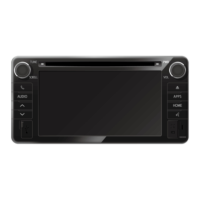
Details the system's 4 cameras and 360-degree bird's eye view on the Display Audio.
Lists features like guide lines, speed-dependent modes, and object detection.
Covers system activation, view modes, guide lines, and special functions like Turn Signal and MOD.
Details limitations and potential issues with the PVM system regarding blind spots and image interpretation.
Provides common symptoms, likely causes, and solutions for PVM system issues.
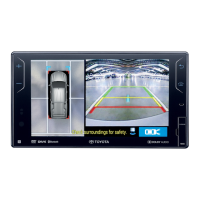
The Panoramic View Monitor (PVM) is a subsidiary device designed to assist drivers by providing a visual representation of the vehicle's surroundings. It utilizes four cameras installed at the front, rear, and on the left and right side mirrors of the car to create a 360-degree bird's eye view, which is displayed on the Display Audio unit. This system aims to guide drivers in identifying blind spot areas around the vehicle.
The primary function of the PVM system is to enhance visibility around the vehicle, particularly in blind spot areas. It achieves this by presenting a seamless image that can show front, back, or left and right views. The system incorporates PVM guide lines to help drivers gauge distances between the vehicle and peripheral obstacles. These front and rear guidelines are designed to refer to the car's width, assisting with low-speed reversing or driving maneuvers.
When the PVM icon is pressed to enter PVM mode, the car model will briefly display a 360-degree rotation, which can be skipped with a single click. In Reverse Gear (R) mode, the Display Audio automatically displays a panoramic image specifically tailored for reversing within 2-3 seconds. This view typically shows a surrounding bird's eye view combined with a rear view to assist the driver. Users can switch between a 360-degree view + rear view or a 360-degree view + rear top view using the view switch.
For Parking, Neutral, or Drive (P/N/D) modes, if the shift lever is in P/N/D and the vehicle speed is under 20 ± 5 km/h, the car will continue to display the PVM-ahead image mode. In this mode, the front view will not show the entire image; instead, there will be a black mask area at the top of the front view due to safety concerns. The front guide lines are blue and indicate a distance of approximately 3 ft (1m) from the edge of the bumper. Drivers are advised to pay close attention to these lines and the distance to peripheral obstacles. When reversing, drivers should also utilize the left and right side mirrors to check the surrounding area, and icons can be pressed to switch to different views such as 360° view + front top view, 360° view + front right view, front view, and 360° view + rear right view.
The PVM system also includes a Turn Signal Mode. When the driver activates the left or right turn signal and the vehicle speed is under 20 ± 5 km/h, the corresponding side view will be triggered, showing a 360° view + 3D RH side view or 360° view + 3D LH side view.
Another feature is the Motion Object Detection (MOD) Mode. This mode detects moving objects and indicates their direction with a yellow alarm. The MOD function is available only when the vehicle speed is around 0 km/h. Users can activate and deactivate the MOD function by pressing the MOD icon. Additionally, in P/N/D/R mode, there is a "color change icon" that allows users to switch the color of the car model displayed on the screen.
The PVM system is designed to be user-friendly, with clear visual cues and intuitive controls. The system is activated by pressing the "Apps" icon to enter Apps mode, and then selecting the "PVM" icon. The screen illustrations provided in the manual are examples, and the actual car image displayed on the unit may vary.
It is crucial for drivers to understand that the PVM is a supplementary aid and should not be relied upon as the sole means of checking vehicle surroundings. Visual checks with mirrors are always necessary before driving. The system provides guide lines to assist with distance estimation, but drivers should be aware that the position of these lines on the monitor may differ from actual conditions, especially if tire size has been changed.
The panoramic image is a simulated aerial view, and while it helps in identifying obstacles, drivers should stop the car and confirm the actual secure distance when an obstacle is close. The system also highlights that there are blind spots around the vehicle that may not be displayed in the panoramic view monitor. Due to varying light conditions around each camera, the light displayed on the image may differ, and the clarity of the borders where the four camera images are combined may decline, which is considered normal. The car display image may also differ from the actual car, as its purpose is to simulate the car's surroundings.
The PVM system is only available when the car speed is under 20 ± 5 km/h in P/N/D mode. If the car speed exceeds this threshold, the PVM view will switch to the audio system.
To ensure proper operation and longevity of the PVM system, certain maintenance precautions are recommended. It is advised not to use high-pressurized water columns to wash the panoramic view monitor, as this could cause damage. The PVM cameras are precision devices, and hitting them could lead to abnormal situations, failure, or damage.
In case of issues, a simple troubleshooting guide is provided to help identify the most likely cause and restore the system to working status. For example, if the image is difficult to see, it could be due to the vehicle being in a dark area, extreme temperatures around the lens, or the presence of water droplets or humidity. Solutions include moving the car away from uneven light or direct sunlight, or moving it to a room temperature environment.
If the image is blurry, it might be caused by external factors like mud adhering to the camera, direct sunlight or headlights shining into the camera, or the vehicle being under fluorescent, sodium, or mercury lights. The recommended solution is to clean the camera with water and a soft cloth.
If the image is out of alignment, it suggests that the camera or surrounding area has experienced a strong impact, or the camera position is out of alignment. In such cases, it is advised to have a dealer check the vehicle. Similarly, if the guide lines are out of alignment, it could be due to the vehicle being tilted (e.g., heavy load, tire puncture) or being on a slope. While this is not considered a malfunction, drivers should visually check their surroundings when reversing.
For any problems not resolved by the provided solutions, drivers are encouraged to have their car checked by their nearest TOYOTA dealer. Heavy impact or displacement from a collision might cause the PVM image to diverge, worsening image connection, and may require image calibration and part replacement to resume normal operations. It is also noted that the PVM image might be affected or incorrect with a change in tire size, so changing tire size is not suggested.
 General
| Category | Automobile Accessories |
|---|---|
| Type | Parking Assist System |
| Function | Provides a 360-degree view around the vehicle to assist with parking and maneuvering in tight spaces. |
| Display | Integrated with the vehicle's infotainment screen |
| Features | Bird's-eye view, obstacle detection |
| Compatibility | Designed for specific Toyota models |
| Installation | Factory-installed or dealer-installed option |
| Cameras | Multiple cameras positioned around the vehicle (front, rear, and sides) |


 To Next Page