33
OVERVIEWFEATURES & OPERATIONSTOYOTA SAFETY SENSESAFETY & EMERGENCY FEATURES
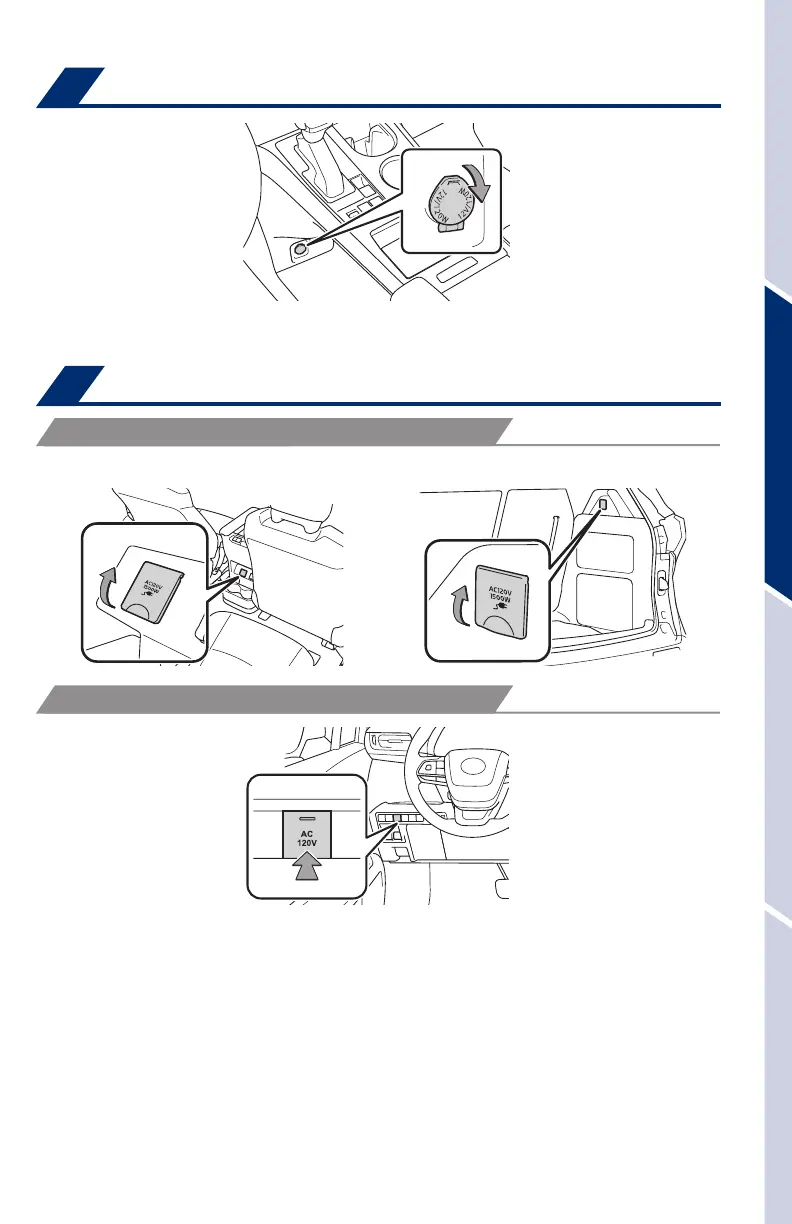
Power outlet-12V DC
Power outlets-120V AC (if equipped)
Check that the “Ready” indicator is illuminated, then press the AC 120V master
switch. The power outlets can be used when the indicator on the AC 120 V master
switch is illuminated.
To turn off the 120 V outlets, press the master switch and observe that the switch is
no longer illuminated.
Refer to the Owner’s Manual for more details.
Rear of console box Luggage compartment
The vehicle must be in the “ACCESSORY” or “IGNITION ON” mode for use.
OUTLET LOCATION
POWER OUTLET ON/OFF MASTER SWITCH
Qi Wireless charger (if equipped)
A mobile device can be charged wirelessly on the tray. (1) Press the wireless
charger power switch and the green operation indicator light turns on. (2) Place
a compatible mobile device on the tray as shown in the illustration. An amber
indicator illuminates while charging is in progress. When charging is complete, the
indicator illuminates green. Some phones, cases or cover type wireless chargers
may not cause the green indicator to illuminate even though it is fully charged.
The vehicle must be in the “ACCESSORY” or “IGNITION ON” mode for use.
Refer to the Owner’s Manual for limitations and more details on this system before
attempting to use it.
When the vehicle is turned off, the last state
(ON/OFF) of the wireless charger is retained.
Place device nearest the center of charging
area for best results. Moving device may
result in stopping or restarting the charging
process.
MY21_Sienna_QRG_V4_ML_0929.indd 33 10/5/20 12:14 PM















 To Next Page