43
OVERVIEWFEATURES & OPERATIONSTOYOTA SAFETY SENSESAFETY & EMERGENCY FEATURES
Intuitive parking assist (if equipped)
(1) Press “ ” or “ ” switches and select “ ” from the Multi-Information Display
(MID).
(2) Press “
” or “ ” switches and select “
(PKSB)” and then press “ .”
The setting screen is displayed.
(3) Press “
” or “ ” switches and press “
” to select the desired setting.
(4) Press “
” to go back to the menu.
The system will continue in the last state it was in (ON or OFF) when the vehicle is
started again.
Refer to all of the section “Parking Support Brake function” (static objects and rear-
crossing vehicles) in the Owner’s Manual for limitations and more details.
When the vehicle moves in
the unintended direction
due to the wrong shift
position being selected.
The Front and Rear Parking Assist with Automated Braking consists of the following
functions that operate when driving at a low speed or backing up, such as when
parking. When the system determines that the possibility of a collision with a
detected object is high, a warning operates to urge the driver to take evasive
action. If the system determines that the possibility of a collision with a detected
object is extremely high, the brakes are automatically applied to help avoid the
collision or help reduce the impact of the collision.
For static objects
For rear-crossing vehicles
Front and Rear Parking Assist with
Automated Braking (PA w/AB) (if equipped)
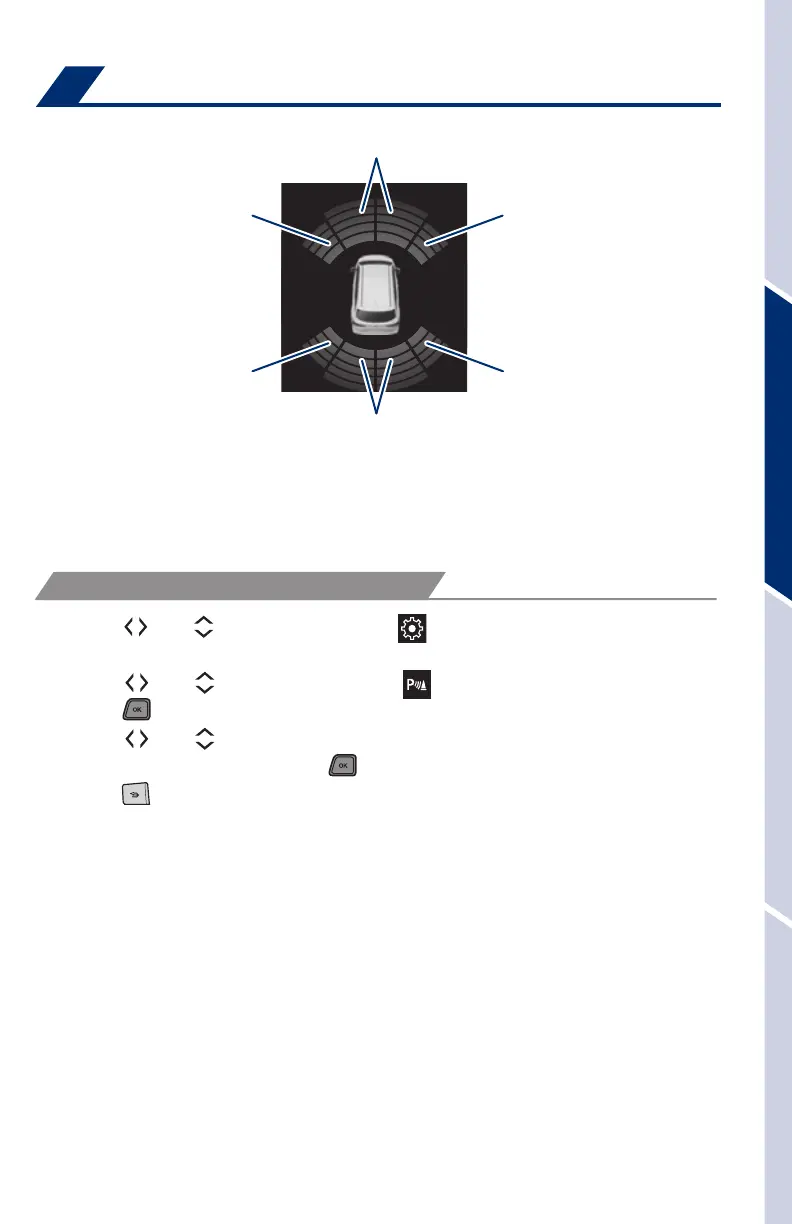
Front
center sensor
Rear
center sensor
Corner sensors
(front)
Corner sensors
(front)
Corner sensors
(rear)
Corner sensors
(rear)
If the sensors detect an obstacle, the buzzer and MID or navigation system
display inform the driver of the approximate position and distance of the obstacle
by illuminating continuously (far) or blinking (near). Depending on your Audio
Multimedia system, you can adjust settings.
(1) Press “
” or “ ” switches and select “ ” from the Multi-Information Display
(MID).
(2) Press “
” or “ ” switches and select “ (Intuitive parking assist)” and then
press “
.” The setting screen is displayed.
(3) Press “
” or “ ” switches and select the “Intuitive parking assist on/off”
setting function and then press “
.”
(4) Press “
” to go back to the menu.
Refer to the Owner’s Manual for limitations and more details.
SYSTEM ON/OFF
MY21_Sienna_QRG_V4_ML_0929.indd 43 10/5/20 12:15 PM














 To Next Page