38
FEATURES & OPERATIONS
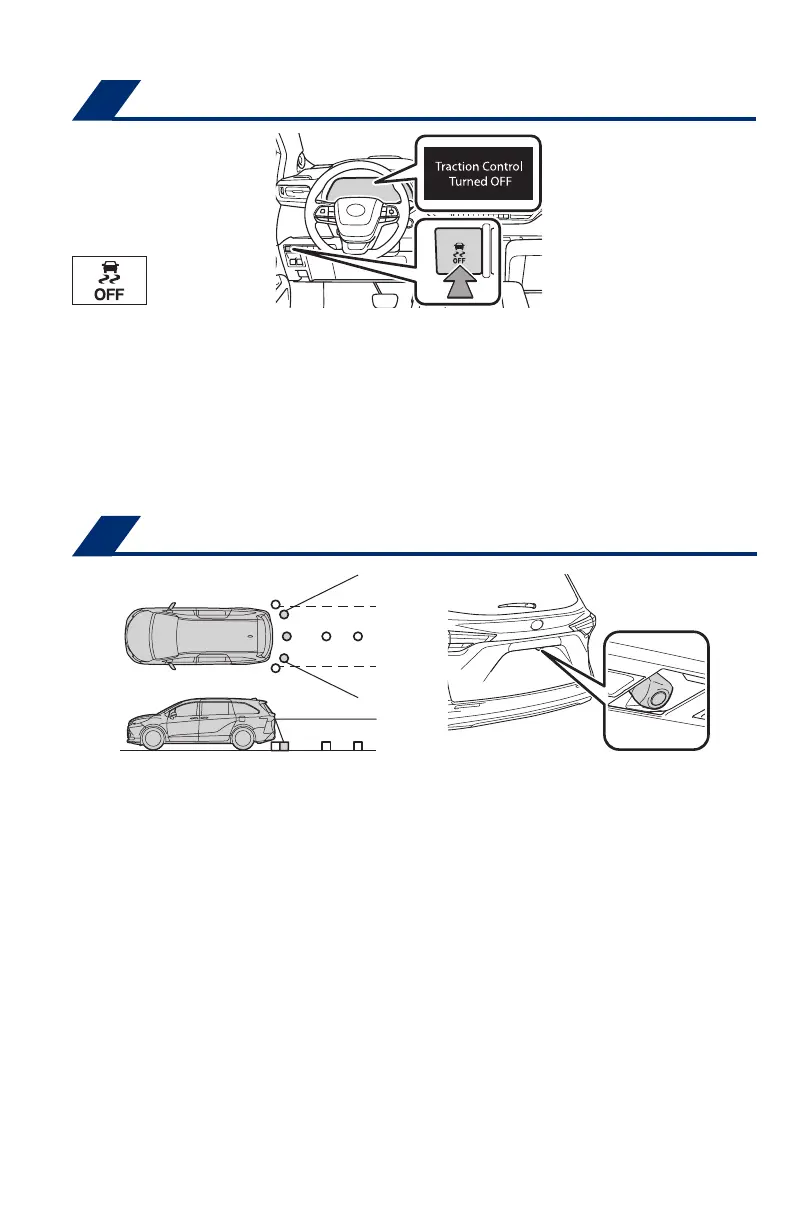
The VSC OFF switch can be used to help free a stuck vehicle in surroundings like
mud, dirt or snow. While the vehicle is stopped, press switch to disable the TRAC
system.
To disable VSC/TRAC/Trailer Sway Control systems, press and hold the switch for at
least 3 seconds.
Refer to the Owner’s Manual for limitations and more information.
Vehicle Stability Control (VSC)/TRAC/
Trailer sway control OFF switch
Rear view monitor system
The rear view monitor system displays an image of the view from the bumper of
the rear area of the vehicle. The camera for the rear view monitor system is located
above the license plate.
To adjust the image on the rear view monitor screen, press the “MENU” button and
select “Display.” Select “Camera” to adjust the screen contrast and brightness.
Refer to the “Navigation and Multimedia System Owner’s Manual” for limitations and
more details on this system.
The rear camera detection (RCD) function is designed to detect pedestrians in the
detection area behind the vehicle when the vehicle is backing up. If a pedestrian
is detected, a buzzer will sound and an icon will be displayed on the audio system
screen to inform the driver of the pedestrian.
DISPLAY ON AUDIO SYSTEM SCREEN
(1) Press “ ” or “ ” switches and select “ ” from the Multi-Information Display
(MID).
(2) Press “
” or “ ” switches and select “
(RCD)” then press “ .” The
setting screen is displayed.
(3) Press “
” or “ ” switches and select the “Rear Camera Detection function
on/off” setting function and then press “
.”
(4) Press “
” to go back to the menu.
Refer to the Owner’s Manual for limitations and more details on this system before
attempting to use it.
SYSTEM ON/OFF
Pedestrian detection icon: The icon will be displayed automatically when a
pedestrian is detected.
RCD OFF icon: The RCD OFF icon will illuminate when the RCD function is
disabled.
MY21_Sienna_QRG_V4_ML_0929.indd 38 10/5/20 12:14 PM













 To Next Page