Bluetooth® Audio
The Bluetooth® audio system enables
users to enjoy listening to music that is
played on a portable player on the vehicle
speakers via wireless communication.
This audio system supports Bluetooth®, a
wireless data system capable of playing
portable audio music without cables. If a
device does not support Bluetooth®, the
Bluetooth® audio system will not
function.
Depending on the type of portable player
connected, some functions may not be
available and/or the screen may look
differently than shown in this manual.
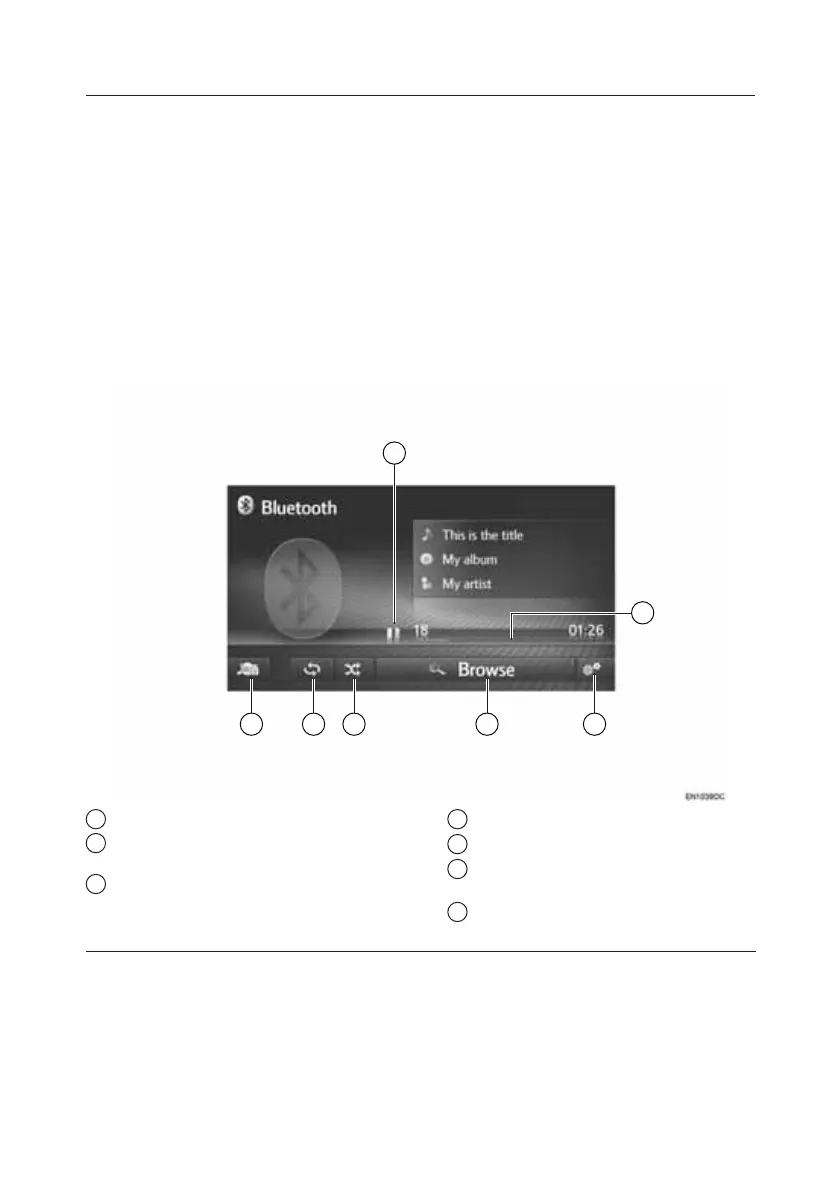
The Bluetooth® audio operation screen
can be reached by the following methods.
• Connecting a Bluetooth® audio device
• Select “Bluetooth” on the audio
source selection screen
7
1
23
4
5
6
1 Shows progress.
2 Select to display the Bluetooth®
audio options screen.
3 Select to display the browse options
selection screen and then select the
desired item.
4 Select to set random playback.
5 Select to set repeat playback.
6 Select to display the audio source
selection screen.
7 Select to play/pause.
TOUCH-SCREEN MULTIMEDIA
11







 To Next Page