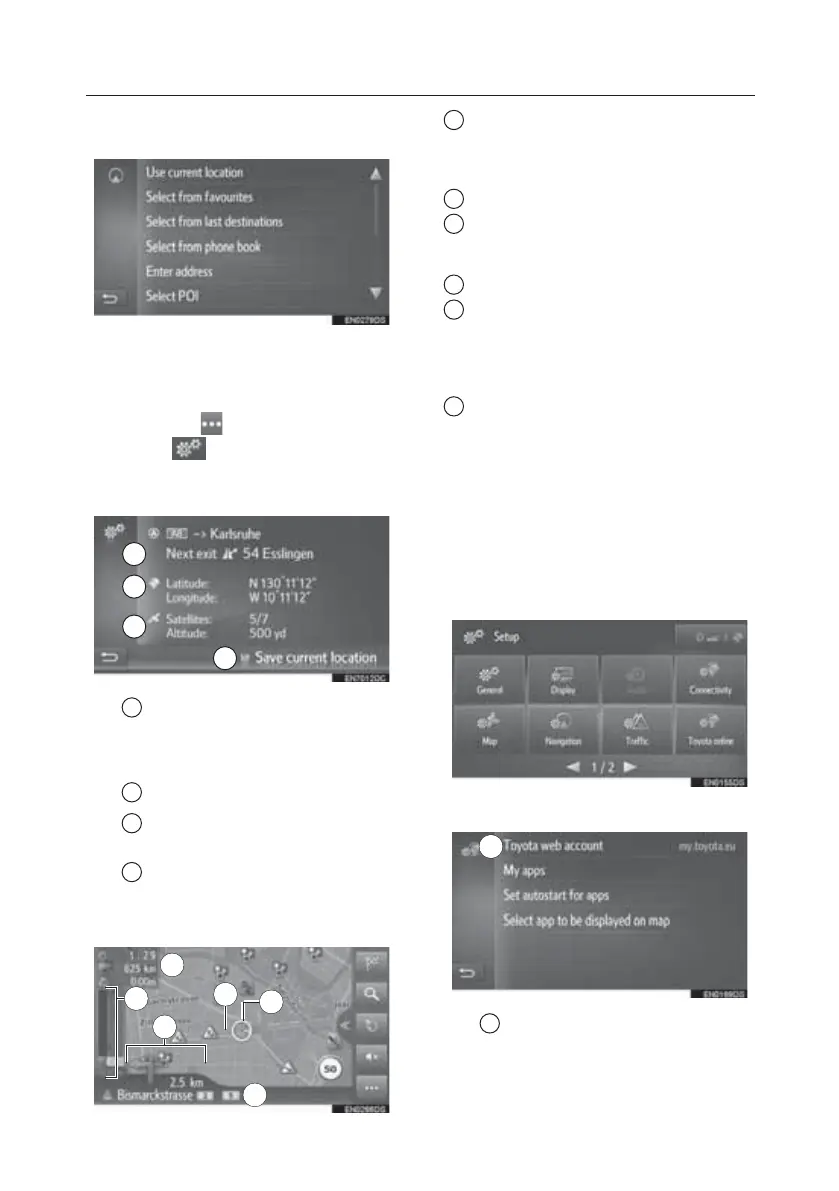
3. Select “Yes” when the confirmation
screen appears.
4. Select the desired method to enter
the location.
Current Location
1. Select the on the map.
2. Select
.
3. Check that current location
information is displayed.
1 The information provided
varies, depending whether the road
currently being travelled on is a
motorway or a street.
2 Latitude and Longitude
3 Amount of available satellites
and the altitude.
4 Select to register the current
position in the favourites list.
Route Guidance
1 Displays information about the
destination, such as estimated arrival
time, remaining travel time, distance, and
traffic prediction information.
2 Guidance route
3 The name of the current street or
the next street (when approaching a
turning point)
4 Current position
5 Displays the distance to the next
turn with the arrow indicating the turn
direction. When the arrow icon is
selected, the last navigation
announcement will be repeated.
6 Displays traffic events on the route.
The remaining length and the remaining
delay time are displayed.
Applications
Toyota Online Settings (Toyota
Touch 2 with Go)
1. Press the “SETUP” button.
2. Select “Toyota online”.
3. Select the item to be set.
1 Select to create a new account
or log in with an existing account.
1
2
3
4
X
1
X
2
1
4
X
5
X
6
X
3
X
1
TOUCH-SCREEN MULTIMEDIA
22








 To Next Page