Settings Required for Using the
Online Service (Toyota Touch 2
with Go)
Before using the online services
• When using some applications,
internet connection and a portal
account is required.
• When using some applications,
logging on to the Toyota portal site is
required.
• When using some applications, a
subscription is required. For details,
refer to Toyota portal site
(www.my.toyota.eu) first to
subscribe.
Creating a portal account
It is possible to create a portal account on
the system or on the Toyota portal site
(www.my.toyota.eu). It is also possible to
create a portal account with the Toyota
online settings.
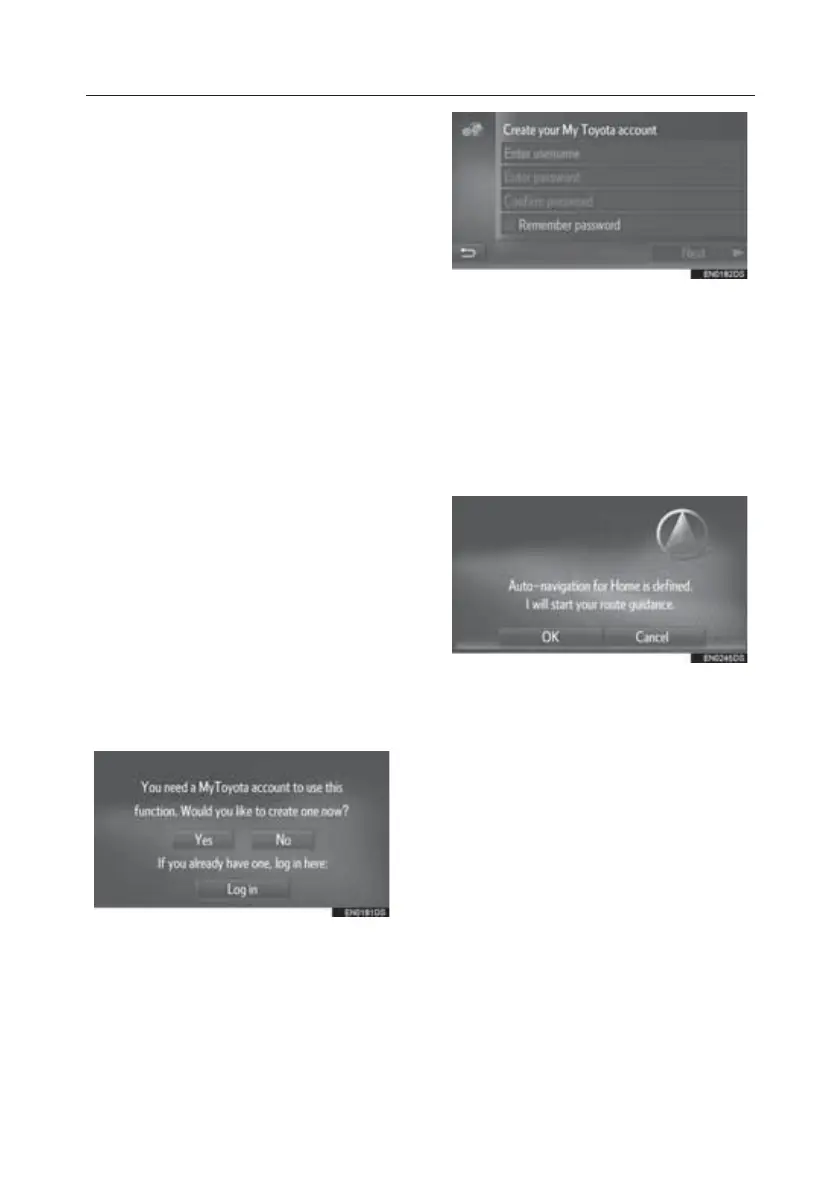
Creating a portal account on the system
1. Display the Toyota online menu
screen.
2. Select the desired application.
3. Select “Yes”.
4. Fill the fields and create a portal
account by following the instructions
on the screen.
Automatic Navigation for
Commuting
This feature automatically obtains traffic
information on the route to the
registered destinations. When you start
the vehicle during a registered day/ time
slot, the system will propose to set that
destination automatically.
1. Select “OK” to start route guidance.
• A pop-up message is displayed when
you start the vehicle in registered
day/ time slot.
• Automatic navigation is available to
the 4 favourite destinations (home,
work, and 2 other favourites) only.
• To use this feature, it is necessary to
register day/time slots for the
destinations.
TOUCH-SCREEN MULTIMEDIA
23







 To Next Page