Bluetooth® Hands-Free System (Toyota Touch 2) (Without
Navigation)
Quick Reference
Connecting a Bluetooth® Phone
In order to use the hands-free system, it
is necessary to pair the phone and
connect the phone’s profile (HFP) with
the system.
Once the profile has been connected,
hands-free calls can be made.
If Bluetooth® phones with phone profile
(HFP) have not been connected, first
connect a Bluetooth® phone with phone
profile (HFP) according to the following
procedure. Connect a Bluetooth® phone
with phone profile (HFP) after bringing
the vehicle to a complete stop.
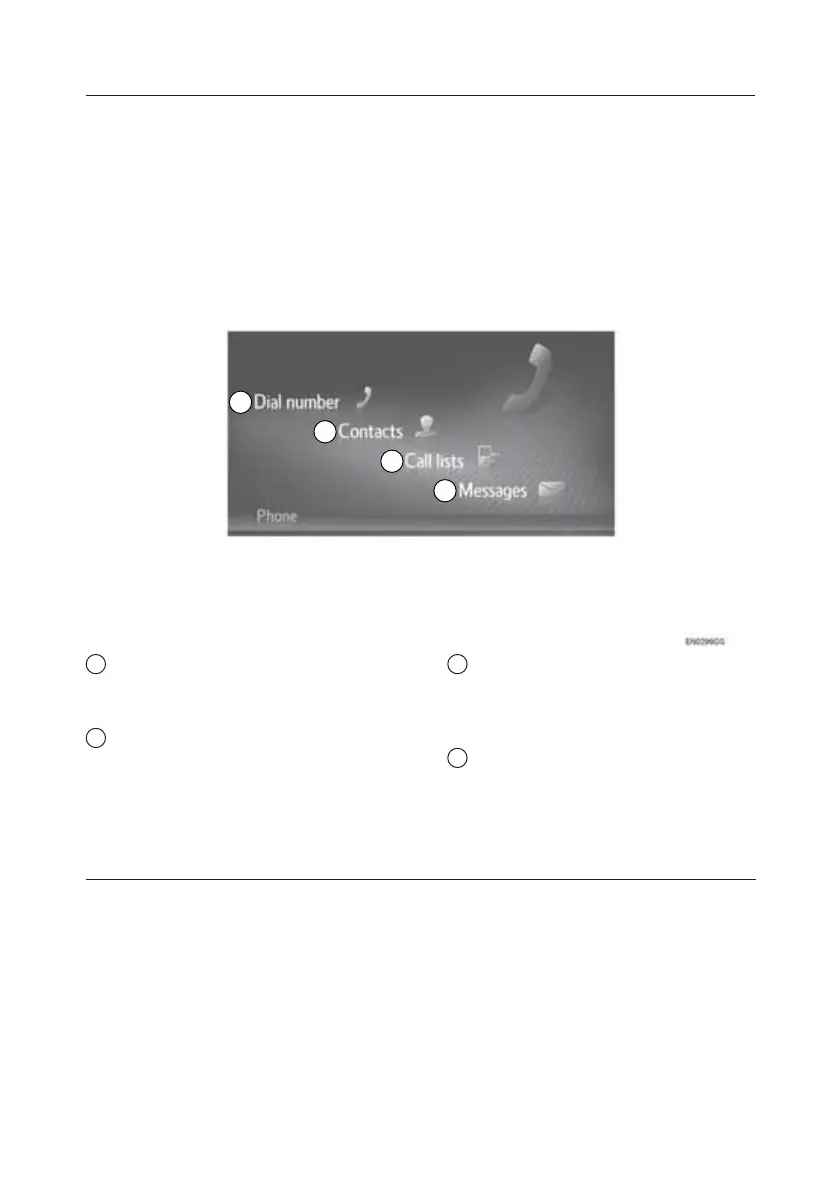
3
2
1
4
1 Select to display the dial number
screen.
A call can be made by dialing the number.
2 Select to display the contacts
screen.
An entry from the list of contacts in the
“Stored” and “Phone book” screen can
be selected and called.
3 Select to display the call lists screen.
An entry from the missed, received or
dialed call lists can be selected and
called.
4 Select to display the messages
screen.
A list of received and sent short
messages as well as a menu to create
new short messages can be displayed.
TOUCH-SCREEN MULTIMEDIA
12





 To Next Page