Rear View Monitor System
(If equipped)
The rear view monitor system assists the
driver by displaying an image of the view
behind the vehicle with fixed guide lines
on the screen while backing up, for
example while parking.
Vehicles without smart entry and start
system
The rear view monitor system screen will
be displayed if the shift lever is shifted to
the “R” position while the engine switch
is in the “ON” position.
Vehicles with smart entry and start
system
The rear view monitor system screen will
be displayed if the shift lever is shifted to
the “R” position while the engine switch
is in IGNITION ON mode.
Canceling Rear View Monitor
System
The rear view monitor system is canceled
when the shift lever is shifted into any
position other than the “R” position.
When the shift lever is shifted to the “R”
position and any mode button (such as
“MEDIA”) is pressed
The rear view monitor system is canceled,
and the screen is switched to the mode of
the button that was pressed.
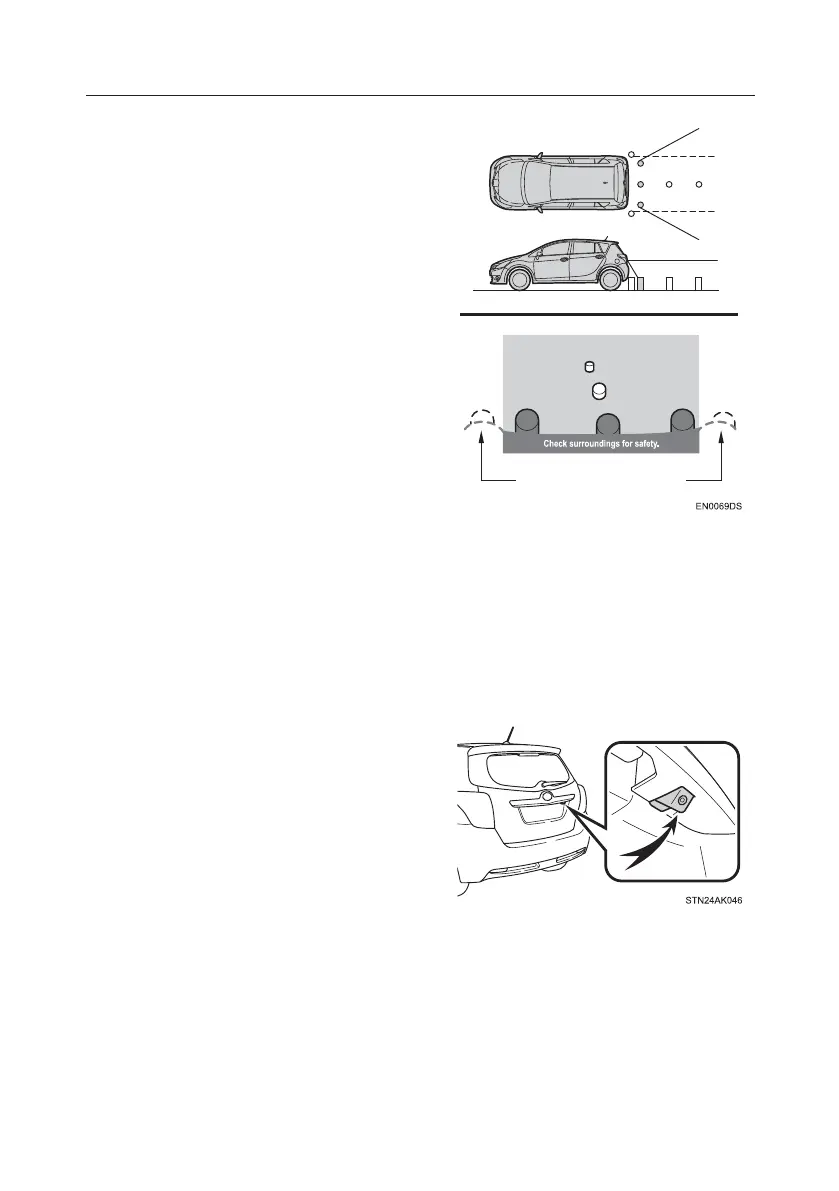
Area Displayed on Screen
The rear view monitor system displays an
image of the view from the bumper of the
rear area of the vehicle.
The area displayed on the screen may
vary according to vehicle orientation
conditions.
Camera
The camera for the rear view monitor
system is located as shown in the
illustration.
If dirt or foreign matter (such as water
droplets, snow, mud, etc.) is adhering to
the camera, it cannot transmit a clear
image. In this case, flush it with a large
quantity of water and wipe the camera
lens clean with a soft and wet cloth.
This is a generalized illustration,
conditions specific to your vehicle can be
found in the User Guide or full Owner's
Manual.
TOUCH-SCREEN MULTIMEDIA
18







 To Next Page