Once you have connected the Bluetooth®
device, it is automatically connected
whenever the system is started.
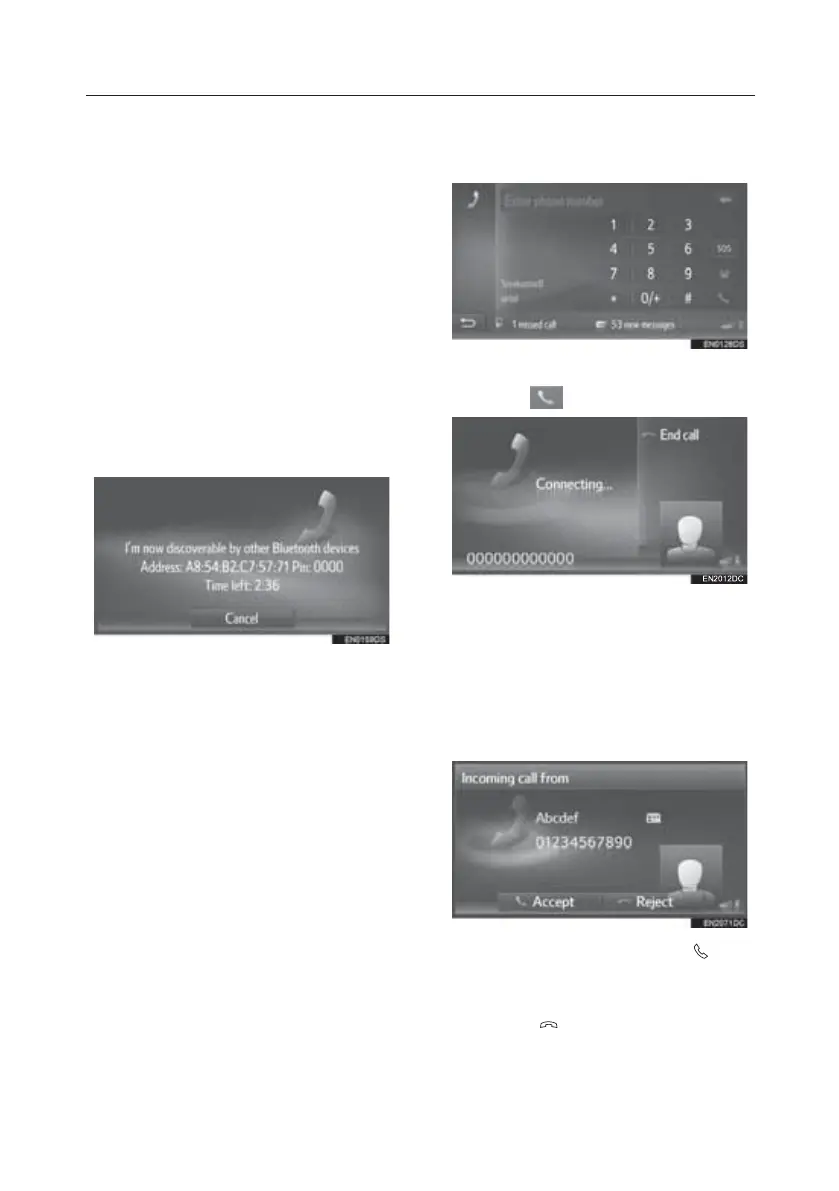
Pairing From The Device
1. Display the Bluetooth® settings
screen and select “Make system
discoverable”.
• If another Bluetooth® device is
already connected, disconnect that
Bluetooth® device.
• If four Bluetooth® devices have
already been paired, one of the
paired devices needs to be
removed.
2. Search for this system from your
Bluetooth® device.
3. Pair the Bluetooth® device using
your Bluetooth® device.
• Depending on the type of
Bluetooth® device being
connected, it may be necessary to
perform additional steps on the
system.
• A PIN code is not required for SSP
(Secure Simple Pairing) compatible
Bluetooth® devices. Depending on
the type of Bluetooth® device
being connected a message
confirming registration may be
displayed on the Bluetooth®
device’s screen. Respond and
operate the Bluetooth® device
according to the confirmation
message.
Calling on a Bluetooth® Phone
1. Display the phone menu screen and
select “Dial number”.
2. Enter a phone number.
3. Select
.
4. Check that the connecting screen is
displayed.
Receiving Calls on a Bluetooth®
Phone
Incoming calls to a Bluetooth® phone will
be displayed on the screen.
1. Select “Accept” or press the
switch on the steering wheel.
To reject an incoming call: Select “Reject”
or press the
switch on the steering
wheel.
To adjust the volume of a received call:
Turn the power/volume knob.
TOUCH-SCREEN MULTIMEDIA
17





 To Next Page