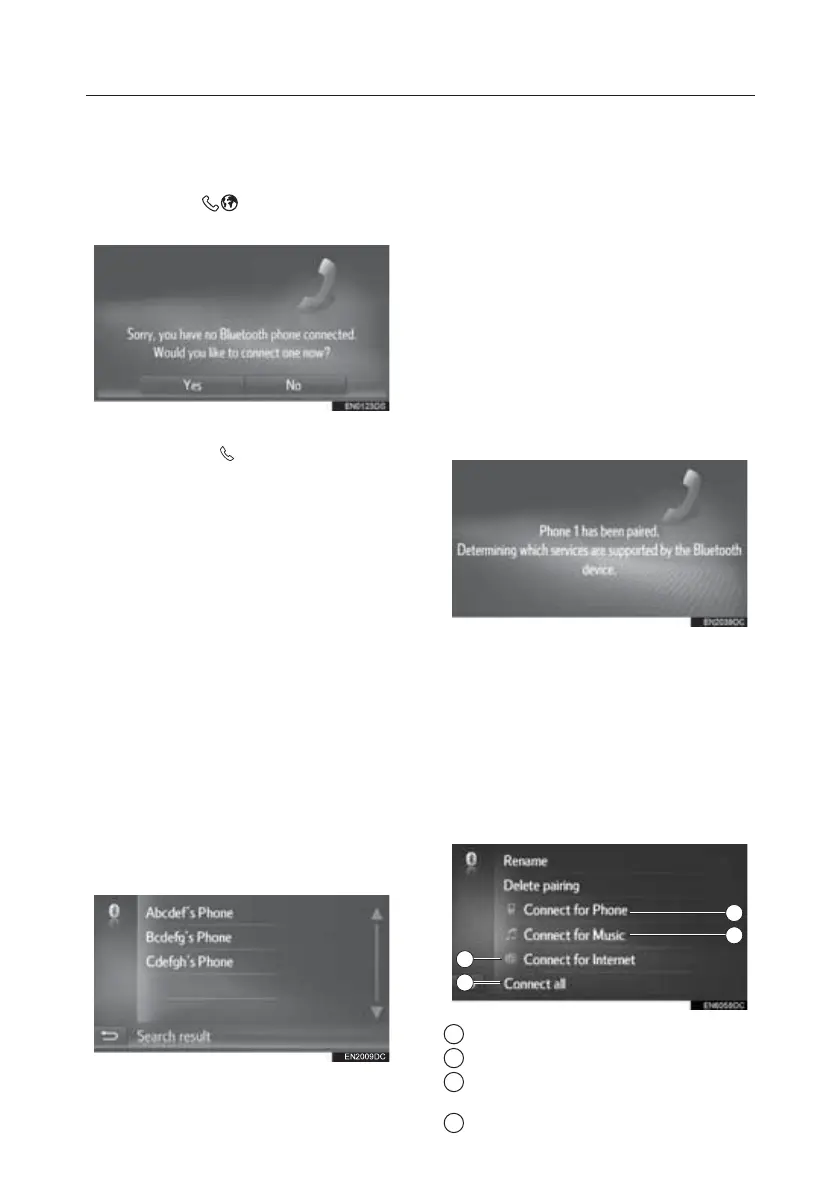
profile (HFP) according to the following
procedure. Connect a Bluetooth® phone
with phone profile (HFP) after bringing
the vehicle to a complete stop.
1. Press the
button.
2. Select “Yes”.
This screen can be displayed by
pressing the
switch on the
steering wheel.
Pairing a Bluetooth® Device
NOTE:
Up to four Bluetooth® devices can be
paired. A paired device can be
connected to any of its supported
profiles such as phone (HFP), music
(A2DP) and/or internet (DUN/PAN).
Pairing From the System
1. Display the Bluetooth® settings
screen and select “Search device”.
• If another Bluetooth® device is
connected, disconnect that
Bluetooth® device.
• If four Bluetooth® devices have
already been paired, one of the
paired devices needs to be
removed.
2. Select the desired device.
Connectable Bluetooth® devices will
be displayed in the list.
3. Confirm the PIN.
•
A PIN code is not required for SSP
(Secure Simple Pairing) compatible
Bluetooth® devices. Depending on
the type of Bluetooth® device being
connected a message confirming
registration may be displayed on
the Bluetooth® device’s screen.
Respond and operate the
Bluetooth® device according to the
confirmation message.
4. Check that the following screen is
displayed.
• The system waits for connection
requests coming from the paired
device. All requested profiles are
connected automatically.
• Internet profile is not connected
automatically.
If the automatic connection failed, the
following screen will be displayed. Select
the desired profile to be connected.
1 Select to connect the phone profile.
2 Select to connect the music profile.
3 Select to connect the internet
profile.
4 Select to connect all profiles.
1
2
3
4
TOUCH-SCREEN MULTIMEDIA
16





 To Next Page