45
Chapter 8
HomeCare – Parental Controls, QoS, Antivirus
Note: Only devices that have previously been connected to your router’s network are listed here. If you are unable to
find the device you want to add, connect it to your network and then try again.
4 ) Click Next.
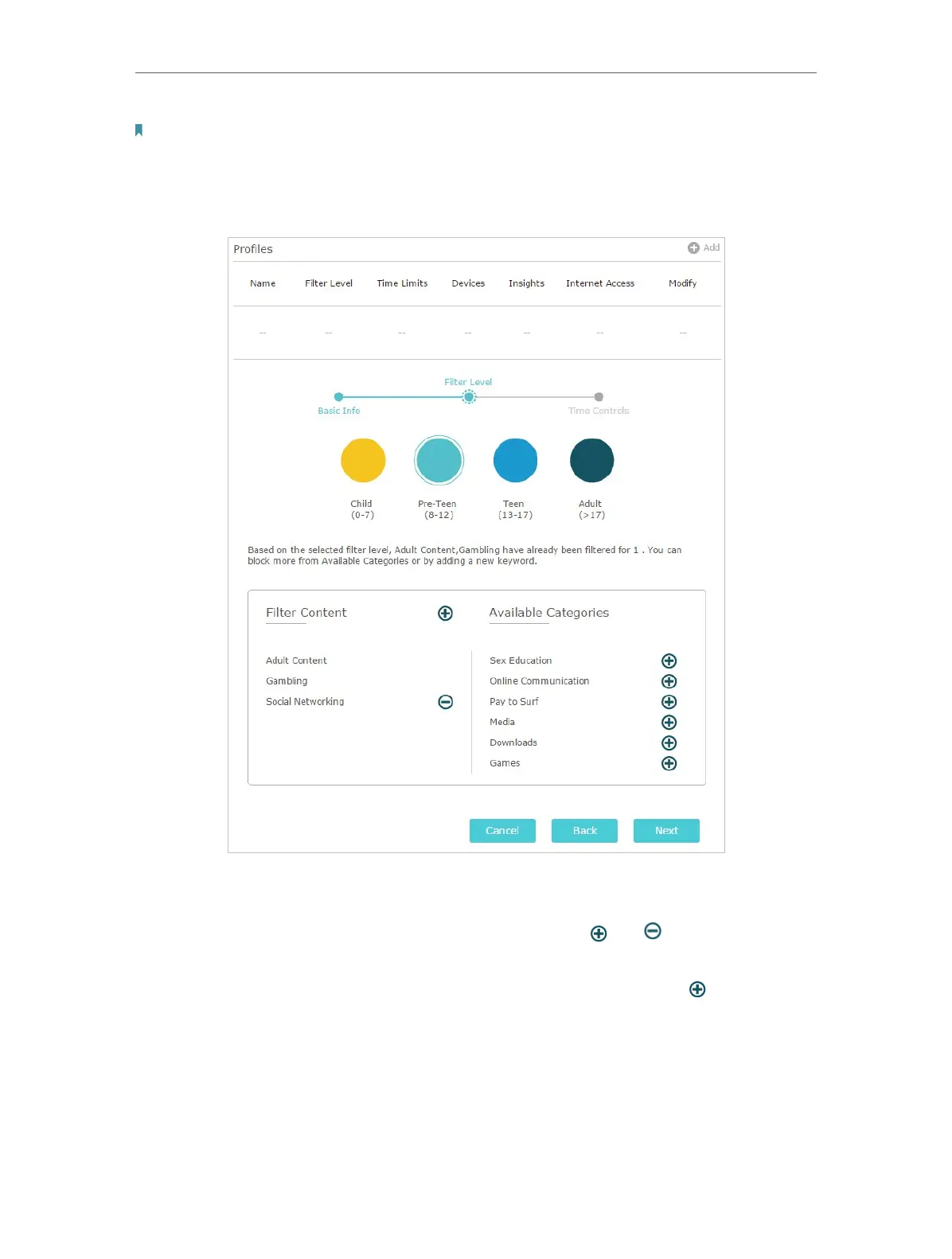
5. Block content for this profile.
1 ) Select a filter level based on the age of the family member this profile belongs to.
Blocked content will then be displayed in the Filter Content list.
2 ) If needed, you can edit the blocked content by clicking and to move categories
between the Filter Content and Available Categories lists.
3 ) You can also block a specific website or application by clicking next to Filter
Content. Enter a keyword (for example, “Facebook”) or a URL (for example,
“www.facebook.com”), then click Add.
4 ) Click Next.
6. Set time restrictions on internet access.














 To Next Page