EasyManua.ls Logo

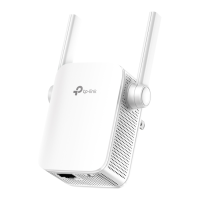
TP-Link N300 - User Manual

TP-Link N300
65 pages
Print Icon
To Next Page IconTo Next Page
Loading...
Content
English……………………………………………………………..1
български…………………………………………………………5
Čeština……………………………………………………………10
Eesti………………………………………………………………15
Hrvatski…………………………………………………………...20
Latviešu………………………………………………………......25
Lietuvių……………………………………………………………30
Magyar……………………………………………………………35
Polski……………………………………………………..………40
Româna………………………………………………………..…45
Slovenčina……………………………………………….………49
Slovenski…………………………………………………...……54
Srpski jezik/Српски језик………………………………………59
Question and Answer IconNeed help?

Do you have a question about the TP-Link N300 and is the answer not in the manual?

Summary

Method 1: Setup by Button

Method 2: Setup by Web-based Management Page

Technical Support Information

Global Support Contacts

Provides phone and email for global technical support, available 24/7.

Polish Support Contacts

Provides phone and email for Polish technical support, with specific service hours.

TP-Link N300 Specifications

General IconGeneral
Wireless StandardIEEE 802.11b/g/n
Frequency2.4GHz
Operating Temperature0°C~40°C (32°F ~104°F)
Storage Temperature-40°C~70°C (-40°F ~158°F)
Operating Humidity10%~90% non-condensing
Storage Humidity5%~90% non-condensing
Data Rate300Mbps
Ethernet Port1 x 10/100Mbps
ButtonReset Button
Power Consumption3.6W
Wireless SecurityWPA/WPA2
LEDsPower, Ethernet

Videos

How to set up TP-Link WiFi Extender N300

How to Set Up TP-Link N300 WiFi Range Extender: Step-by-Step Guide

How to Set Up TP-Link N300 with WPS Button (Quick Method)

How to Connect Wired Ethernet TP-Link N300 Wi-Fi Range Extender to Laptop

How To Create Guest Network On TP-Link N300

How to Reset TP-Link N300 Wi-Fi Range Extender

Related product manuals