2. TRACERCO PED OPERATION
2.1 PHYSICAL DESCRIPTION
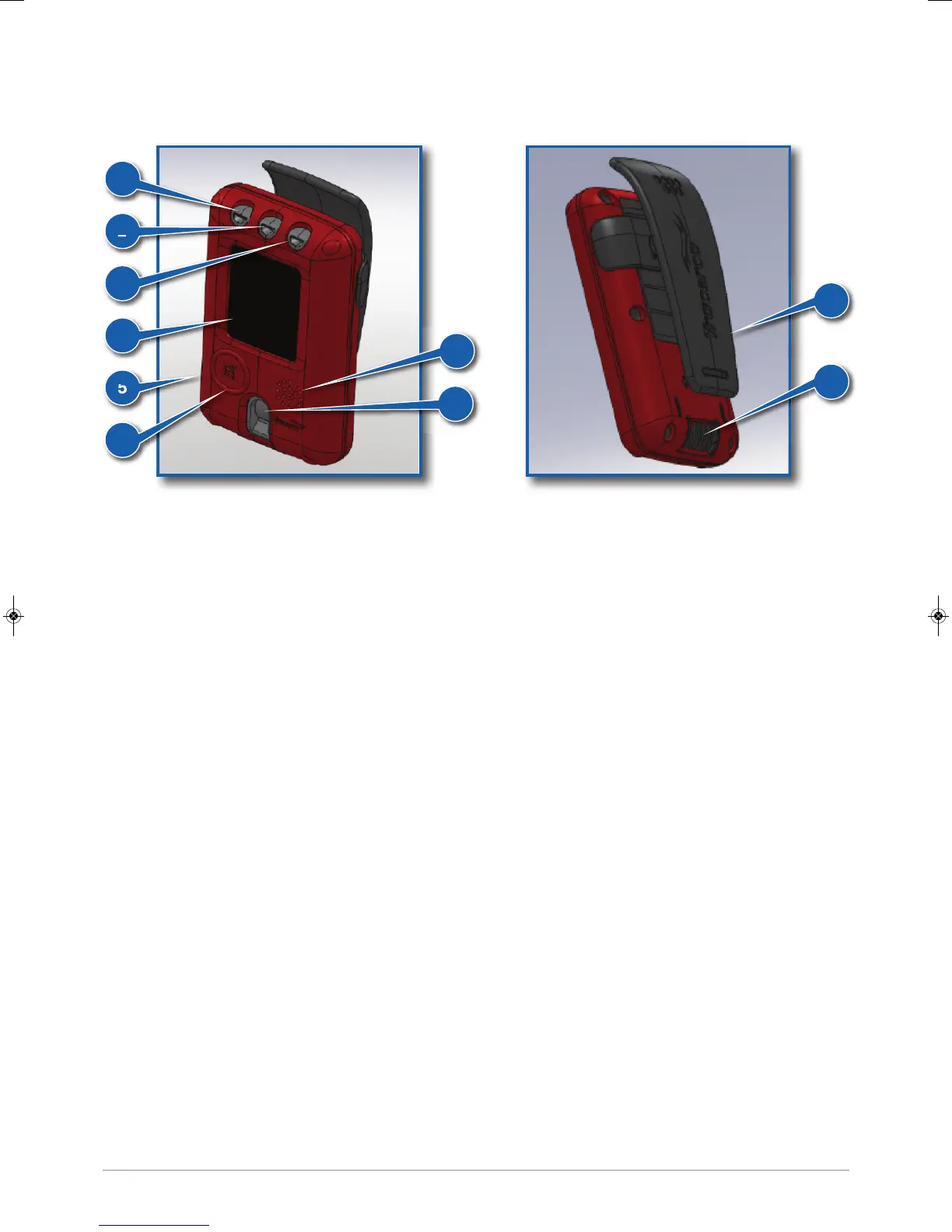
(1) System check light
LED will periodically flash green while the TRACERCO PED is functioning correctly. The LED will flash red if
the instrument is in a critical status (see section 2.7 for possible critical status messages).
(2) Dose rate alarm light
Flashes amber while the amber dose rate alarm is exceeded. Flashes red while the red dose rate alarm is
exceeded.
(3) Dose alarm light
Flashes amber when the amber dose alarm has been passed. Flashes red when the red dose alarm has been
passed. Will continue to flash until the data has been transferred to a PC, using DoseVision.
(4) Screen
An AMOLED screen is used to display readings and menus. The screen can be programmed to display the
information you want using DoseVision. The screen is coated with an antistatic material. See section 4 for
maintenance tips.
(5) Case
The TRACERCO PED case is constructed from a robust, durable polymer that has inherent antistatic
properties. See section 4 for maintenance tips.
(6) Button
The TRACERCO PED utilises a single button for selection and navigation. A long press is used to turn on the
TRACERCO PED, open the menu system and to make a selection. A short press is used to scroll. This button
is also used to silence alarms.
(7) Speaker
The speaker is used for audible alarms.
(8) Geiger Müller tube window
The Geiger Müller tube has a small window to allow increased low energy response.
(9) Clip
The clip is used for fixing the TRACERCO PED to the users clothing.
(10) Contacts
When placed in the TRACERCO PED dock the contacts are used to transfer data and charge in the
instrument.
4
1
2
3
4
5
7
8
6
9
10
38472_CD Manual 23/08/2013 14:24 Page 4


 To Next Page