2.6 TRACERCO PED FUNCTIONS
2.6.1 Alarms
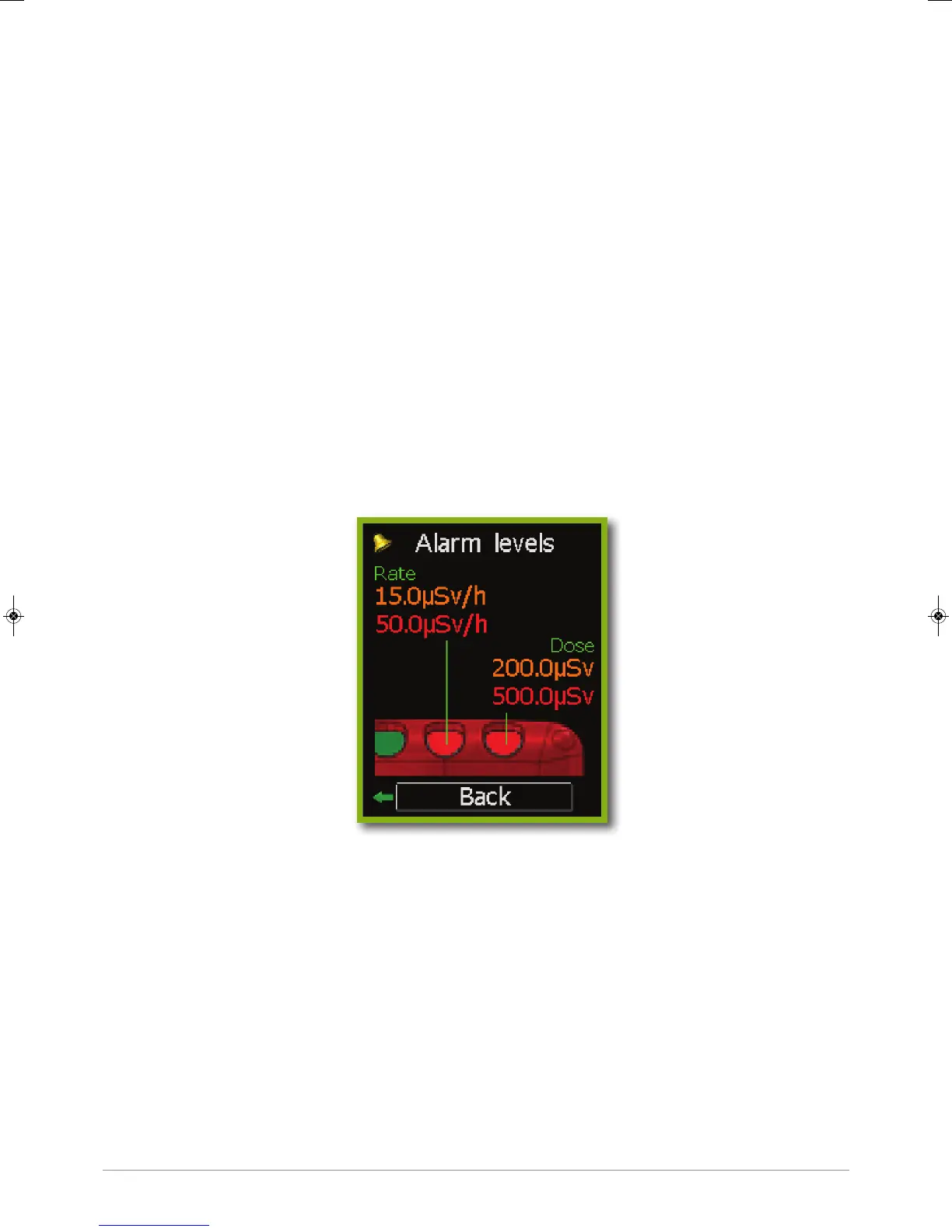
The TRACERCO PED has two adjustable alarm levels for both dose and dose rate.
The alarm levels can be set using the DoseVision software.
The LEDs for dose and dose rate alarms will flash amber when the first alarm is reached and red
for the second alarm. See section 2.1 for how the dose and dose rate alarm LEDs are positioned.
The TRACERCO PED will make a loud beeping noise for the audio alarm.
The dose rate alarms will continue until the dose rate drops below the alarm level. The dose
alarm will continue until the total dose history has been transferred to the PC using DoseVision.
If the TRACERCO PED button is pressed during an alarm the audio alert will be silenced
and the vibrate alert will stop. The relevant LED will continue to flash.
Dose and dose rate alarm levels are checked every second.
The TRACERCO PED alarm settings may be viewed in the alarm levels screen. See section 2.5 for
navigation to this screen. The alarm settings may only be changed via the DoseVision software.
2.6.2 Tasks
A special function of the TRACERCO PED is the capability to allow users to monitor dose and peak
dose rate over particular time periods or tasks. Tasks are started from the Task Menu screen. See
section 2.5 for navigation to this screen. Tasks will continue to record, until stopped by the user.
8
38472_CD Manual 23/08/2013 14:25 Page 8


 To Next Page