INSTALLATION INSTRUCTIONS | PAGE 17IN-0050
PCminimumrequirementsandrecommendedinternetconnectionminimumupload/download.
Forfurtherinformationvisithttps://www.Trackman.com/support
EnsureWindowsisfullyupdated.
•KeepinstallinganypendingupdatesandthenpresscheckforupdatesontheWindowsUpdate
settingspageuntilnomoreupdatesareavailable.Rebootifnecessary.
InstalltheTPSversionfromtheUSBstick.
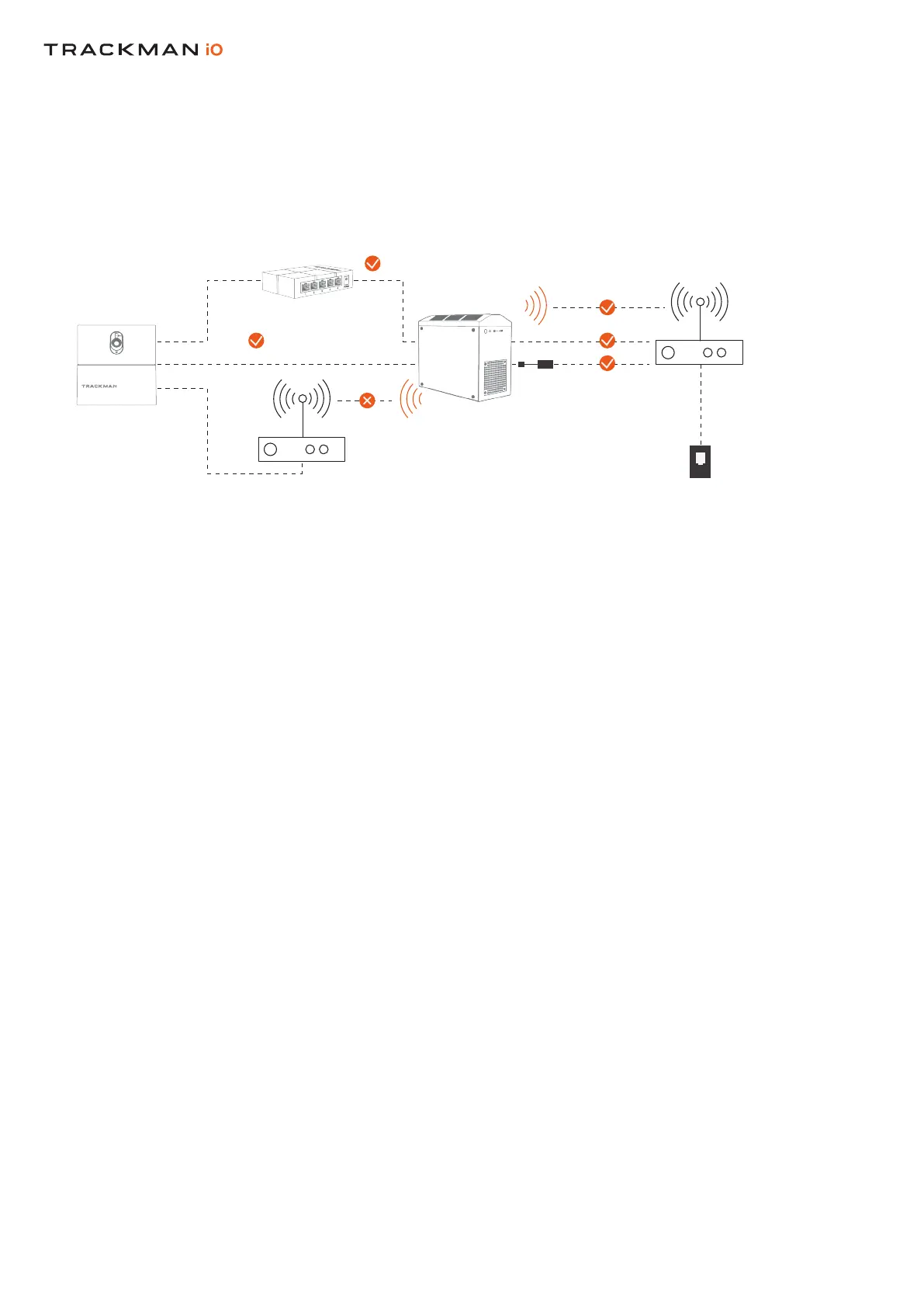
CONNECTING YOUR TRACKMAN iO
TO A PC AND THE INTERNET
INSTALLING TPS (9.2 OR LATER)
1GB CAT 6 LAN CABLE
USB TO LAN ADAPTOR
LAN CABLE
INTERNET
1GB CAT 6 LAN CABLE
SWITCH MUST BE MINIMUM 1GB
PC MUST BE ACCORDING TO
TRACKMAN SPECIFICATION
HITTING SCREEN
HITTING SCREEN
CEILING
HITTING SURFACE
CEILING SURFACE
TEE MARKER
CALIBRATION TARGET
SIDE VIEW


 To Next Page