INSTALLATIONINSTRUCTIONS|PAGE5IN-0050
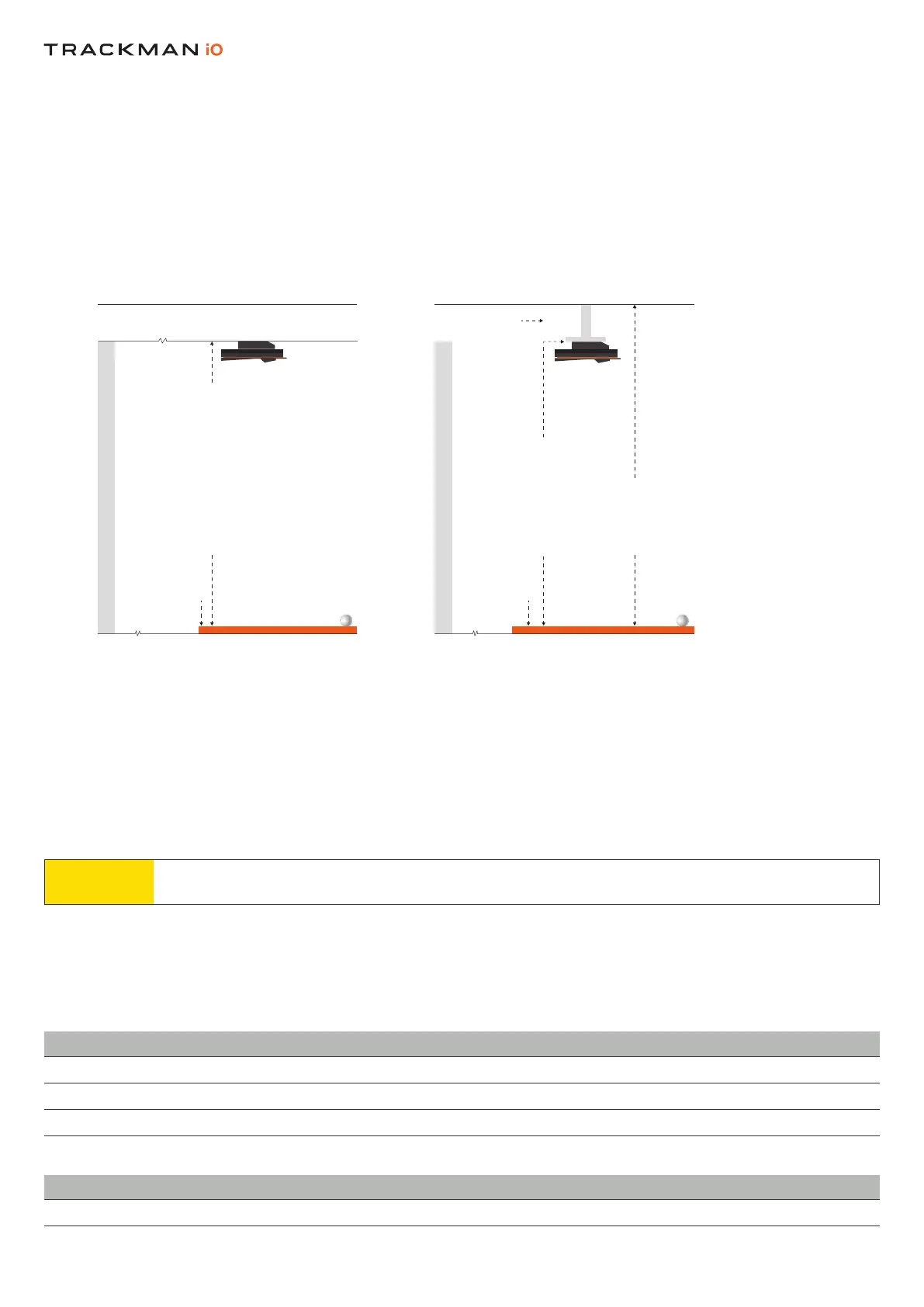
A. Directceilingmount
•Seesectionfor
B. VESAmount(100x100,withrotaryjointandadjustablepole/bracket)
•Seesectionfor
• (directceilingmount)whenthedistancebetweentheandthe
isbetween285cm/9’4”–305cm/10’0”aslistedintheSpacerequirements.
•Ifthedistancebetweentheandisgreaterthan305cm/10’0”,use
VESAmountwithadjustablepole/bracketsettotherecommendedmountingheightof295cm/9’8”.
Whichevermountingtypeyouchoose,boththeCEILINGSURFACEandtheoormustbelevel.
InstallingyourTrackmaniOonaCEILINGSURFACEthatisnotlevelwillaffectitsperformance.
•Topoftomountingheight(i.e,whereisattachedtotheor
VESAmount
Table 1 Mounng height of Trackman iO
MountingHeight(cm) ft/in Comments
305 10’00” Max
295 9’8”
285 9’4” Min
• positiontoornet.(Recommendedminimumdistance)
Distance(cm) ft/in Comments
250 8’2” Min
MOUNTING TYPES
MOUNTING TYPE A
HITTING SCREEN
HITTING SURFACE
SIDE VIEW
HITTING SURFACE
MOUNTING HEIGHT ACCORDING TO TABLE 1
295CM/9’8” RECOMMENDED
>305 CM / 10’0”
HITTING SCREEN
HITTING SCREEN
HITTING SURFACE
CEILING SURFACE
TEE MARKER
CALIBRATION TARGET
SIDE VIEW
MOUNTING TYPE B
HITTING SCREEN
VESA 100X100 MOUNT
SIDE VIEW


 To Next Page