INSTALLATION INSTRUCTIONS | PAGE 19IN-0050
CALIBRATING YOUR TRACKMAN iO
Yourneedstobecalibratedtoknowitspositionintheroomrelativetotheandthe
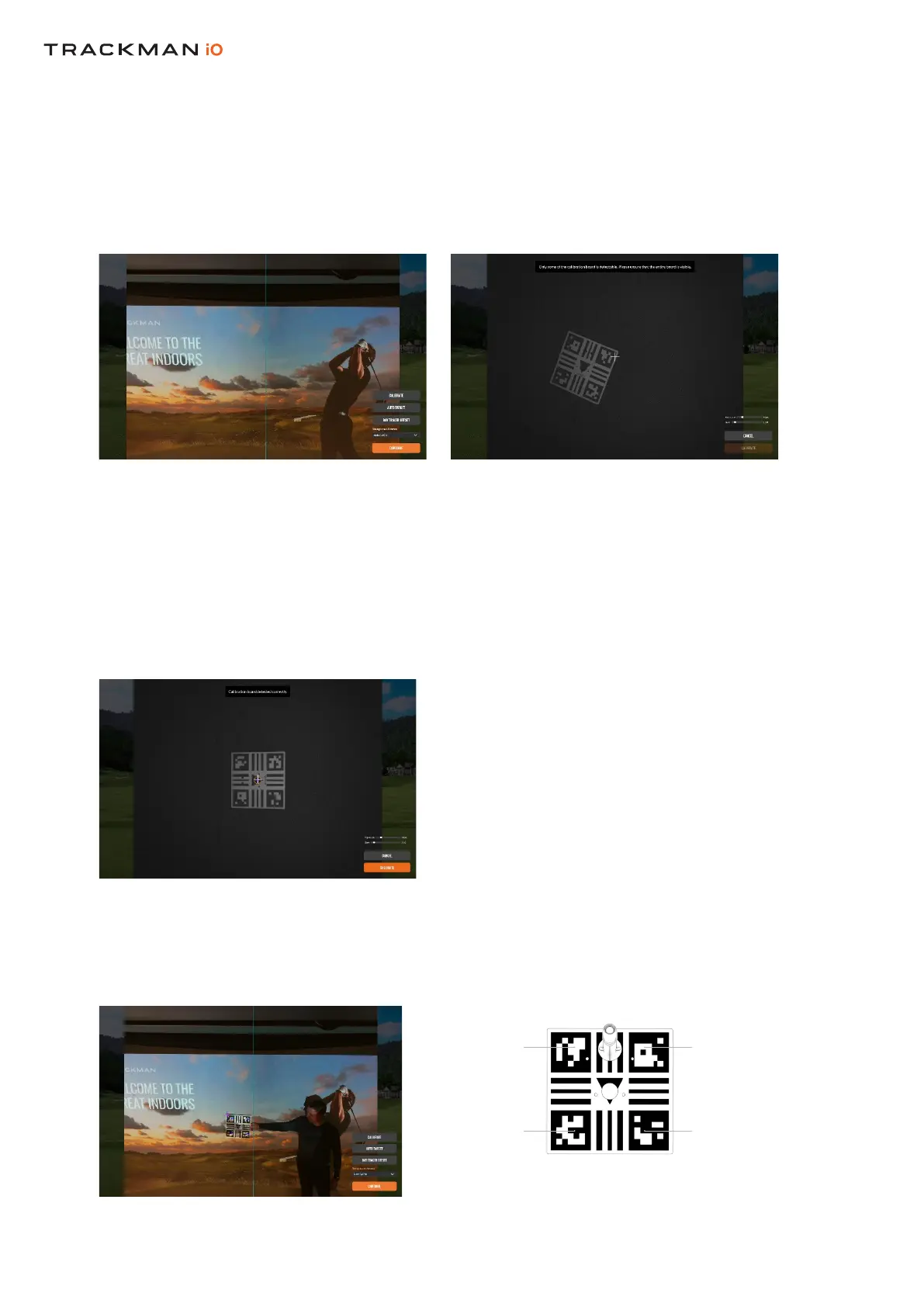
Afterconnectingtoyour,youshouldbepresentedwithascreenshowinganimagefromoneofthecameras
inyour.
Ifyourhasneverbeencalibratedbeforeitwillshowaviewoftheautomatically
Doyouseeaviewofthe?
a. No:Press“Calibrate”
b. Yes:Proceed
Placethesuppliedontheoorandpositionitinthecenteroftheimage.
Whenplacedcorrectly,youwillseetwocrossesinsidetheholeintheboard.Thepositionoftheholeindicates
theoptimalplacementofthe.
Press
Pickuptheandholditagainstthewithoutcoveringthefourcornermarkers
onthe.Nowcalibratethedistancefromthetothe
Alignment camera showing HITTING SCREEN Main camera showing TEE AREA
DonotcoverDonotcover
DonotcoverDonotcover


 To Next Page