22
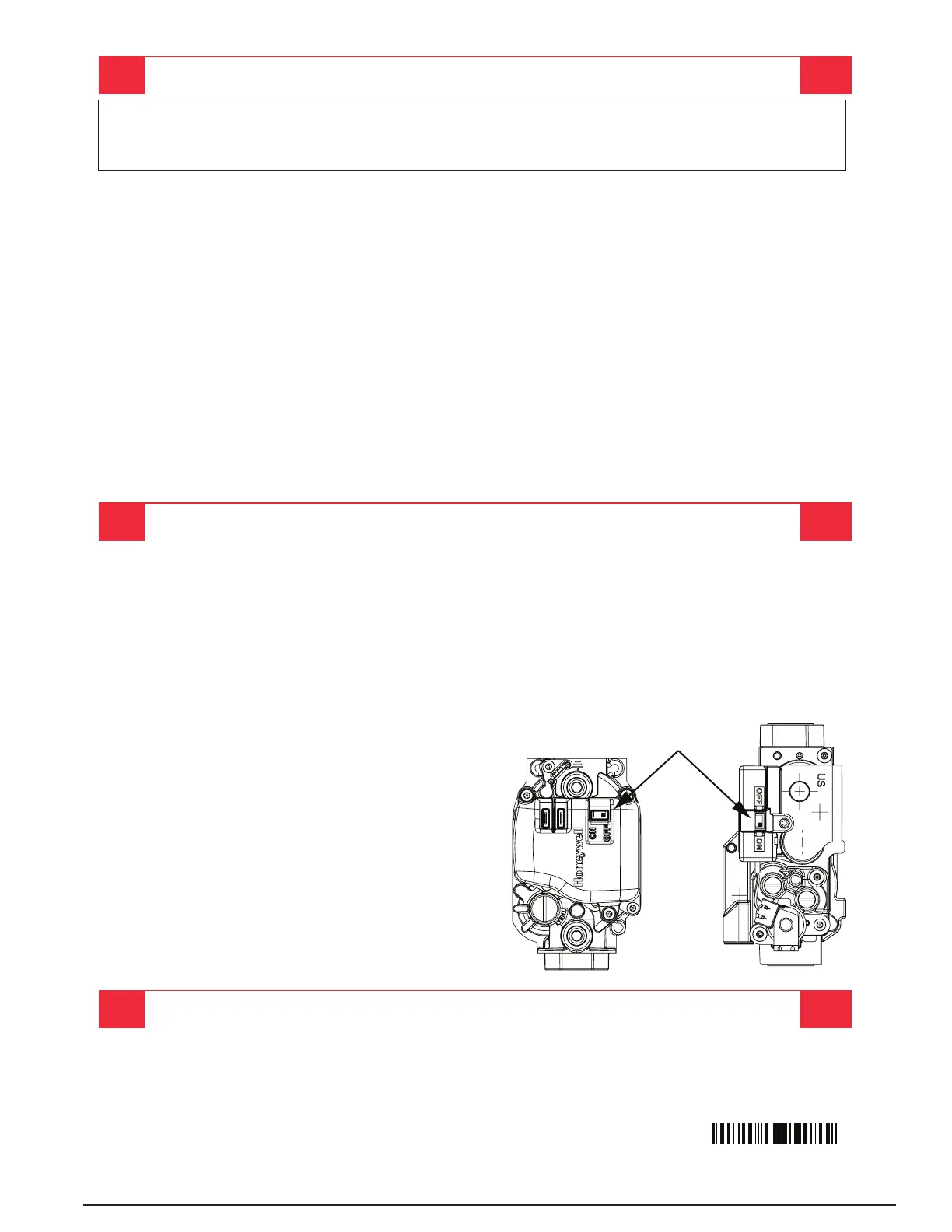
Figure 11. Gas Valve Label
OPERATING INSTRUCTIONS
10186330 (Replaces 7106740)
(10/17)
SWITCH
A. This appliance does not have a pilot. It is equipped with an ignition device which automatically lights
the burner. Do not try to light the burner by hand.
B. BEFORE OPERATING smell all around the appliance area for gas. Be sure to smell next to the floor
because some gas is heavier than air and will settle on the floor.
WHAT TO DO IF YOU SMELL GAS
• Do not try to light any appliance.
• Do not touch any electrical switch; do not use any phone in your building.
• Immediately call your gas supplier from a neighbor’s phone. Follow the gas supplier’s instructions.
• If you cannot reach your gas supplier, call the fire department.
C. Use only your hand to push in or turn the gas control knob. Never use tools. If the knob will not push in
or move by hand, do not try to repair it, call a qualified service technician. Force or attempted repair may
result in a fire or explosion.
D. Do not use this appliance if any part has been under water. Immediately call a qualified service
technician to inspect the appliance and to replace any part of the control system and any gas control
which has been under water.
WARNING: If you do not follow these instructions exactly, a fire or explosion
may result causing property damage, personal injury, or loss of life.
FOR YOUR SAFETY READ BEFORE OPERATING
1. STOP! Read the safety information above on this label.
2. Set the thermostat to the lowest setting.
3. Turn off all electrical power to the appliance.
4. The appliance’s ignition device automatically lights the burner. Do not try to light burner by hand.
5. Remove the control access door/panel (upper door if two-door model).
6. Move the gas control switch to the “OFF” position. (See Figure 1)
7. Wait fi ve (5) minutes to clear out any gas. Then smell for gas, including near the floor. If you smell gas,
STOP! Follow “B” in above information. If you don’t smell gas, go to the next step.
8. Move the gas control switch to the “ON” position. (See Figure 1)
9. Replace the control access door/panel (upper door if two door model).
10. Turn on all electrical power to the appliance.
11. Turn the thermostat to a desired setting.
12. If the appliance will not operate, follow the
instructions “To Turn Off Gas To Appliance”
and call your service technician or gas supplier.
1. Set the thermostat to the lowest setting.
2. Turn off all electrical power to the appliance if service is to be performed.
3. Remove the control access door/panel (upper door if two-door model).
4. Move the gas control switch to the “OFF” position. Do not use force. (See Figure 1)
5. Replace the control access door/panel (upper door if two-door model).
TO TURN OFF GAS TO APPLIANCE


 To Next Page