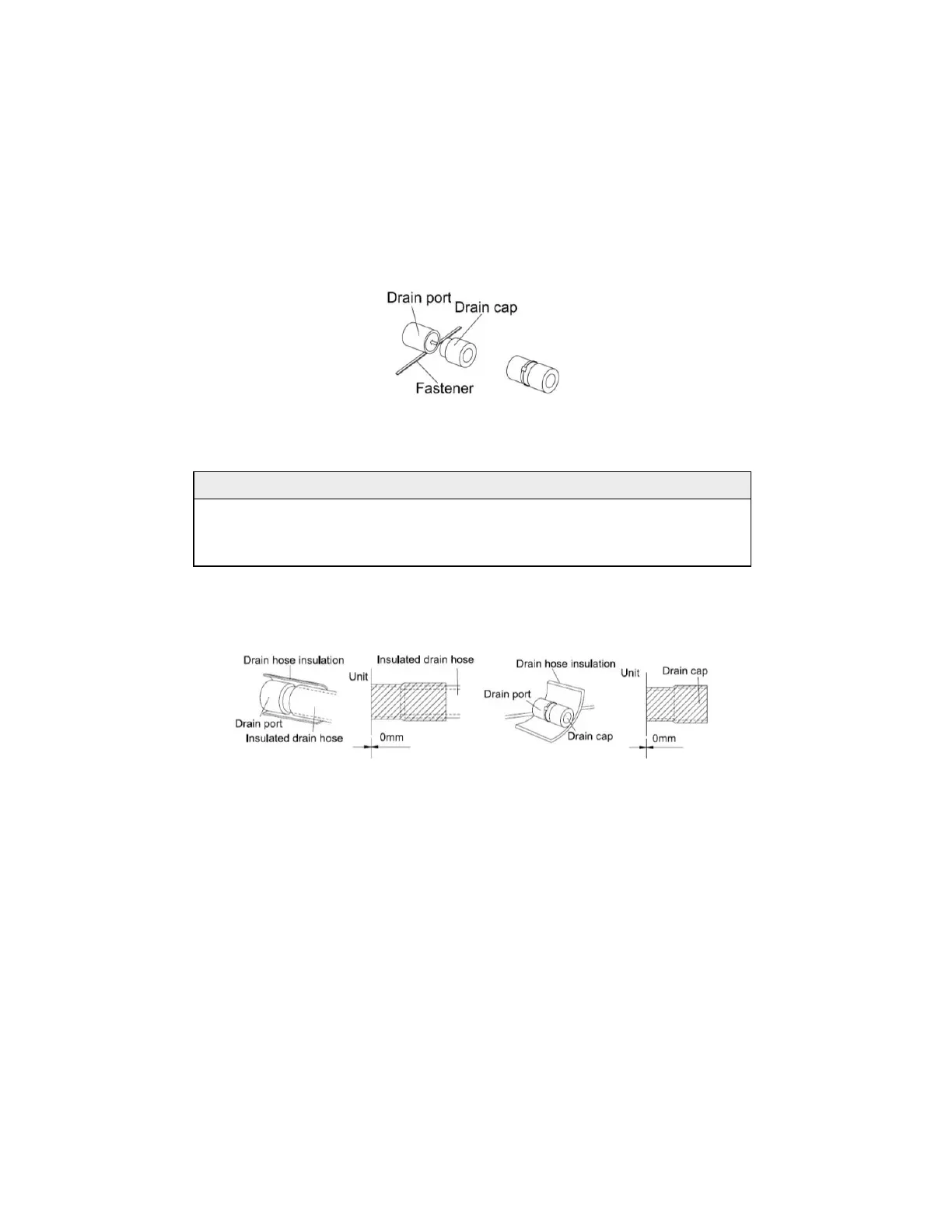
1. There is a drain port on both the left and right sides. Select the drain port best suited to the
installation conditions.(Fig. 4.23)
2. When the unit is shipped from the factory, the drain port is defaulted to be on the left side
(electric box side), the port on right side has been plugged.
3. When using the drain port on the right side of the unit, reinstall the drain cap to the left side
drain port.(Fig. 4.25)
Fig. 4.25
NOTICE!
Always check that the drain cap is installed to the unused drain port and is fastened with the nylon
fastener. If the drain cap is not installed, or is not sufficiently fastened by the nylon fastener, water
may drip during the cooling operation.
1. Be sure to insulate where the drain port and the drain hose connect.(Fig. 4.26 )
2. The unused drain port also should be insulated properly.(Fig. 4.27)
Fig. 4.26 Fig. 4.27
3. There is adhesive on one side of the insulation so that after removing the protective paper
over it the insulation can be directly attached to the drain hose.
4. Considerations for installing a condensate pump (field supplied):
1). When a condensate pump is used, the drain hole on the left (the electrical box side) must
be used.



 To Next Page