Home
Transcend
Dash Cameras
DrivePro 550
Page 17 (Deleting Videos;Photos)
Transcend DrivePro 550 - Deleting Videos;Photos
37 pages
Manual
Save Page as PDF
To Next Page
To Next Page
To Previous Page
To Previous Page
Loading...
16
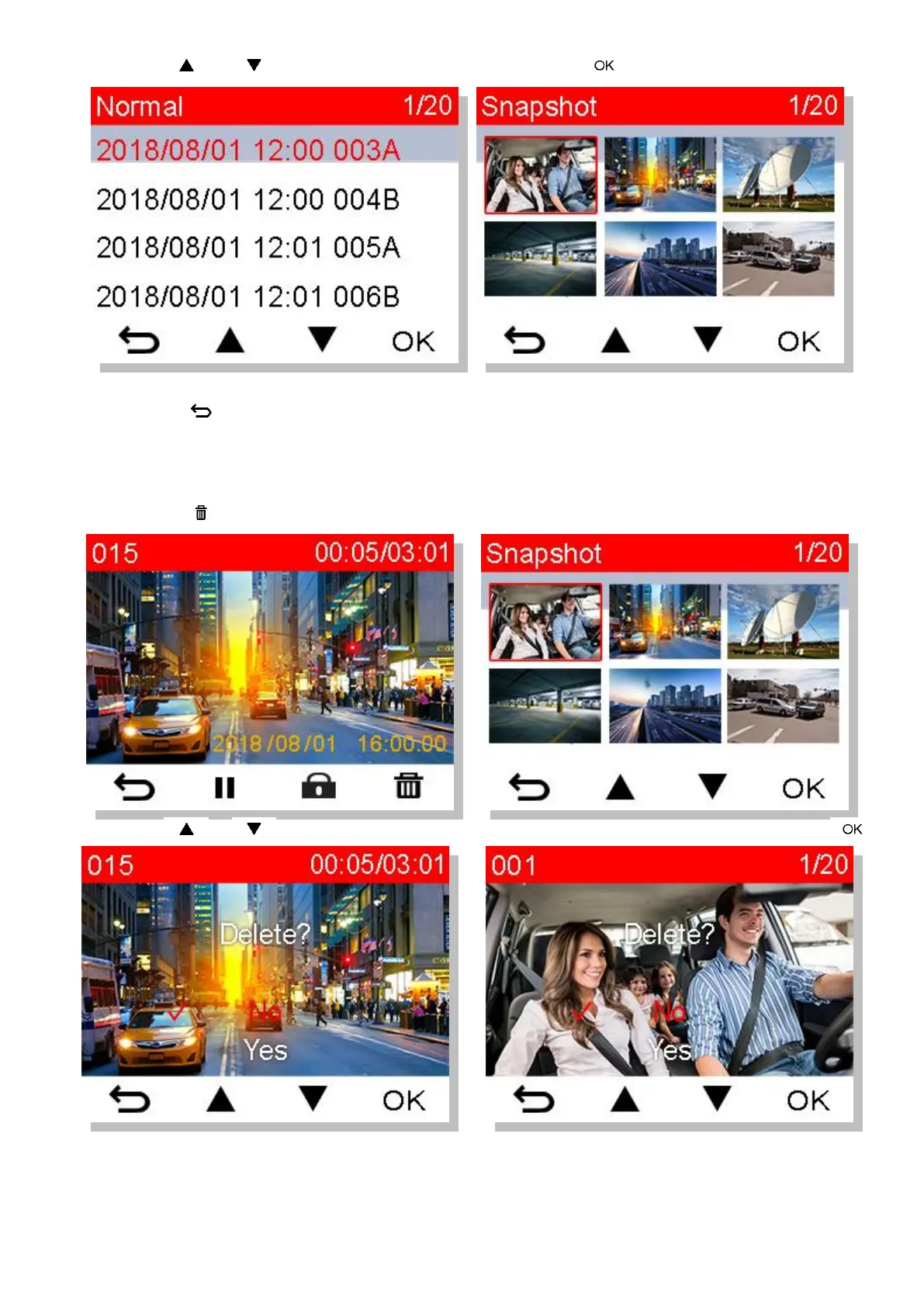
3.
Use
/
to select the desired file, and press
to p
review
4.
Press
to return to the video file list.
6-
2
Deleting V
ideos/Photos
1.
Press
to delete
video/photo files
.
2.
Use
/
to cancel
or confirm
the deletion o
f the video/photo file
,
and
press
.
16
18
Table of Contents
Main Page
Table of Contents
2
Introduction
4
System Requirements
5
Package Contents
6
Getting Started
7
Overview
7
Inserting a Microsd Memory Card
8
Mounting the Drivepro
9
Connecting to Power
11
Function Buttons
12
LED Indicator Chart
12
Setting the Date, Time and Time Zone
13
Recording Videos
14
Normal Recording
14
Emergency Recording
14
Parking Mode Recording
15
Playing Videos and Browsing Photos
16
Playing Videos / Browsing Photos
16
Deleting Videos/Photos
17
Protecting Videos
18
Settings
18
Using the Drivepro App
24
Downloading and Installing the App
24
Connecting to the Drivepro
24
Drivepro™ Toolbox Software
25
Transferring Files to a Computer
26
Safety Cautions
28
Troubleshooting
29
Specifications
30
EU Compliance Statement
31
Recycling and Environmental Protection
32
Federal Communications Commission (FCC) Statement
33
Two-Year Limited Warranty
34
GNU General Public License (GPL) Disclosure
35
End-User License Agreement (EULA)
35
Related product manuals
Transcend DrivePro 550B
32 pages
Transcend DrivePro 50
30 pages
Transcend DrivePro 520
33 pages
Transcend DrivePro 10
29 pages
Transcend DrivePro 20
29 pages
Transcend DrivePro 250
37 pages
Transcend DrivePro 220
37 pages
Transcend DrivePro 200
69 pages
Transcend DrivePro 110
32 pages
Transcend DrivePro 230
34 pages
Transcend DrivePro 620
40 pages
Transcend DrivePro 130
34 pages















 To Next Page