Encompass 4 Reader
TransCore Proprietary
9
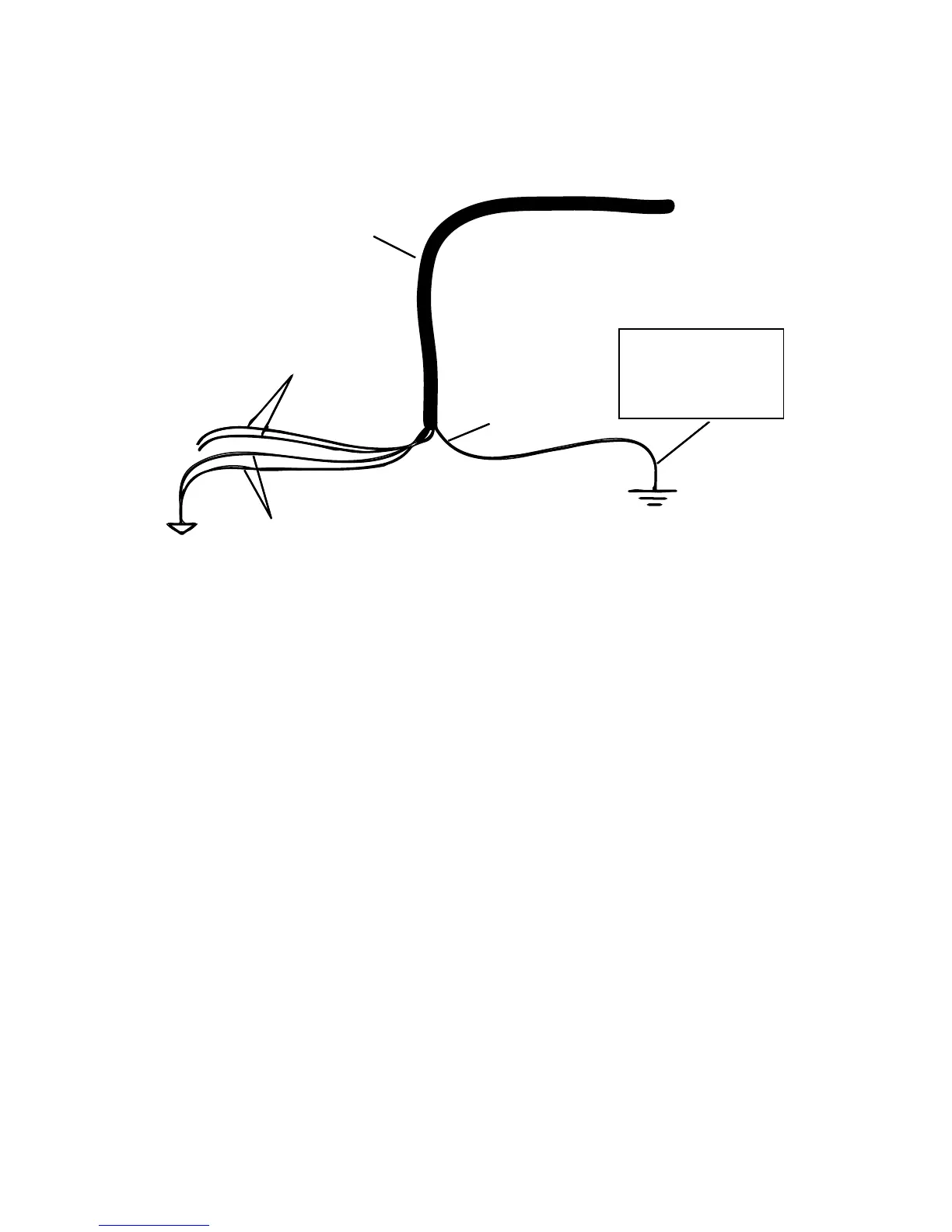
Correct Reader Grounding
Ground the reader following the recommended grounding shown in Figure 1.
Set up the Terminal Emulation Application
1. Launch the terminal emulation application.
2. In the dialog boxes choose the com port to which the communications interface is attached and set
the properties as follows:
• Bits per second: 9600 baud
• Data bits: 8
• Parity: None
• Stop bits: 1
• Flow control: None
Power the Reader
1. Plug the AC transformer or DC power supply into an approved outlet. Switch on the power.
2. Once the reader has been powered up, a sign-on message will appear. If startup is successful, the
sign-on message appears as follows:
Model E4 Series [software version] SNYYYYYY
[Copyright notice]
Where YYYYYY is the serial number of the Encompass 4 Reader unit being used.
Figure 1 Recommended Reader Grounding
Ensure proper Earth
Ground for drain wire in
accordance with National
Electric Code for the
reader installation locale
Yellow/black wires for
communications and
sense input/output to
Signal Ground
To power/communications
input/output connections,
RS-232/RS-422 and Wiegand
Communications cable
Shield drain wire
To Reader
WD-0082



 To Next Page