EasyManua.ls Logo

TRANSTEK TMB-2285-B - User Manual

TRANSTEK TMB-2285-B
28 pages
Print Icon
To Next Page IconTo Next Page
Loading...
Thank you for selecting Transtek Blood Pressure Monitor. Please read the
user manual carefully and thoroughly so as to ensure the safe usage of this
product. Keep this manual for further reference in case any issues arise.
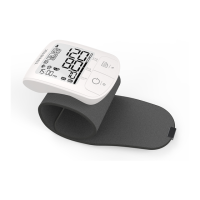
Wrist Type
User Manual
Blood Pressure Monitor
Model: TMB-2285-B
Guangdong Transtek Medical Electronics Co., Ltd.
Zone A, No.105, Dongli Road, Torch Development District,
528437 Zhongshan, Guangdong, China
Version:A/0
Question and Answer IconNeed help?

Do you have a question about the TRANSTEK TMB-2285-B and is the answer not in the manual?

Overview

This document is the user manual for the Transtek Blood Pressure Monitor, Model TMB-2285-B, a digital device designed for measuring blood pressure and heartbeat rate.

Function Description

The Transtek TMB-2285-B Blood Pressure Monitor utilizes the Oscillometric Measuring Method. Before each measurement, the unit establishes a "zero point" equivalent to atmospheric pressure. It then inflates the cuff and detects pressure oscillations generated by beat-to-beat pulsatile, which are used to determine systolic pressure, diastolic pressure, and pulse rate. Readings taken by this monitor are equivalent to those obtained by a trained observer using the cuff and stethoscope auscultation method.

The device is intended for adult indoor use only, for measuring blood pressure and heartbeat rate with a wrist circumference ranging from 13.5cm to 21.5 cm (approximately 5¼"-8½"). It can also detect irregular heartbeats.

Key features include:

  • Systolic blood pressure measurement.
  • Diastolic blood pressure measurement.
  • Pulse rate measurement.
  • Storage of up to 199 records for each user (User 1 and User 2), with a guest mode (User G) that does not save records.
  • Wrist Positioning Guide to assist users in finding the ideal wrist position for accurate measurements.
  • Bluetooth wireless connectivity for saving and sending measurement data to a smartphone or tablet application.
  • Automatic date and time synchronization after successful Bluetooth pairing.
  • Detection and display of irregular heartbeats (IHB icon).
  • Detection and display of excessive body motion during measurement.

Important Technical Specifications

  • Model: TMB-2285-B
  • Power Supply: Battery powered mode: 2x AAA batteries (3V).
  • Display Mode: Digital LCD V.A. 43 mm x 46 mm.
  • Measurement Mode: Oscillographic testing mode.
  • Measurement Range:
    • Rated cuff pressure: 0 mmHg ~ 299 mmHg.
    • Measurement pressure: SYS: 60 mmHg ~ 230 mmHg, DIA: 40 mmHg ~ 130 mmHg.
    • Pulse value: (40-199) beat/minute.
  • Accuracy:
    • Pressure: 5°C-40°C within ±3 mmHg.
    • Pulse value: ±5%.
  • Working Condition:
    • Temperature range: +5°C to +40°C.
    • Relative humidity range: 15% to 90%, non-condensing, but not requiring a water vapor partial pressure greater than 50 hPa.
    • Atmospheric pressure range: 700 hPa to 1060 hPa.
  • Storage & Transportation Condition:
    • Temperature: -20°C to +60°C.
    • Relative humidity range: ≤ 93%, non-condensing, at a water vapor pressure up to 50 hPa.
    • Atmospheric pressure range: 500 hPa to 1060 hPa.
  • Measurement Perimeter of the Wrist: About 13.5-21.5 cm.
  • Weight: Approx. 106 g (excluding batteries).
  • External Dimensions: Approx. 85.7 mm × 60.8 mm × 24.7 mm (excluding the cuff).
  • Degree of Protection: Type BF applied part.
  • Device Classification: Internally Powered ME Equipment.
  • IP Classification: IP22 (protected against solid foreign objects of 12.5mm Φ and greater, and against vertically falling water drops when enclosure tilted up to 15°).
  • Software Version: A01.
  • Expected Lifetime: Device: 3 years or 30,000 measurements; Cuff: 10000 times; Alkaline battery: About 200-300 times.
  • Bluetooth Specifications:
    • RF Frequency Range: 2402 MHz to 2480 MHz.
    • Output Power Range: -3.26 dBm.
    • Supply Voltage: 1.8-3.6 V.
    • Transmitting Distance: 10 meters.
    • Compatible devices: iOS 13.0 or more, Android 5.0 or more.

Usage Features

Before You Start:

  • Battery Installation: Slide off the battery cover, install 2x AAA batteries as indicated, and replace the cover. The device indicates low battery with a "+bAt Lo" symbol, dim display, or no light.
  • Setting Date and Time: This is crucial for accurate record timestamps. The year range is 2022-2052, and time format can be 12/24 H. The process involves using the "START/STOP" and "MEM" buttons to navigate and set year, date format, month, day, hour, and minute.
  • Pairing with a Smartphone/Tablet: The device can be paired via Bluetooth. When the monitor is off and batteries are installed for the first time, the Bluetooth symbol will flash, indicating pairing mode. If successful, the symbol stops flashing, and "donE" is displayed. If unsuccessful, the device enters year setting mode. Long pressing the "START/STOP" button when off also initiates pairing. Date and time are automatically synchronized after pairing.
  • Wrist Positioning Guide: An optional sensor helps guide the wrist to the ideal heart-level position for accurate readings. The display shows icons to indicate if the wrist needs to be raised or lowered. Once the ideal position is found, the wrist symbol flashes, and measurement begins after a few seconds.
  • Setting a User ID: There are three user IDs: User 1, User 2 (each with 199 memory spaces), and Guest (no memory space). Users can switch between IDs by long-pressing the "MEM" button when the monitor is off, then confirming with "START/STOP".

Measurement:

  • Cuff Application: Remove accessories from the wrist. Roll up the sleeve. Apply the cuff with the palm facing up, positioning the edge 1-2cm from wrist joints. Fasten snugly, ensuring no extra room for accurate measurement.
  • Measurement Procedure: Sit comfortably with the tested wrist resting on a flat surface, elbow on a table, and cuff at heart level. Sit upright, take 5-6 deep breaths. For hypertensive patients, the cuff should be at the level of the right atrium of the heart; sit with legs uncrossed, feet flat, back and wrist supported, and rest for 5 minutes before measuring. Wait at least 3 minutes between measurements. Remain still and silent during measurement.
  • Starting Measurement: When the monitor is off, press "START/STOP". It displays the latest record, then detects wrist position. Once the correct position is found (displayed for ~3 seconds), the measurement automatically proceeds.
  • Measurement Display: The device adjusts to zero, inflates, measures, and then displays systolic pressure, diastolic pressure, and pulse rate. The Bluetooth symbol and data transmitting symbol appear during data transmission. If transmission is successful, these symbols disappear, and the monitor turns off. If unsuccessful, it times out after 60 seconds and turns off. The "START/STOP" button can manually power off the device.

Data Management:

  • Recalling Records: When the monitor is off, press "MEM" to enter memory recall mode. The user ID blinks, and the memory number is shown. Users can switch between User 1 and User 2 by pressing "MEM" again. After selecting a user, press "START/STOP" to confirm. The average of the latest three records is shown first (if more than 3 records exist). Press "MEM" to view individual records, which display alternately with date and time.
  • Deleting Records:
    • Single Measurement: In memory recall mode, find the desired record, then press and hold "MEM" for 3 seconds. "dEL y" and the memory number will blink. Use "MEM" to toggle between Y (yes) and NO (no), then "START/STOP" to confirm.
    • All Measurements: In memory recall mode, press and hold "MEM" + "START/STOP" for 5 seconds. "dEL AL" and the User ID will blink. Use "MEM" to toggle between AL (all) and NO, then "START/STOP" to confirm.

Maintenance Features

Cleaning Process:

  1. Switch off the device.
  2. Clean the cuff with a soft cloth wetted with soapy water, then with clear water to remove residual soap. Avoid liquid invasion into the cuff.
  3. Wipe the cuff with a dry soft cloth to remove moisture.
  4. Dry the cuff in a well-ventilated place.

Disinfection Process:

  1. Switch off the device.
  2. Disinfect the cuff with a soft cloth wetted with 70% isopropanol for about 10 minutes. Avoid liquid invasion.
  3. Wipe off the disinfectant with a clean dry cloth or towel until no visible residue remains.
  4. Dry the cuff in a well-ventilated place.

Frequency of Cleaning and Disinfection:

  • Single Patient Multiple Use: Recommended once a month or as necessary.
  • Multiple Patient Multiple Use: Recommended before and after each usage.

General Care:

  • Store the device and cuff in a clean, dry place, protected from extreme moisture, heat, lint, dust, and direct sunlight.
  • Do not place heavy objects on the device.
  • Do not wash the cuff in a washing machine or dishwasher.
  • Remove batteries if the device will not be used for a long time.
  • Dispose of worn batteries and accessories according to local guidelines.
  • The device contains sensitive electronic components; avoid strong electromagnetic fields during measurements.
  • Keep wireless communication equipment (mobile phones, cordless phones, walkie-talkies) at least 1 foot (30 cm) away during measurements to prevent interference.
  • The device may require up to 30 minutes to warm up/cool down from storage temperatures before use.
  • Performance should be checked after repair, maintenance, and every two years of use by retesting cuff pressure indication and air leakage.
  • No modification of this equipment is allowed.
  • Do not attempt to repair the unit yourself; contact authorized service centers.

TRANSTEK TMB-2285-B Specifications

General IconGeneral
BrandTRANSTEK
ModelTMB-2285-B
CategoryBlood Pressure Monitor
LanguageEnglish

Related product manuals