EasyManua.ls Logo

Traulsen RBC200 - User Manual

Traulsen RBC200
28 pages
Print Icon
To Next Page IconTo Next Page
Loading...
Quality Refrigeration
OWNER’S MANUAL
Instructions for the installation, operation,
and maintenance of Blast Chiller Models:
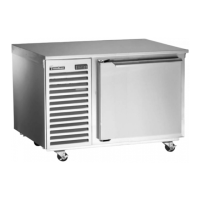
RBC50 (50 lb. capacity undercounter model)
RBC100 (100 lb. capacity reach-in model)
RBC200 (200 lb. capacity roll-in model)
RBC200RT (200 lb. capacity roll-thru model)
RBC400 (400 lb. capacity roll-in model)
RBC400RT (400 lb. capacity roll-thru model)
This Traulsen unit is built to our highest quality standards. We build our refrigerators, freezers, blast
chillers and heated cabinets this way as a matter of pride. This philosophy has made Traulsen the
leader in commercial refrigeration since 1938. We thank you for your choice and confidence in
Traulsen equipment and we know you will receive many years of utility from this equipment.
All Traulsen units are placed on a permanent record file with the service department. In the event
of any future questions you may have, please refer to the model and serial number found on the name
tag affixed to the unit. Should you need service, however, call us on our toll free number, 800-825-
8220 between 7:30 am and 4:30 pm CST, Monday thru Friday. It is our pleasure to help and assist
you in every possible way.
FORM NUMBER TR35850 REV. 4/07 P/N 375-60217-00
IMPORTANT WARRANTY NOTES
RBC50 & RBC100 Owner/Operators
Please Contact (800) 825-8220 ext. #6115 upon start-up to register your warranty
RB200/RBC200RT & RBC400/RBC400RT Owner/Operators
Please Contact (800) 825-8220 ext. #6112 after installation but before start-up in order to register
your warranty and arrange for a mandatory free Installation Validation & Service Check
(allow at least 72 hours from time of call for this to be performed)
Contact your local Hobart/Traulsen sales representative to arrange for a free on-site
demonstration (after warranty registration and/or installation validation)

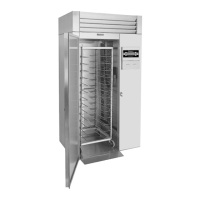
Table of Contents

Other manuals for Traulsen RBC200

Questions and Answers

  • J
    Jason BowmanAug 14, 2025
    What to do if there is refrigeration failure in Traulsen RBC200?
    • E
      Evelyn HamiltonAug 14, 2025
      If the interior temperature of your Traulsen Refrigerator exceeds 100° F, it could indicate a refrigeration failure. First, try removing power from the unit by unplugging it and plugging it back in, or by resetting the circuit breaker. If that doesn't work, ensure that the batch programming was complete and correct; if not, try programming the batch again. Check if you have loaded too much product, and if so, reduce the load to stay within the unit's capacity. A dirty condenser coil can also cause this, so clean it. If the issue persists even after these steps, it may indicate a refrigeration system failure, and you should call for service.
  • J
    Joseph GibsonAug 17, 2025
    Why cannot I program a new batch on Traulsen RBC200 Refrigerator?
    • J
      Justin EspinozaAug 17, 2025
      If you cannot program a new batch on your Traulsen Refrigerator, it might be because the unit is in a defrost cycle, during which batch programming is not possible. If you are in a BY TEMP chill cycle, you can add a new batch using the ADD/REMOVE option.
  • H
    heathergarciaAug 21, 2025
    Why does batch require too much time to chill product down to 40° F in Traulsen Refrigerator?
    • H
      handersonAug 21, 2025
      If your Traulsen Refrigerator is taking too long to chill the product down to 40° F, consider these factors: * Ensure that the door is closed properly. * Reduce the amount of product loaded, making sure not to exceed the unit's capacity. * If using pans, ensure the product depth does not exceed 2 inches. * Confirm that pans are covered correctly with a lid, plastic wrap, or foil, ensuring it's in direct contact with the product. * If the product has high density, allow extra chilling time. * Clean a dirty condenser coil. * Allow the evaporator coil to defrost by pressing the DEFROST button to initiate a manual defrost.
  • D
    douglas80Aug 25, 2025
    How to fix condensing unit that fails to start in Traulsen RBC200?
    • P
      phillipsianAug 25, 2025
      If the condensing unit on your Traulsen Refrigerator fails to start when programming a new batch, try the following: * Check the power supply to the condensing unit. * Make sure that the batch was programmed properly by selecting the chill method, pressing START, and selecting probes if required. * If problems persist, it may be a system issue and you should call for service.
  • D
    David KennedyAug 27, 2025
    How to troubleshoot printer not printing in Traulsen Refrigerator?
    • G
      Gary SmithAug 27, 2025
      If the printer is not printing on your Traulsen Refrigerator, check the following: * Ensure the printer has paper and replace the roll if necessary. * Verify that the printer paper is installed correctly with the thermal sensitive side on top and the feed door closed. * If the paper does not feed or jams, remove the paper and reinstall it.
  • J
    Jennifer MartinezAug 30, 2025
    What to do if food probe failure alarm occurs in Traulsen RBC200?
    • P
      Patricia VazquezAug 31, 2025
      If the food probe fails during a chill cycle in your Traulsen Refrigerator, the printer will notify you that it is converting to chilling BY TIME. When starting a BY TEMP cycle, if a food probe is not available, check the probe plug connection. If the food probe was placed in excessively hot product, cool the probe and test again. If food probe fails and operates correctly later, program a BY TEMP batch using the suspect probe and wiggle the food probe wire. If a second Food Probe Failure occurs the food probe is defective and should be replaced. If the food probe is damaged or defective, replace it with a new one.
  • N
    Nicholas JohnsSep 3, 2025
    Why is there no display on control of Traulsen RBC200 Refrigerator?
    • P
      Paige TaylorSep 3, 2025
      If there is no display on the control of your Traulsen Refrigerator, check the power supply and circuit breaker. Confirm that the unit is correctly plugged into a working power outlet. If the problem persists, it may be a system issue, and you should call for service.
  • A
    Alexandria MendezSep 6, 2025
    What does power loss notification mean for Traulsen RBC200?
    • E
      Edward HarmonSep 7, 2025
      If you receive a power loss notification on your Traulsen Refrigerator, it indicates that power to the unit was lost. Check the printout to see if the product temperature was compromised. The printout shows the temperature before and after the interruption.
  • J
    Jay ContrerasSep 10, 2025
    Why is there condensation on exterior surface of Traulsen RBC200?
    • M
      Michael BestSep 12, 2025
      Condensation on the exterior surface of your Traulsen Refrigerator is normal during periods of high humidity. Also, check the door alignment and gasket for a proper seal. If there is an electric door heater malfunction, call for service.

Summary

I. INTRODUCTION

II. RECEIPT INSPECTION

III. INSTALLATION

Site Selection and Packaging

Proper location selection and unpacking procedures for safe unit placement.

Installing Legs, Casters, and Assembly

Steps for attaching legs/casters and assembling multi-unit models.

Wiring Diagram and Electrical Requirements

Information on electrical connections, circuit requirements, and wiring diagrams.

Proper Clearances and Condensate Removal

Guidelines for maintaining adequate space and managing condensate drainage.

Remote Condensing Units and Special Procedures

Covers remote unit requirements, cut-out settings, sealing, and ON/OFF switch.

RBC50 Control Panel Installation

Step-by-step guide for installing the control panel on the RBC50 model.

IV. CARE & MAINTENANCE

Cleaning the Condenser and Printer Supplies

Instructions for cleaning the condenser coil and details on printer supplies.

Cleaning Exterior and Interior Surfaces

Methods for cleaning the unit's exterior stainless steel and interior components.

V. OTHER

Service Agency Check, Training, and Information

Covers required inspections, operator training, service contacts, and demonstrations.

VI. THE SMARTCHILL CONTROL

Control Overview, Basics, and Startup

Explains the SmartChill control features, basic operation, and startup screen.

Control Modes, Printing, and Features

Details on printing capabilities, over temperature alarms, power interruptions, and EZ Start.

VII. OPERATING THE BLAST CHILL CONTROL

Starting a Chill Cycle by Temperature

Step-by-step instructions for initiating a blast chill cycle using temperature targets.

Starting a Chill Cycle by Time

Guide on how to perform a blast chill cycle based on a set duration.

Starting a Chill Cycle by Product

Process for selecting and chilling products using pre-programmed parameters.

Hold Mode and Defrost Operations

Explains how to use the refrigerated hold mode and initiate manual defrost cycles.

Printing Data and Setup Procedures

Instructions for printing reports and setting up products, users, and system parameters.

VIII. SMARTCHILL COMMUNICATIONS

System Requirements and Hardware Connection

Outlines the necessary PC system requirements and hardware connection for data communication.

IX. GLOSSARY

X. REPLACEMENT PARTS LIST

XI. SUMMARY OF ERROR MESSAGES

XII. WARRANTY INFORMATION

XIII. MECHANICAL TROUBLE SHOOTING GUIDE

Traulsen RBC200 Specifications

RBC200

Electrical Data IconElectrical Data
voltage115/60/1
full load amperes15.2
minimum circuit ampacity20
wattage1725
Refrigeration Data IconRefrigeration Data
refrigerantR404a
BTU/HR - HP3880 - 3/4 HP
heat load - BTU/HR7000
suction line3/8 in. (.95 cm)
liquid line1/4 in. (.63 cm)
Remote Condenser IconRemote Condenser
refrigerantR404a
voltage208-230/60/1
recommended BTU/HR - HP18, 700 - 4 HP
suction line at blast chill unit7/8 in. (2.2 cm)
liquid line at blast chill unit1/2 in. (1.3 cm)
suction line on remote condenser1.125 in. (2.9 cm)
liquid line on remote condenser1/2 in. (1.3 cm)
Weight and Dimensions IconWeight and Dimensions
net capacity35 cu. ft. (990.5 l)
length overall48.5 in. (123.2 cm)
depth - cabinet only34 in. (86.4 cm)
depth - with door open 90°65.125 in. (165.4 cm)
depth - overall37.5 in. (95.3 cm)
clear door width27.25 in. (69.2 cm)
clear door height72.625 in. (184.5 cm)
height - overall89.5 in. (227.3 cm)

RBC200RT

Electrical Data IconElectrical Data
voltage115/60/1
full load amperes15.2
minimum circuit ampacity20
wattage1725
Refrigeration Data IconRefrigeration Data
refrigerantR404a
BTU/HR - HP3880 - 3/4 HP
heat load - BTU/HR7000
suction line3/8 in. (.95 cm)
liquid line1/4 in. (.63 cm)
Remote Condenser IconRemote Condenser
refrigerantR404a
voltage208-230/60/1
recommended BTU/HR - HP18, 700 - 4 HP
suction line at blast chill unit7/8 in. (2.2 cm)
liquid line at blast chill unit1/2 in. (1.3 cm)
suction line on remote condenser1.125 in. (2.9 cm)
liquid line on remote condenser1/2 in. (1.3 cm)
Weight and Dimensions IconWeight and Dimensions
net capacity35 cu. ft. (990.5 l)
length overall48.5 in. (123.2 cm)
depth - cabinet only34 in. (86.4 cm)
depth - with door open 90°96.25 in. (244.5 cm)
depth - overall41.125 in. (104.5 cm)
clear door width27.25 in. (69.2 cm)
clear door height72.625 in. (184.5 cm)
height - overall89.5 in. (227.3 cm)

Related product manuals