72
EN
minipool Quarz
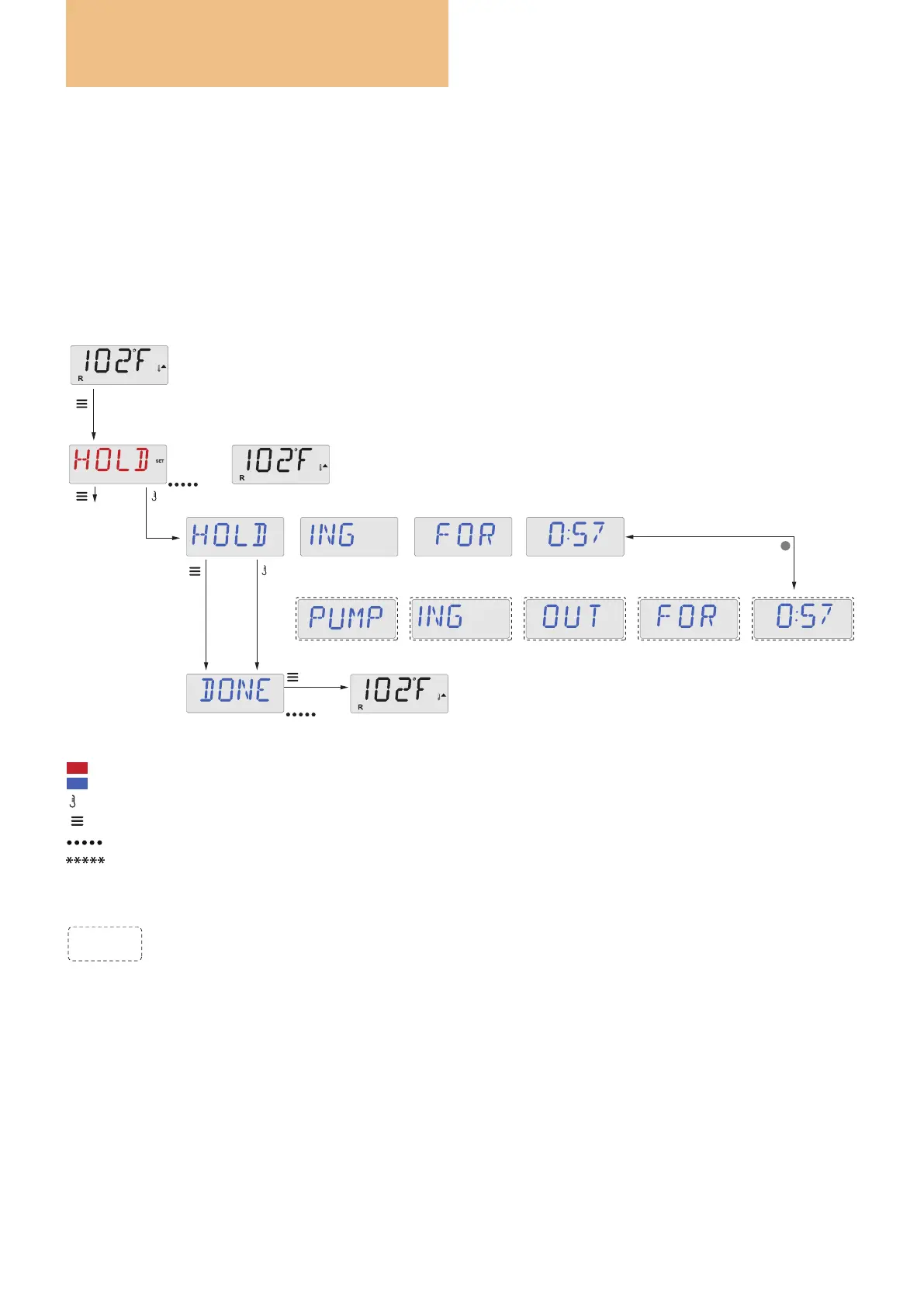
HOLD (Standby)
Hold Mode –MO37*
Hold Mode is used to disable the pumps during service functions like cleaning or replacing the lter.
Hold Mode will last for 1 hour unless the mode is exited manually.
Drain Mode
Some spas have a special feature that allows a pump to be used when draining the water.
When available, this feature is a component of Hold Mode.
Drain Mode will time out with Hold Mode.
Press “Jets” Button for draining, only if Drain Mode is enabled.
OR
Some spas have the
PUMPING OUT function (Drain Mode)
with the “Jets” button
“Jets” will toggle pump on and off.
J
Press Menu/Select
repeatedly until
HOLD appears.
Main Screen
Main Screen
A few seconds
Main Screen
a few seconds
or
To next item
in Main Menu
Key
+
-
Indicates a change in the display.
Indicates a continuous or intermittent message - every 1/2 second.
A temperature button, used for “Action”
Menu/Select button
Waiting time that keeps the last change to a menu item.
Wait time in which the initial settings are restored
by cancelling the changes made.
Indicates a Menu Item that Depends on a Manufacturer Conguration and may or may not appear.
Use


 To Next Page