2022 Checkpoint SL/SLR
3
Brake/shi routing — mechanical (continued)
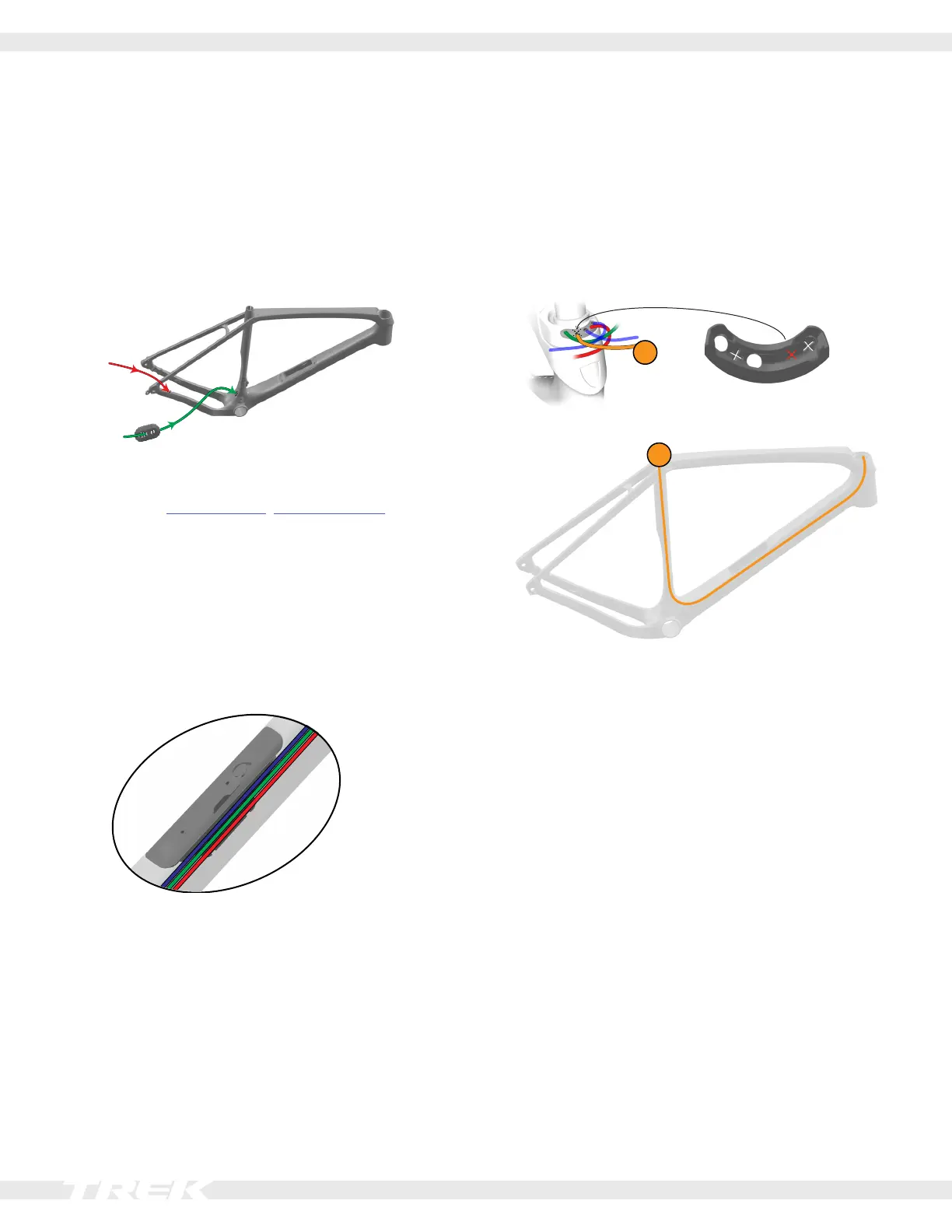
Route the shift cables
1. Label both shift housings. You will need to identify
them when you assemble the headset.
2. Attach the derailleurs to the bicycle.
3. Route the front derailleur housing through the
grommet (3). Route both shift housings through the
frame as shown.
4. Connect the shift housings to the derailleurs. Insert
the grommet (3) into the frame.
5. Install the bottom bracket, headset and fork, and
handlebars.
6. Cut the cable and brake housings at the levers (make
sure you have enough slack).
7. Route the shift cables through the housings in the
frame — starting in the front — and attach them to
the derailleurs.
8. Use a cable (zip) tie to connect the shift housings
and rear brake hose to the outside of the storage
door frame.
Dropper post cable routing (SL only)
Cut out a hole in the outer dimple on the back of the
routing cap grommet. Route the dropper post cable to the
handlebars as shown below.
NOTE: A dropper post is not compatible with the SLR
model due to the seat mast system.
10
10







 To Next Page