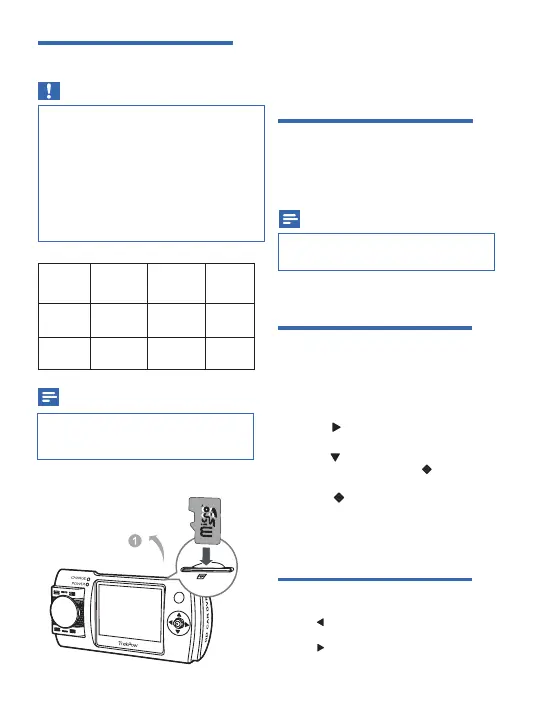
Insert Micro SD card
Caution
•
•
•
For reliable operation, please use a genuine
8-64G micro SD card (class 10 or more,
bounced read speed 80M / S above), or the
carema might not be able to operate
functionally.
Insert the micro SD card before using the
dash cam.
Insert the micro SD card with the right direction.
Wrong direction may damage the
dash cam
and the card.
Note
•
When using for the first time, please format
the micro SD card to ensure videos are
recorded normally.
Insert a micro SD card into the card slot until
you hear a "click".
Turn on the dash cam
•
To turn off the d
ash can
, press and hold
for more than 3 seconds.
•
•
To remove the micro SD card
The card is disengaged.
Press to turn on the d
ash cam
.
Push the card inwards until you hear a
"click".
Note
•
When using for the first time, please set the
date/time.
For the first time use
After the
d
ash cam is turned on, format the micro
SD card.
Format SD card
1
Press twice to access system
setting menu.
2
Press
to select format micro SD
card menu and then press to enter
the menu.
3
Select to format the micro SD
card.
Mode switch
•
•
Press repeatedly to select the video recording
mode, photo capture mode or playback mode.
Press twice to access system setting menu.
Card
Capacity
1080P
30FPS
720P
60FPS
720P
30FPS
32GB
640min64GB
480min360min320min
960min720min
05


 To Next Page