IQ3xcite Installation Instructions - Mounting TG200626 Issue 4, 29/12/2010 7
Installation Instructions – Mounting IQ3xcite
13
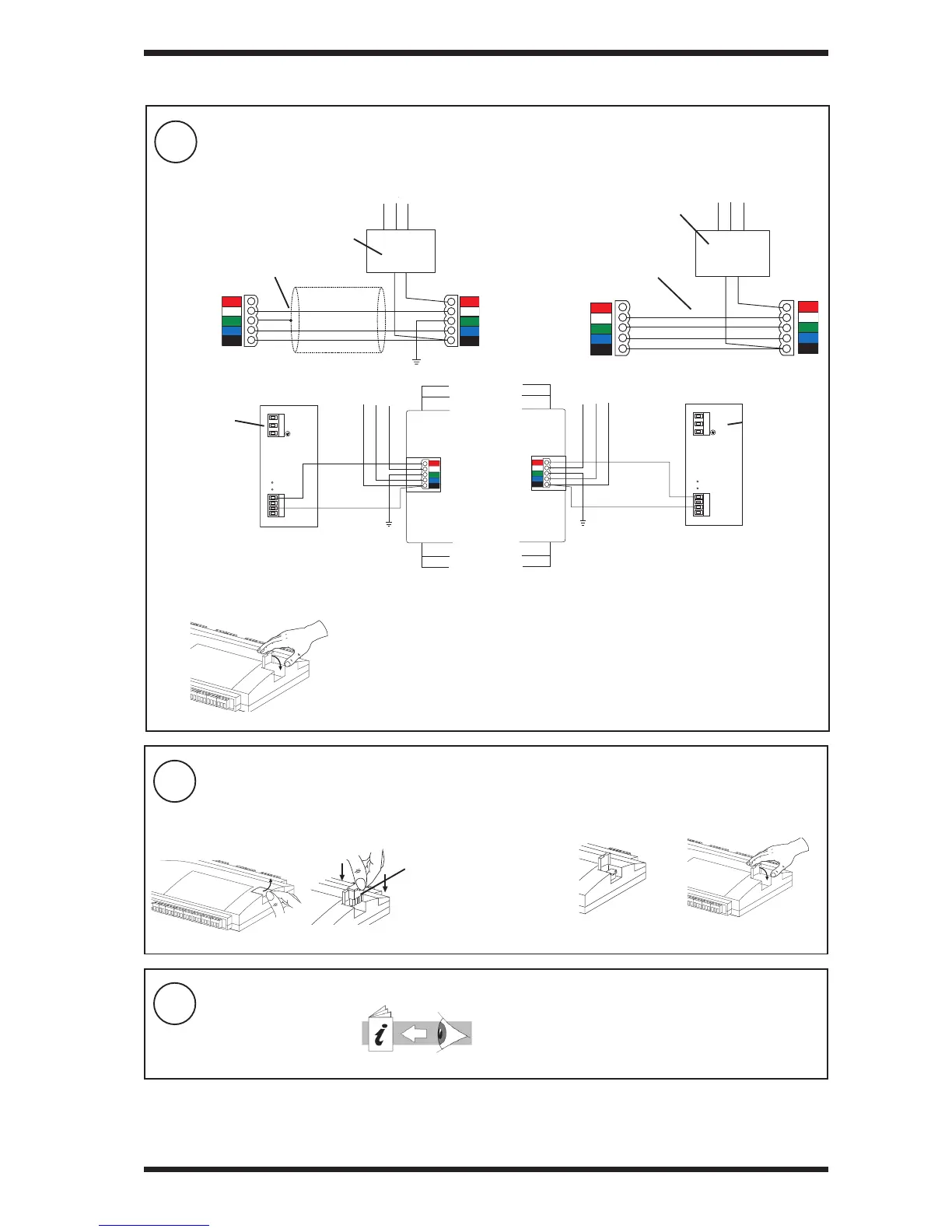
Connect I/O Bus (continued)
14
Terminate I/O Bus
ba Open fl ap Plug in terminator (supplied) c Close fl ap
XCITE/TERM terminator
(supplied with IQ3xcite)
(XCITE/TERM/5,
pack of 5 available separately)
15
Confi gure IQ3
230 Vac input
power supply
External PSU with isolated output
External PSU with isolated output
XCITE/PCON/50, for adjacent
modules available, order separately
(modules separated by 10 mm)
XCITE/PCON/1000, 1 metre cable (type A)
available, order separately
Close fl apd
Trend can supply the PSR range of DIN rail mounted auxiliary power supplies (e.g. 1.3 A or 2.5 A). They have isolated outputs.
230 Vac input
power supply
PSR connection to right side
PSR connection to left side
c continued
3 INSTALLATION (continued)
IQ3 Installation Instructions -
Confi guration, TG201160



 To Next Page