6 IQ422, IQ4NC/00, IQ4NC/12 Controllers Installation Instructions - Mounting TG201264 Issue 12, 04-Feb-2020. Applies to v4.30.
IQ422, IQ4NC/00, IQ4NC/12 Installation Instructions - Mounting
9
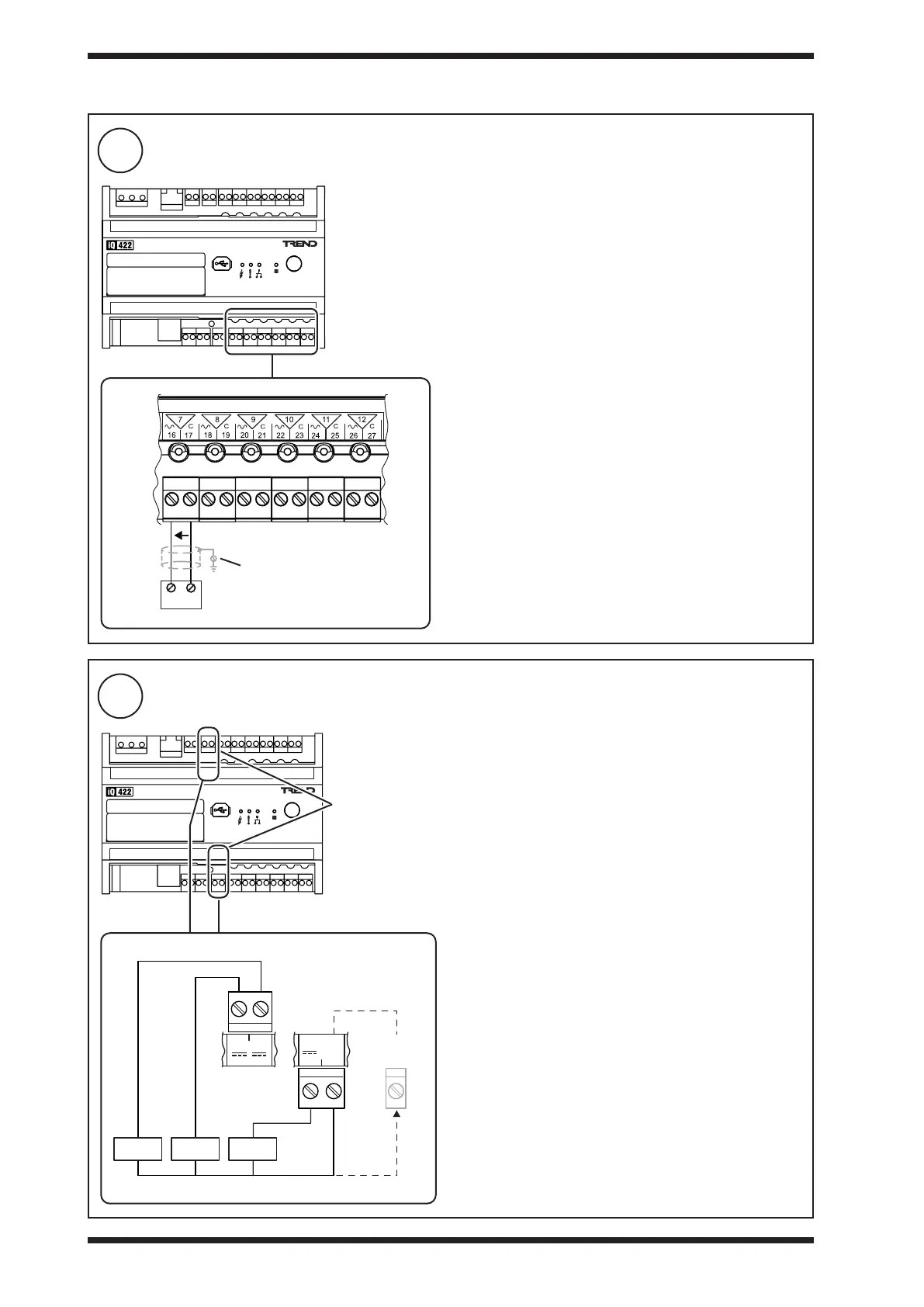
Connect Analogue Outputs OUT7 to OUT12 (if required - not applicable to IQ4NC/00/..)
10
Connect Auxiliary Supply Output (if required - not applicable to IQ4NC/00/..)
3 INSTALLATION (continued)
0 to 10 Vdc at up to 20 mA, reduce to 18 mA maximum above
+40°C (+104°F). Note: for /24VAC version see combined
supply limitation in step 10.
Terminal size: 0.14 to 2.5 mm
2
(22 to 12 AWG)
Terminal screw torque: 0.45 to 0.62 Nm (4 to 5.5 lb.in).
For UL rating use 22 to 14 AWG - Cu only cable. TP/1/1/22/
HF/200 (Belden 8761) cable recommended for analogue
outputs.
Screened cable is not generally required unless the cable
passes through electrically noisy environments. Where it
is used the screen must be connected to the local panel/
enclosure ground and left unterminated at the far end.
Auxiliary Supply
Outputs
20 Vdc ±10%. Return through terminal 73 and other ‘C’
terminals.
/230: 120 mA maximum shared between terminals 70, 71,
plus 120 mA maximum from terminal 72
/24VAC: 240 mA maximum shared between all three
terminals, 70, 71, 72. Reduce maximum current to 200 mA
above 40 °C. The combined current from the auxiliary supply
outputs, Wallbus, RS232, and analogue outputs is 240 mA.
Exceeding this current may cause the auxiliary supply output
voltage to fall out of specication.
Use to power sensors.
e.g. loop powered sensors - see step 8.
Terminal size: 0.14 to 2.5 mm
2
(22 to 12 AWG)
Terminal screw torque: 0.45 to 0.62 Nm (4 to 5.5 lb.in).
For UL rating use 22 to 14 AWG - Cu only cable. TP/1/1/22/
HF/200 (Belden 8761) cable recommended for auxiliary
supply output.
Load
V
ensure correct polarity
panel/enclosure ground
or any
‘C’ terminal
Load A Load B Load C



 To Next Page