WINDOWS ME/98 WIRELESS UTILITY SETTING
Link Information
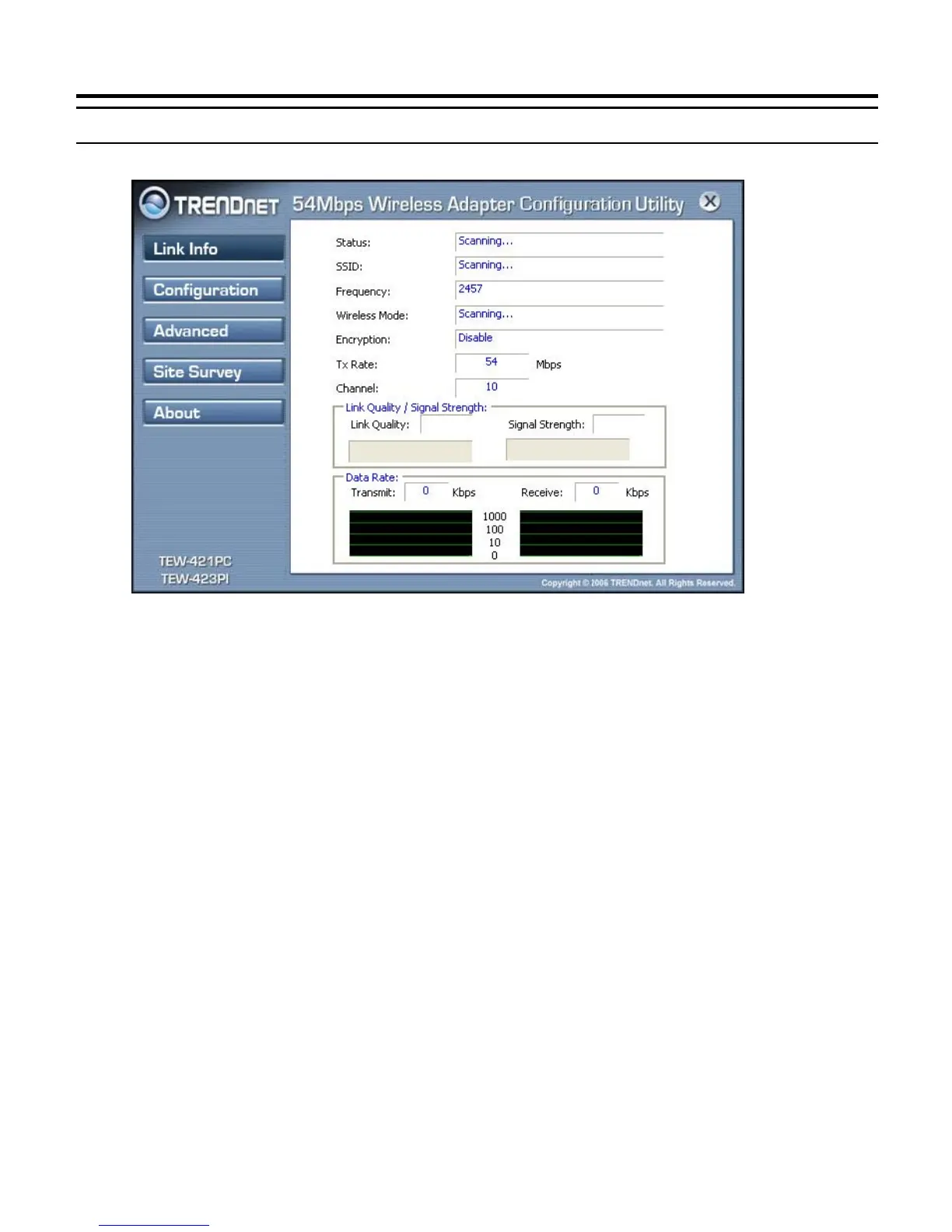
The default page is as below after launching the Utility program.
Status: Shows the associated BSSID, which can be used to identify the wireless
network.
SSID: Shows the current SSID, which must be the same on the wireless client and
AP in order for communication to be established.
Frequency: Shows the current frequency used for wireless network.
Wireless Mode: Shows the current wireless mode used for wireless communication.
Encryption: Shows the current encryption mode used for wireless network.
TxRate: Shows the current data rate used for transmitting.
Channel: Shows the current channel for communication.
Link Quality: Shows the link quality of the wireless LAN adapter with the Access
Point when operating under Infrastructure mode.
Signal Strength: Shows the wireless signal strength of the connection between the
wireless LAN adapter card with the Access Point.
Data Rate: Shows the statistics of data transfer, and the calculation is based on the
number of packets transmitted and received.



 To Next Page