16
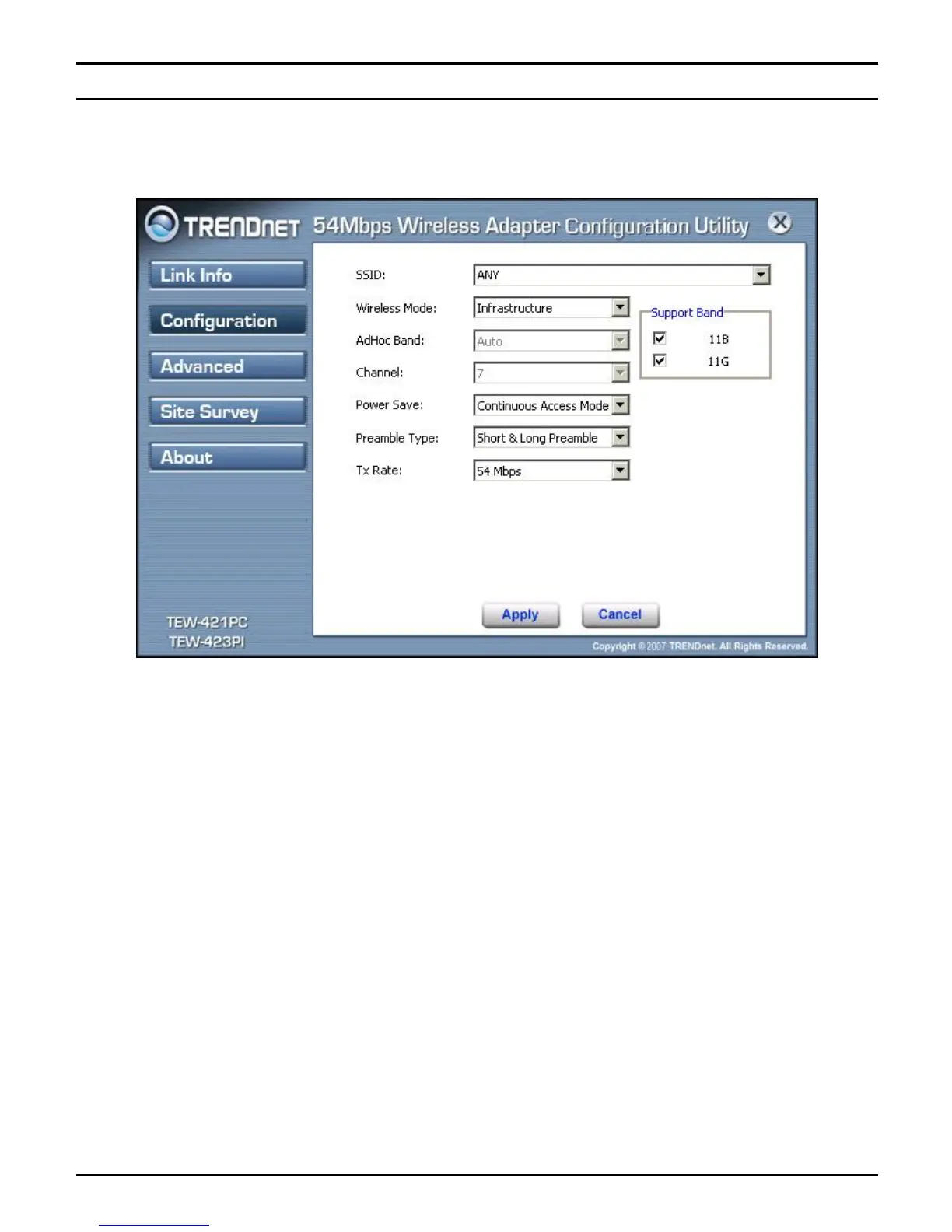
Configuration
This screen is where changes the basic wireless settings for the wireless LAN
adapter with the minimum amount of effort to implement a secure wireless network
environment.
SSID: Service Set Identifier, which is a unique name shared among all clients and
nodes in a wireless network. The SSID must be identical for each clients and nodes
in the wireless network.
Wireless Mode: There are two types available for selection
●Infrastructure – to establish wireless communication with LAN and other
wireless clients through the use the Access Points.
●Ad-Hoc – to establish point-to-point wireless communication directly with
other wireless client devices such as wireless network PCI Adapter.
AdHoc Band: When using Wireless Mode for Ad-Hoc mode, select the AdHoc
Band from drop down list for 11b only, 11g only or Auto for both of 11b and 11g.
Channel: The channel the AP operates on. The channel range of 1 to 11 for North
America (FCC) domain and 1 to 13 for European (ETSI) domain and 1 to 14 for
Japanese domain.
WARNING: Country domain can't be choose by enduser, because the incorrect
region may be in violation of applicable laws.



 To Next Page