Product Hardware Features
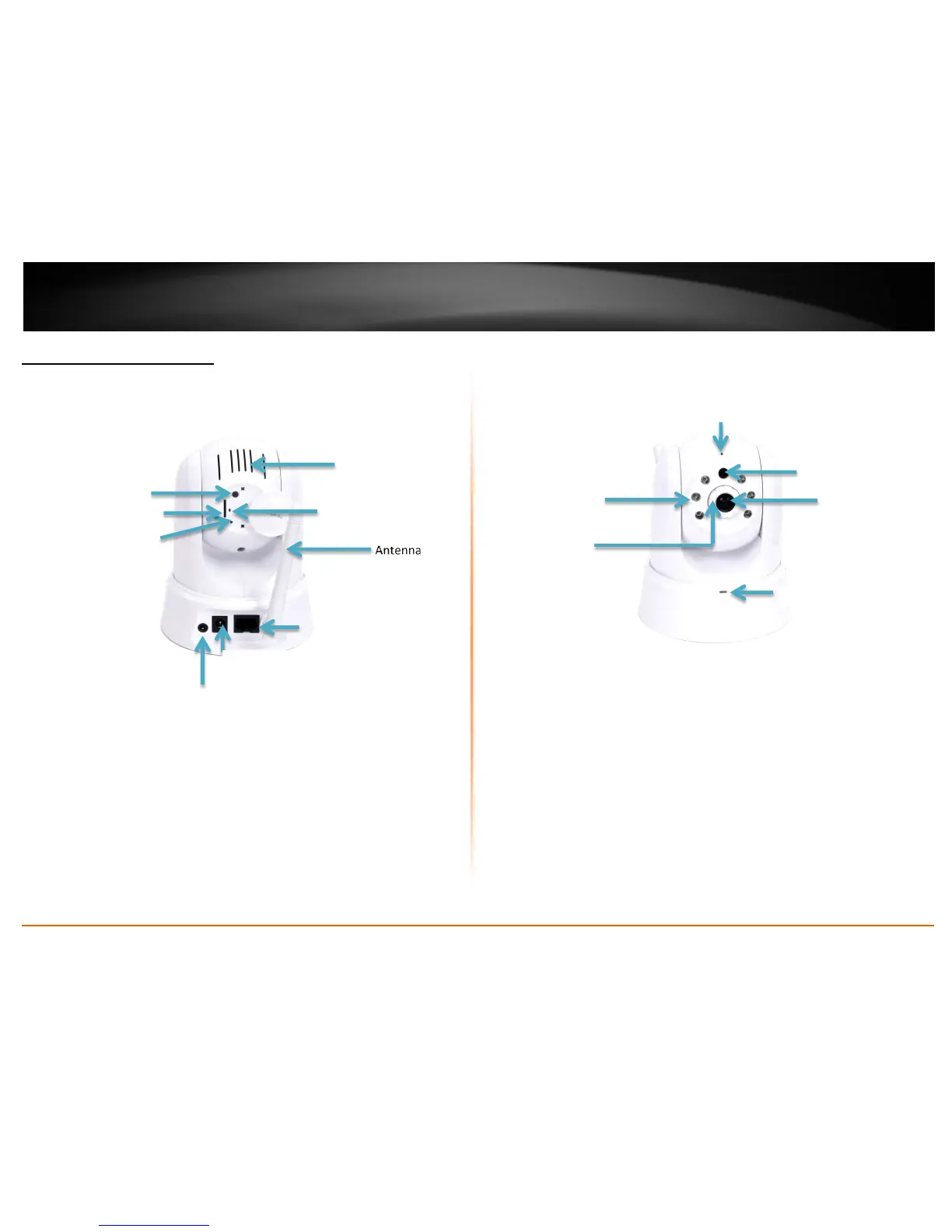
Rear Panel View
LAN Port – Connect Ethernet cables to your wired network devices.
Power Port – Connect the included power adapter from your camera to an
available power outlet.
Note: Use only the adapter that came with your camera.
Reset Button – Use an item such as a paperclip to push and hold this button for
3 seconds and release to reset your camera to its factory defaults.
WPS (Wi-Fi Protected Setup) – Push and hold this button for 3 seconds to
activate WPS. The button LED is blinking green when WPS is activated.
Antenna – 2dBi detachable antenna.
Line Out – Insert an external microphone to this connection.
Micro SD Slot – Insert a micro SD card into this slot to store video/image data.
Rear Air Vent – This is to cool theTV-IP862IC.
Front Panel View
IR LED – Built-in 6 IR LED for night vision uses. (for TV-IP862IC)
Light Sensor – Detects the light source to turn IR on or off.
Focus Ring – Turn to adjust the focus of the camera.
Microphone – Built-in microphone for audio can be turn on or off.
Power – This LED indicator is solid blue when your camera is powered on.
Otherwise if this LED indicator is off, there is no power to your camera.
Link – This LED indicator is blinking green when there is connection/data to
your camera.
Camera Lens – The camera








 To Next Page