Installation
Wired Connection
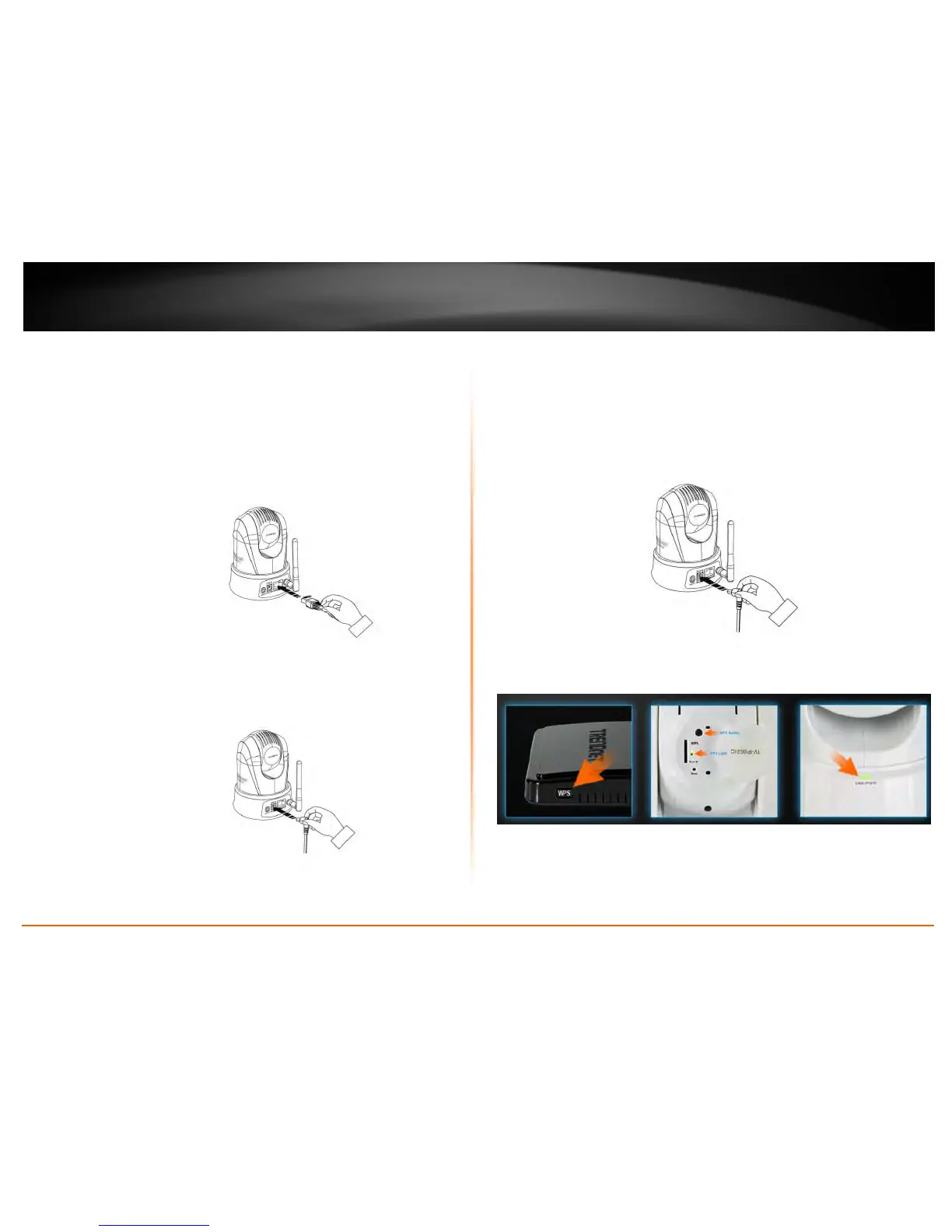
1. Connect the Ethernet Cable
If you intend to use the network camera as a wired device, connect one end of
the included Ethernet cable into the Ethernet port on the rear panel of the
camera and connect the other end to an available port on your network. If you
prefer to use the camera on a wireless network, see below for instructions on
connecting the power adapter.
2. Attach the Power Supply
Attach the included power supply to the DC 12V 1.0A receptor on the rear
panel of the camera and then connect it to a wall outlet or power strip. A blue
LED will light up under the lens indicating that the camera has power.
WPS Connection
An alternative method of connecting your camera to your network is by using WPS. WPS
is a quick, simple and secure method of adding devices to a network. If you have a
router which supports WPS follow the steps below, otherwise, please use the wired
mode of setting up the camera.
1. Attach the Power Supply
2. Press the WPS button on your wireless device then press the WPS button on
the camera.








 To Next Page