Configuration
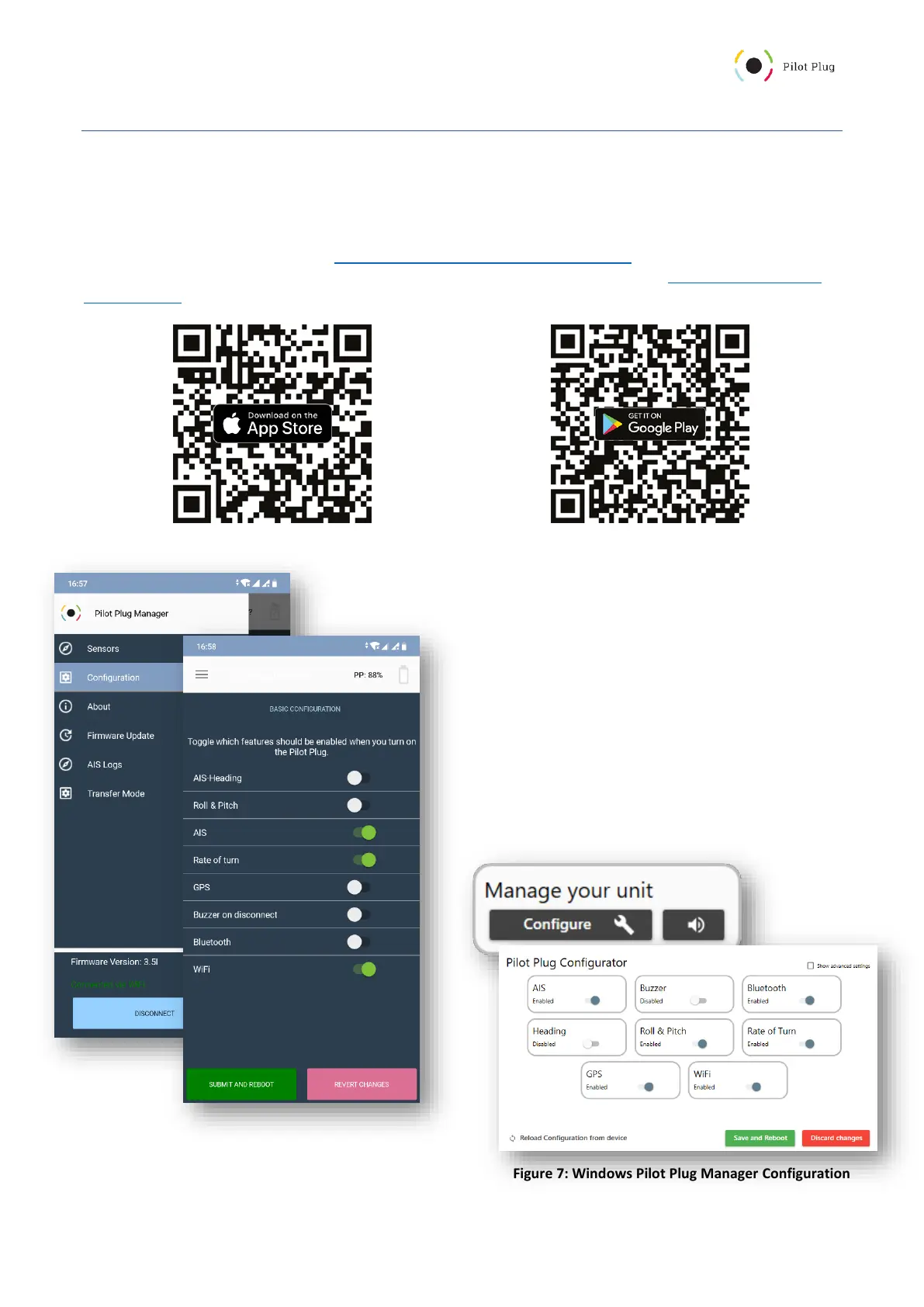
Configuration via the Pilot Plug Manager
The Pilot Plug Manager is available for all platforms including Windows, iOS and Android for free. You can use it to
configure your Pilot Plug and verify the sensors.
You can get it by visiting our website (https://trenz-pilotplug.com/docs/downloads) or by searching for “Pilot Plug
Manager” in your App Store/Play Store. The Windows version can be downloaded here: https://manager.trenz-
pilotplug.com/. You can also scan one of these QR codes with your mobile phone:
Connect to your Pilot Plug (See “Connecting to the Pilot Plug”) and start
the App. Once the connection between your device and the Pilot Plug has
been established, the App will show you the dashboard/sensors.
For Android/iOS: open the menu by tapping on the
icon in the top left corner and tap on “Configuration”.
Here, you can toggle which features you want to
enable or disable (Figure 6).
For Windows: click on the “Configure” button below
the firmware version. In the new window, you can
toggle which features you want to enable or disable
(Figure 7).



 To Next Page