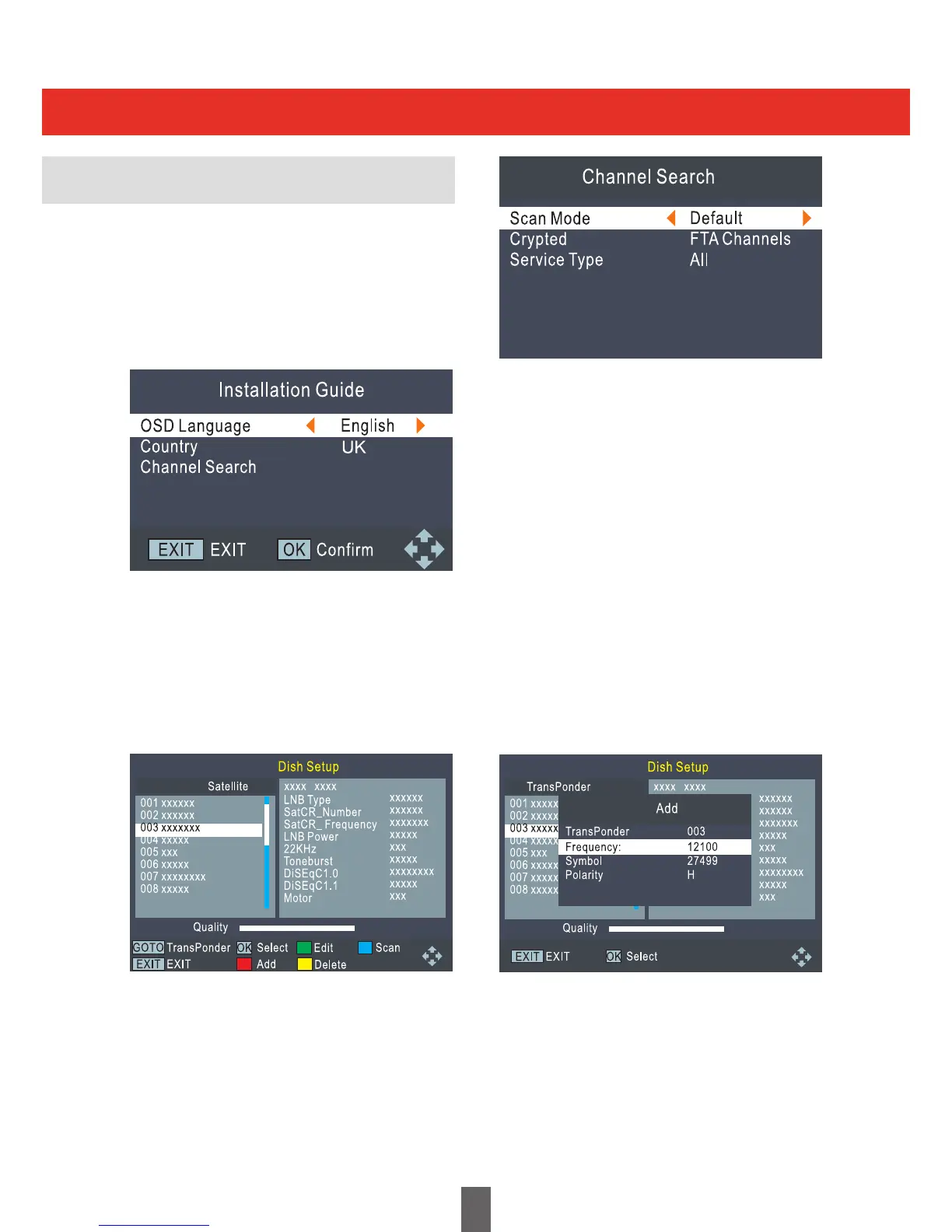
IfyouareusingtheSetTopBox(STB)fortherst
time, the ‘Installation Guide’ menu appears. Press
the cursor button to setup the OSD Language
andCountrysettings.Highlight“ChannelSearch‘,
thenpressthe“ok”buttontoenter“DishSetup”
menu.
In“DishSetup”menu,Astra28.2°Eastisset
asthedefaultsatellite.Ifadierentsatelliteis
required press the ‘UP’ or ‘DOWN’ button to
selecttheSatellite.Press“OK’buttontoselect.
Select the ‘RIGHT’ button to enter the setup
menu. To scan the selected satellite press the
“BLUE”button.
This menu allows you to change settings like LNB
Type, SatCR_Number. SatCR_Frequency, LNB
Power,22KHz,Toneburst,DiSEqC1.0,DiSEqC
1.1 and Motor. Press ‘EXIT’ button to exit the
setup menu.
Installation Guide
Getting Started
Onthe“DishSetup“menuthefollowingoptions
are also available:
GREEN button: Edit satellite
RED button: Add satellite
YELLOW button: Delete satellite
BLUE button: Search Channels
Pressthe“GOTO’buttontoenterthe
Transpondermenu.Pressing“GOTO”again
takesyoubacktothe“DishSetup”menu.
GREEN button: Edit Transponder
RED button: Add Transponder
YELLOW button: Delete Transponder
BLUE button: Search Transponder for
Channels
When the selected scan is complete, all active
channels found will be stored automatically.
To stop scanning at any time, press the EXIT
button. The channels already found will be
automatically stored.
9


 To Next Page