EasyManua.ls Logo

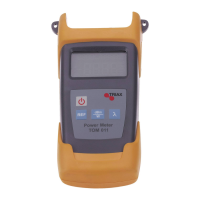
Triax TOM 011 - User Manual

Triax TOM 011
9 pages
Print Icon
To Next Page IconTo Next Page
Loading...
Mode d’emploi / User manual TOM 011
10 / 18
Mesureur Puissance Optique
Optical Power Meter
TOM 011 Référence / Part Number: 307967
Contents
11ˊ Overview 11
12ˊ Main Features 11
13ˊ Specifications 12
14ˊ Standard Packages 12
15ˊ Function 13
16ˊ Operation and Notes 14
17ˊ Maintenance 15
18ˊ Troubleshooting 15
19ˊ Notice 16
20ˊ Warranty and Service 17

Questions and Answers

  • I
    igainesAug 10, 2025
    What to do if my Triax Measuring Instruments fail to turn on?
    • N
      Nichole ReynoldsAug 10, 2025
      If your Triax Measuring Instruments unit fails to turn on, it's likely due to low battery power or incorrect battery placement. First, replace the battery. If that doesn't work, ensure the battery is correctly placed in the unit.
  • P
    patelmichaelAug 20, 2025
    Why is the display faint on my Triax Measuring Instruments LCD screen?
    • A
      Alexis PeckAug 20, 2025
      A faint display on the LCD screen of your Triax Measuring Instruments usually indicates low battery power. To resolve this, charge or replace the battery.
  • J
    james46Aug 31, 2025
    What to do if optical power is not stable after turning off Triax Measuring Instruments?
    • J
      james93Aug 31, 2025
      If the optical power of your Triax Measuring Instruments is unstable after turning it off, allow the unit to warm up for 15 minutes before use.

Triax TOM 011 Specifications

General IconGeneral
BrandTriax
ModelTOM 011
CategoryMeasuring Instruments
LanguageEnglish

Related product manuals