www.tricklestar.com
AV Advanced Powerstrip+
Setup Instructions
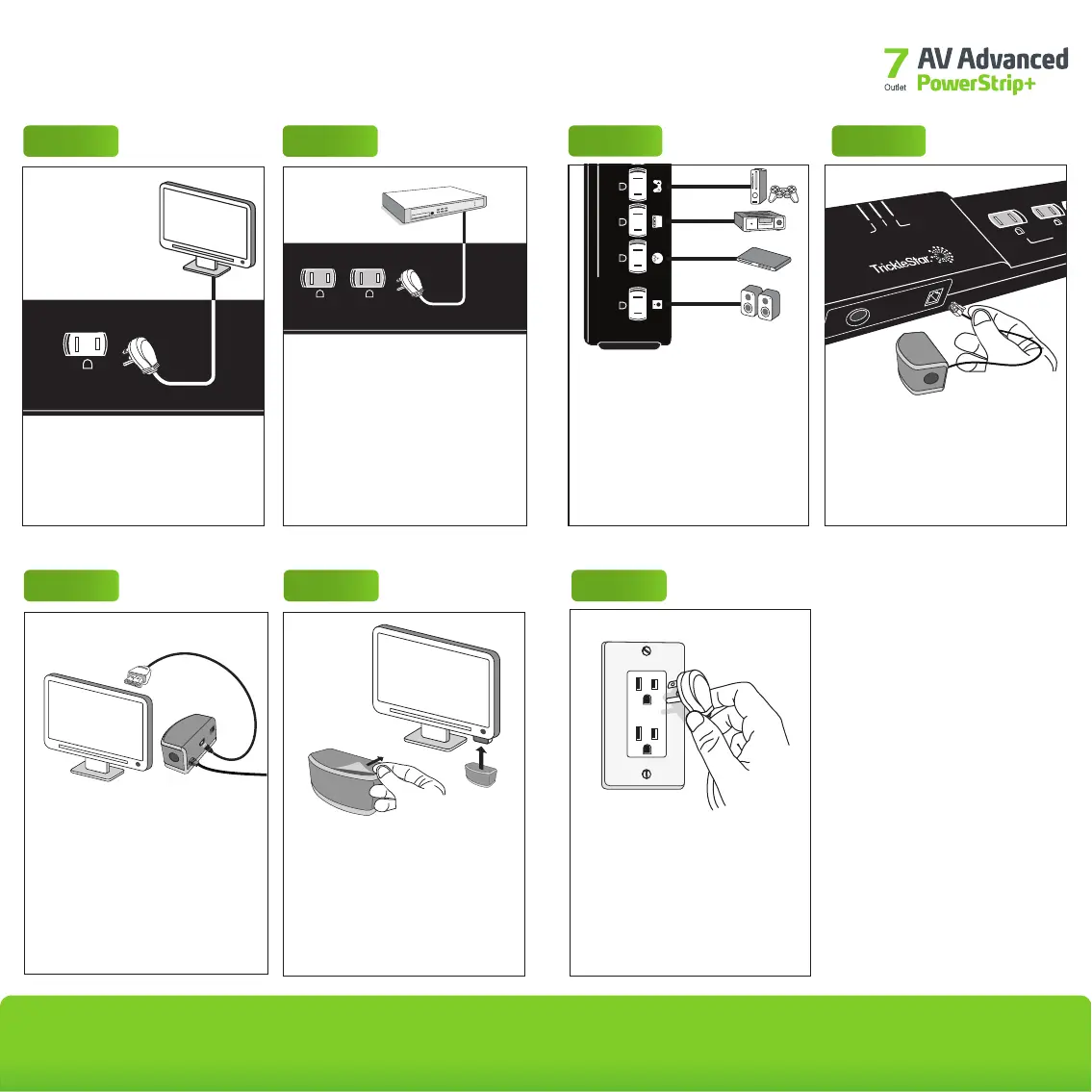
Step 2Step 1
< tv >
< tv >
Plug devices that require continuous
power and devices with hard disk
drives into the always-on outlets
(e.g., DVR and set-top box).
TAV-Link (optional):
Peripheral electronics that are
capable of receiving CEC commands
should be plugged into the always-on
outlets (see step 5).
always on
surge
ground
switched
switched
Plug the TV into the control outlet
marked <tv>.
Note: The TV must be plugged into
this outlet.
Remove the backing from the
double-sided tape on the top of the
multi-sensor. Affix the multi-sensor to
the TV, near the TV's remote sensor,
facing the TV-watching area.
Step 6
Step 5
TAV-LINK CAPABILITY
–OPTIONAL–
Plug the TAV-Link cable (sold
separately) into an open HDMI port
on your TV.
TAV-Link will softly switch off (or
place into an energy saving mode)
HDMI-connected peripherals
capable of receiving CEC
commands.
TAV-LINK CABLE SOLD SEPARATELY
Step 7
Plug the power strip into a
grounded outlet. The ground and
surge lights on the power strip will
illuminate, indicating that the power
strip is properly grounded and
surge protection is active.
Step 4
Plug the multi-sensor into the port
on the side of the power strip that
looks like a phone jack and marked
“sensor.”
Step 3
switched
dvd
game console
amplifier
subwoofer
Plug TV peripherals, such as a DVD
player, speakers and or receiver into
the outlets labeled "switched." into
the switched outlets.
Note: All four switched outlets
operate the same way. The icons are
just examples of AV equipment that
can be plugged into these outlets.
always on
ground
surge
sensor
swiched


 To Next Page