www.tricklestar.com
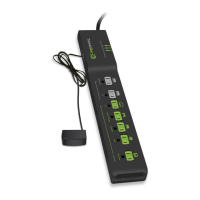
AV Advanced Powerstrip+
Troubleshooting
None of the outlets have power
The switched outlets don't have
power.
The TV peripherals do not
switch off when the TV is off
The multi-sensor is blinking on
and off every 5 seconds
The TV keeps turning off after
30/60/120 minutes
The TV is shutting down within
a couple of minutes of being
turned on or going right into
Music Mode.
Press the circuit breaker button on the side
of the APS+ to activate power.
The multi-sensor must be connected to the
APS+ , the TV must be plugged into the
outlet labeled < tv > and IR signal from
any remote must be received to supply
power to the switched outlets.
Alternatively, press the button on the
multi-sensor to manually supply power to
the switched outlets.
Make sure that the TV is plugged into the
outlet labeled < tv >.
Make sure that the TV peripherals are
plugged in to the green switched outlets
(except for the one labeled < tv >).
The switched outlets will turn off within one
minute of the TV turning off.
This is a notification that your TV and
peripheral electronics plugged into the
switched outlets will shut off in 10 minutes.
The countdown timer shuts off the TV and
peripherals after 30/60/120 minutes if no
Infrared (IR) remote signal or motion is
detected by the sensor. To reset the timer
for another 30/60/120 minutes, press any
button on an IR remote control or move in
front of the multi-sensor.
The APS+ didn't properly learn the power
profile of your TV. Turn everything off.
Unplug the APS+ from the wall outlet.
Unplug the sensor and all devices from the
APS+. Let sit for a few minutes. Plug the
devices and sensor back in to the APS+.
Plug the APS+ back into a wall outlet.
Follow the "Before First Use" instructions.
This will reset the power profile.
Problem Solution
FAQ
What can I plug into the APS+?
The APS+ is intended to be used with a television and related
electronics.
• Never insert any object other than a plug into the APS+ outlets.
• The APS+ is designed for indoor use only. Do not use it outside.
• Never use the APS+ with appliances, such as refrigerators, electric
kettles, oven, microwaves, etc.
• Never use the APS+ with power tools such as power drills, bench saws
or similar.
What TV-related electronics should I plug into the grey always-on
outlets?
Plug in Audio Visual (AV) electronics that need constant power for
recording features, timers and program guides, such as:
• Digital Video Recorders (DVRs)
• Digital receivers
• Set-top boxes
• Game consoles with HDDs
What TV-related electronics should I plug into the switched outlets?
The TV must be plugged into the green outlet labelled < tv >. Plug in
devices such as the following in to the remaining switched outlets:
• Blu-ray player
• Amplifier
• Game consoles without HDDs
• Home theater speakers
• DVD Player
• CD Player
• Soundbar
How does the APS+ save energy?
The APS+ saves energy two ways:
1) Eliminates standby power
• After the TV is turned off, the switched outlets turn off within one
minute and no longer draw any power.
2) Monitors activity and powers down unused electronics
• In TV Mode, all switched outlets turn off if there is no IR remote
activity or motion detected during the countdown period.
• In Music Mode, all switched outlets turn off after eight hours.
• By using the optional TAV-Link cable, HDMI-connected peripherals
capable of receiving CEC commands will automatically soft-switch
off or enter a power saving mode if there is no IR remote activity
or motion detected during the countdown period.


 To Next Page
 Loading...