User Manual
RiX 70 DC
5
3. OPERATING INSTRUCTIONS
3.1 The Control Panel
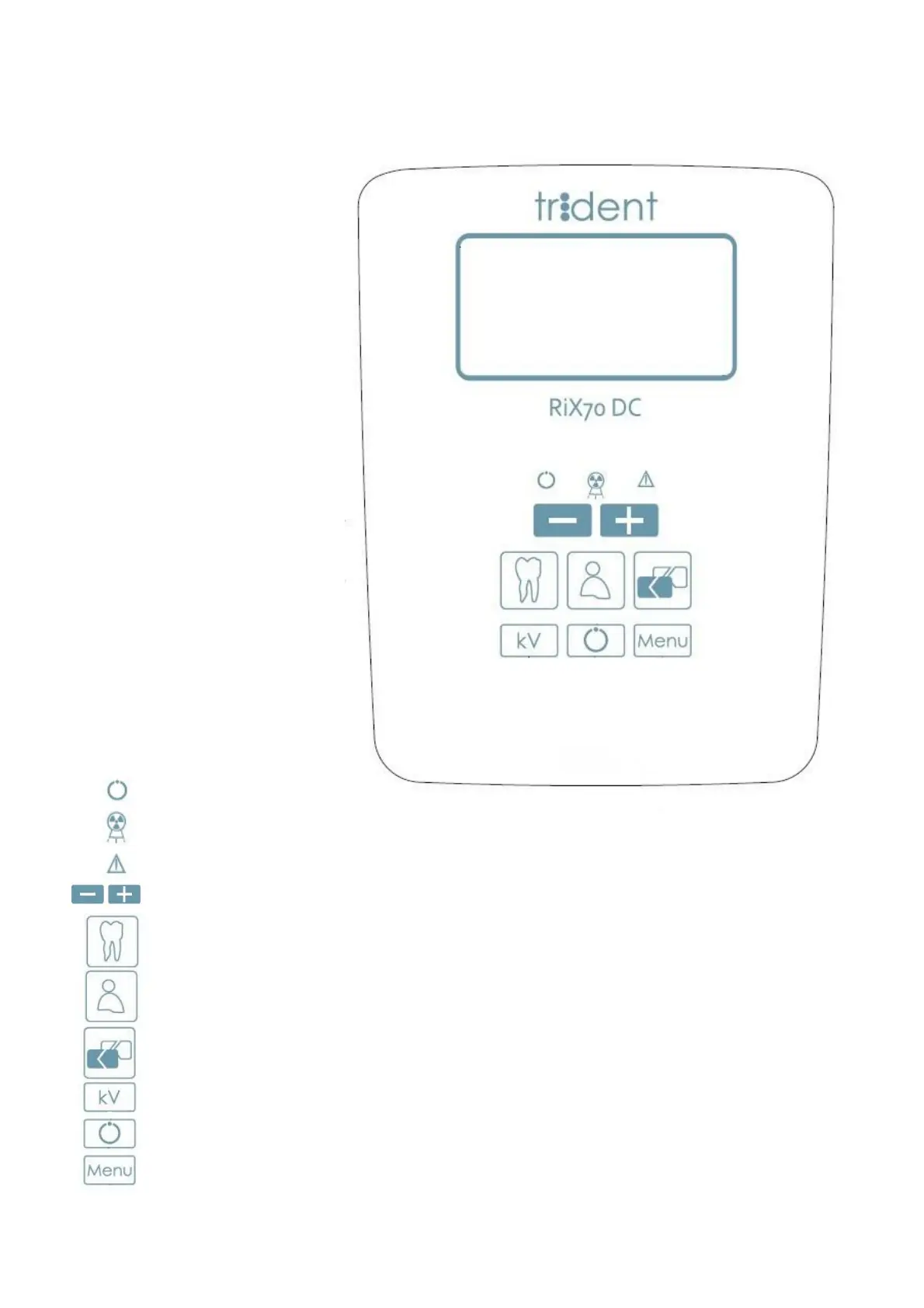
Emission in progress(yellow light ON)
Alarm(red light ON), the system has a problem, CAUTION. It can cause the
interruption of the emission.
Buttons to manually increase/ decrease the preset values.
Menu, pressing this button for at least 2s allows to access the User’s Menu. This menu contains
the parameters that do not need to be adjusted frequently. To exit the user’s menu it’s necessary
to push again “Menu” button.
X RAY button Activation, pressing this button will be activated on the display a count down during
which you can make expositions by pressing the X Ray button.
Tooth Type selection, choose the tooth to be examined: lower incisors , lower canines, lower
bicuspids, lower molars, upper molars, bicuspids, upper canines, upper teeth, bitewing.
System ready (green light ON)
kV selection, allows to select the voltage from 60, 65 and 70 kVp
Image receptor selection, select the receptor from film, intraoral sensor and phosphor plate.
Patient size selection, according to patient morphology choose between adult or child.


 To Next Page