USING THE SYSTEM
IMPORTANT: Triobike cargo features a pedal-assist electric drive
system provided by Brose. Please carefully read its manual.
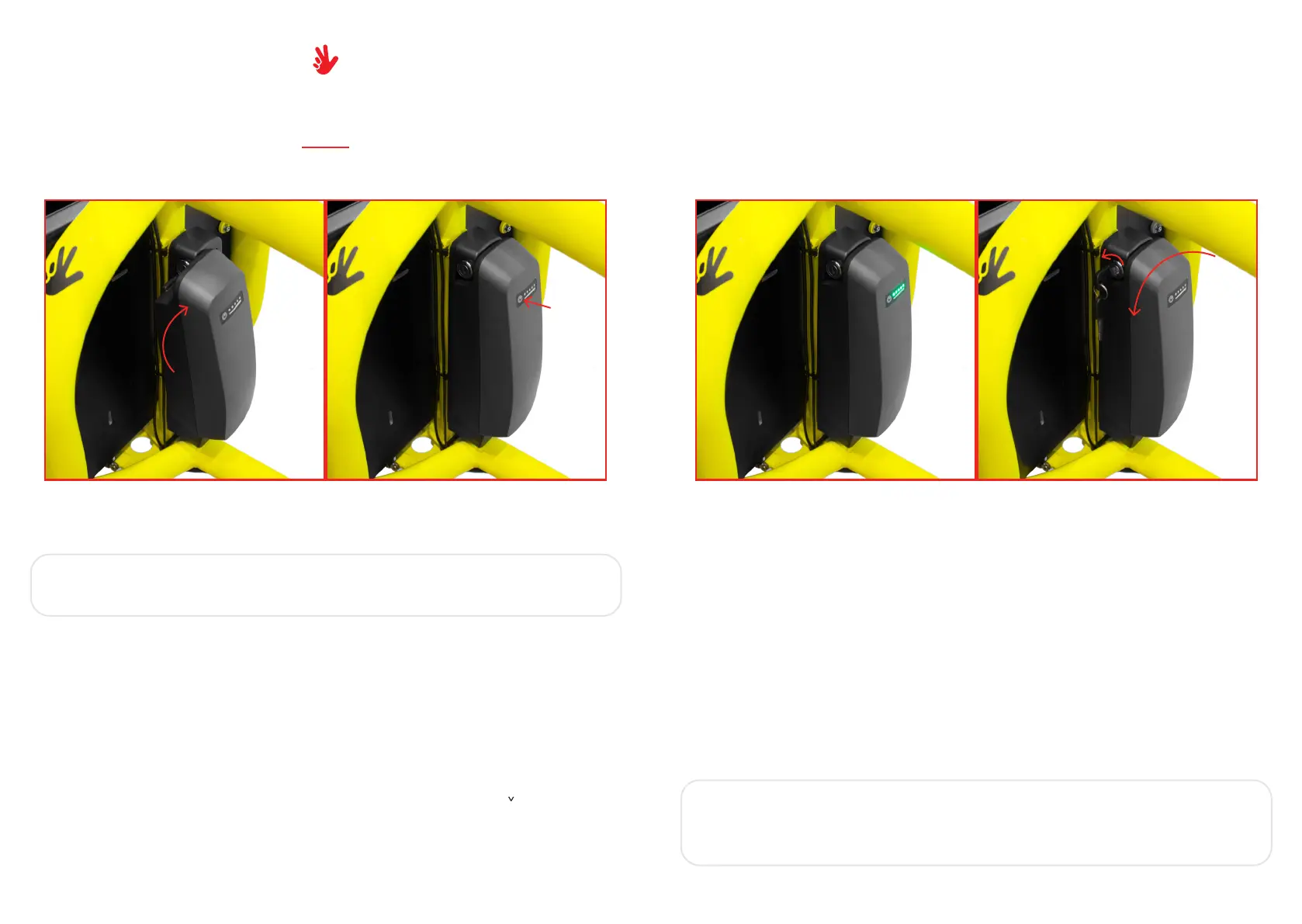
- Insert the battery in the specific stand placed on the steering column.
- Press the power button on the front of the battery pack: all the LEDs should turn on from
left to right, then the charge level is shown, then all the LEDs should turn off.
The system now is active.
- On the operating unit, choose the desired support level by pushing the “^/ ” buttons.
- To make the bike move with electric assistance you just have to pedal.
- To turn off the system, press the power button on the battery for 3 seconds. All the LEDs
will turn on and then off.
- To remove the battery, insert the key in the lock and rotate it. Then rotate the battery to
the left.
- To charge the battery, plug the charger magnetic connector in the specific socket. The
LED on the battery will start blinking. When the charge is done all the 5 LEDs are on.
IMPORTANT: don’t leave the battery charging too much time after
the full charge. When the battery is fully charged disconnect it from
the charger.
22
23
ESYSTEM


 To Next Page