9
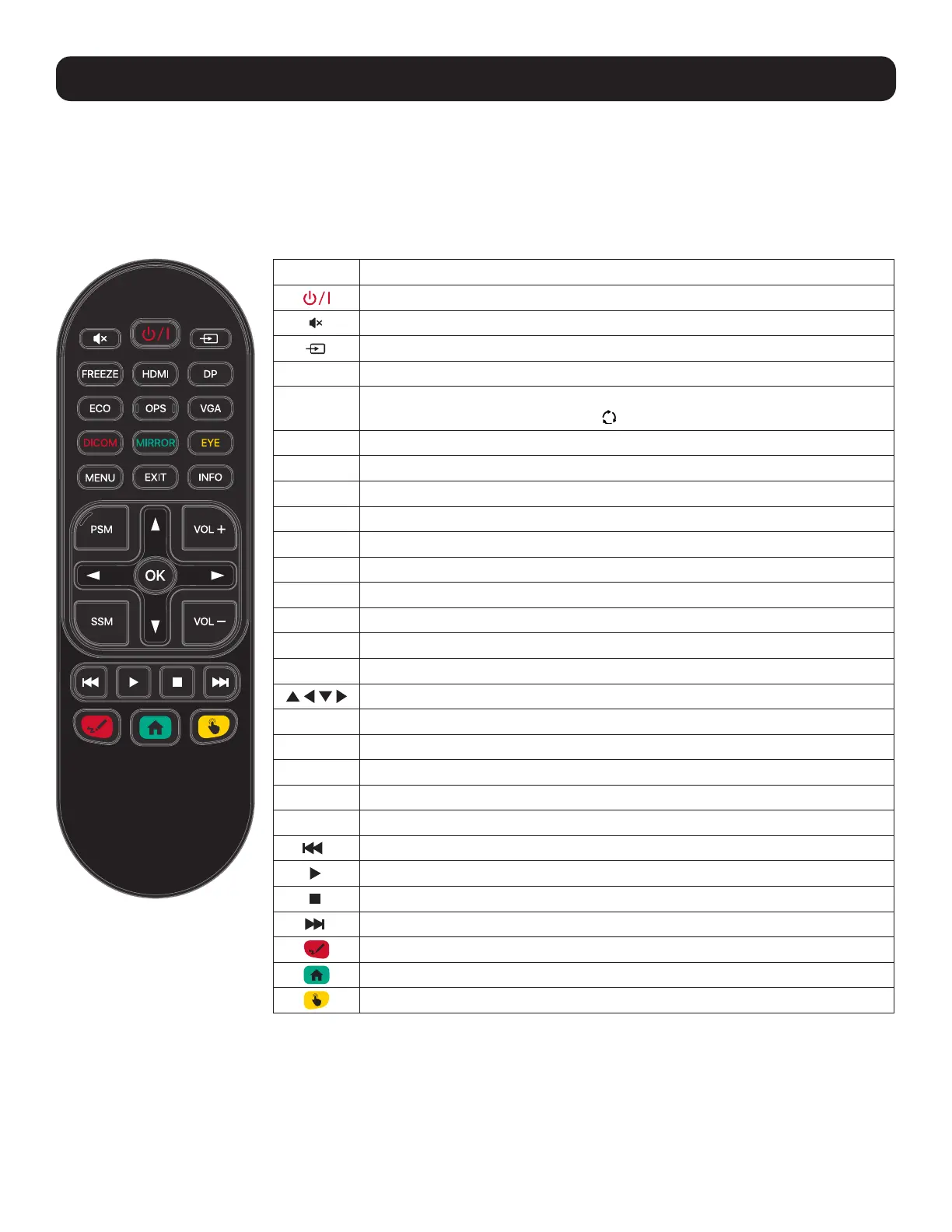
3.4 Remote Control Layout
You can control the touchscreen display in several ways:
1. Using the remote control.
2. Using the physical buttons on the display.
3. Using the on-screen display menus and touch input.
3. Features
Button Description
Power (On/Standby)
Mute
Input Selection Menu
FREEZE
Freeze Screen Image
HDMI
Select HDMI Input
Front HDMI →HDMI1→HDMI2→HDMI3
DP
Select DisplayPort Input
ECO
Adjust Screen Brightness (3 Levels)
OPS
OPS (Built-in PC) Selection/Startup
VGA
Select VGA Input
DICOM
DICOM (Digital Imaging and Communications in Medicine) Calibration On/Off
MIRROR
Wireless Screen Mirroring with EShare
EYE
Eye Protection On/Off (Reduces Screen Brightness During Touch Operations)
MENU
Activate Main OSD Menu
EXIT
Close Main OSD Menu
INFO
Show Current External Input
Menu Navigation/Adjustment
OK
Menu Selection
PSM
Picture Status Memory (Preferred Picture Setting)
SSM
Sound Status Memory (Preferred Sound Setting)
VOL +
Volume Up
VOL -
Volume Down
Previous Chapter
Play/Pause
Stop
Next Chapter
Activate Floating Menu
Activate Home Screen
Touch On/Off



 To Next Page