EasyManua.ls Logo

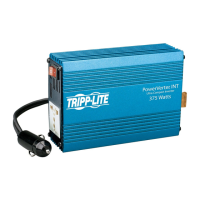
Tripp Lite PVINT375 - User Manual

Tripp Lite PVINT375
24 pages
Print Icon
To Next Page IconTo Next Page
Loading...
1
Owner’s Manual
230V INT Series
Ultra-Compact DC-to-AC
Inverter
Model: PVINT375
1111 W. 35th Street, Chicago, IL 60609 USA • www.tripplite.com/support
Copyright © 2019 Tripp Lite. All rights reserved.
Safety 2
Operation 2
Maintenance & Service 2
Feature Identification 3
Troubleshooting 3
Specifications 4
Warranty 5
Español 6
Français 11
 16
Deutsch 21
19-04-289-932610.indb 1 5/14/2019 1:37:15 PM

Other manuals for Tripp Lite PVINT375

Questions and Answers

  • K
    Kevin GregoryAug 11, 2025
    What to do if my Tripp Lite PVINT375 alarm sounds?
    • M
      Mariah BarnesAug 11, 2025
      The alarm may sound due to low battery voltage (below 10.5V) or an output overload. To resolve this, turn the Tripp Lite Inverter OFF. If the cause is low battery, run the engine to recharge the vehicle battery. If it's an output overload, unplug high-wattage devices to reduce the load, ensuring it doesn't exceed the Inverter’s maximum continuous output power.
  • R
    russellhollyAug 18, 2025
    Why won't my Tripp Lite PVINT375 Inverter turn on?
    • P
      Pamela SmithAug 18, 2025
      The Tripp Lite Inverter may not turn on due to several reasons: automatic shutdown because of low battery voltage (below 10V), automatic shutdown due to output overload, or a blown fuse. To fix this, turn the Inverter OFF. If the battery is low, run the engine to recharge it. If there's an overload, unplug high-wattage devices. Also, check the fuse and replace it with a standard automotive fuse of identical amperage if it's blown.
  • P
    palmermatthewAug 26, 2025
    What to do if my Tripp Lite PVINT375 Inverter is unable to power connected equipment?
    • M
      mgarciaAug 26, 2025
      If the Tripp Lite Inverter can't power connected equipment, it might be due to a low battery or the connected equipment load exceeding the Inverter’s maximum continuous output power. If the battery is running low, turn the Inverter OFF and run the engine to recharge the vehicle battery. If the load is too high, turn the Inverter OFF and unplug some of the high-wattage devices.
  • D
    David HicksSep 1, 2025
    How to fix audio or video distortion when using a Tripp Lite PVINT375?
    • J
      John GrahamSep 2, 2025
      If your connected equipment experiences audio/video distortion when using the Tripp Lite Inverter, this could be due to loose connections or audio/video interference. Check and secure all connections. Also, try repositioning the equipment antennas and the Inverter.

Summary

Safety

Operation

Maintenance & Service

Feature Identification

Troubleshooting

Specifications

Typical Runtimes Before Battery Recharge

Provides typical operating times for the inverter based on vehicle battery and engine status.

Vehicle Electrical System Limitations

Details limitations of vehicle electrical systems for inverter operation.

Warranty

Regulatory Compliance Identification Numbers

Information on product identification and regulatory compliance certifications.

Tripp Lite PVINT375 Specifications

General IconGeneral
Input Voltage12 V DC
Output Voltage120 V AC
Output WaveformModified Sine Wave
Weight2.2 lb (1 kg)
Dimensions2.4 x 4.3 x 7.9 in. (61 x 109 x 201 mm)
Surge Power750 W
Low Battery AlarmYes
Overload ProtectionYes
USB PortYes (5V, 2.1A)
Low Battery ShutdownYes
Operating Temperature32 to 104°F (0 to 40°C)
Output Power375W
No Load Current Draw<0.4 A

Related product manuals