5
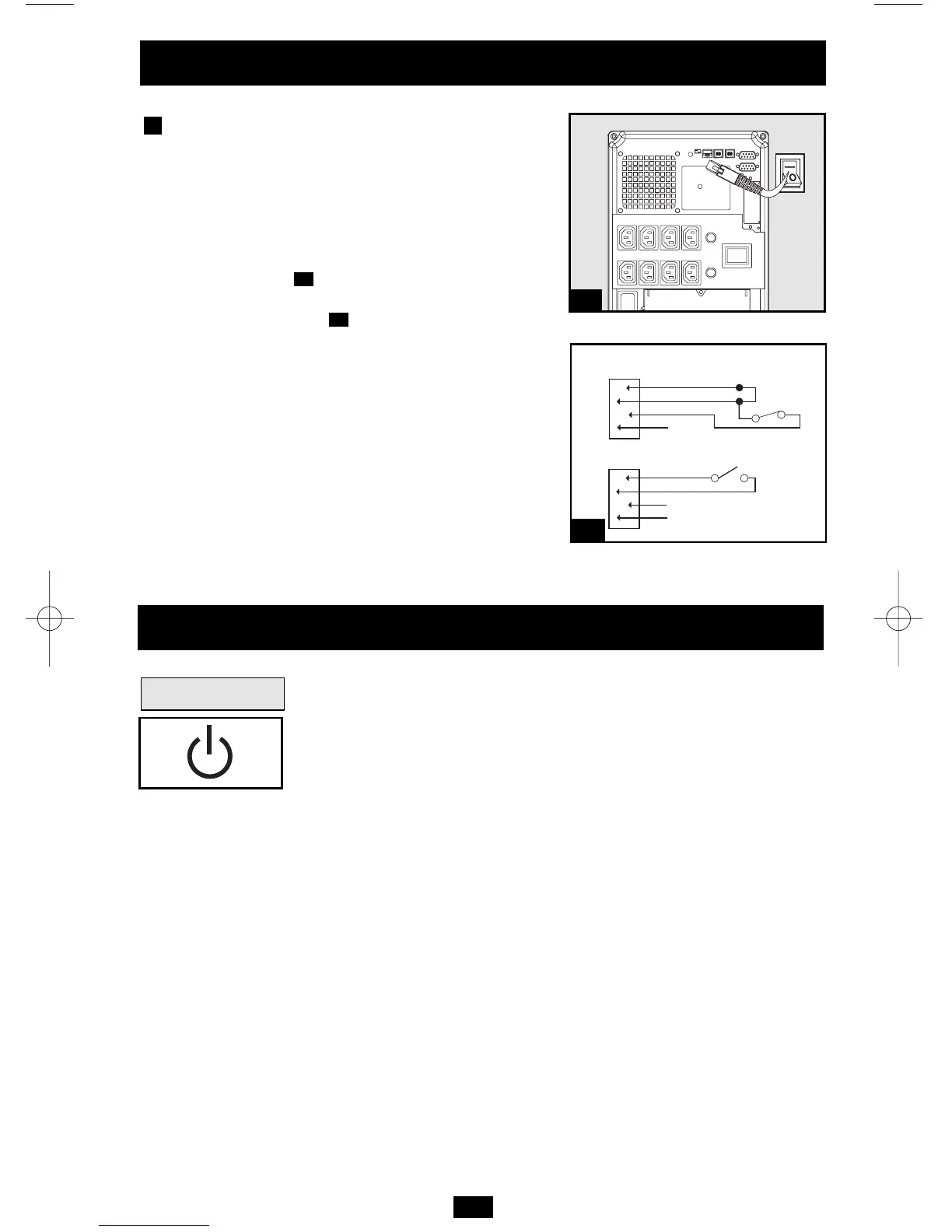
EPO Port Connection
This optional feature is only for those applica-
tions which require connection to a facility’s
Emergency Power Off (EPO) circuit. When the
UPS is connected to this circuit, it enables emer-
gency shutdown of the UPS's inverter.
Using the cable provided, connect the EPO port of
your UPS (see ) to a user-supplied normally
closed or normally open switch according to the
circuit diagram (see ). The EPO port is not a
phone line surge suppressor; do not connect a
phone line to this port.
4b
4a
4
Optional Installation
OPTION 1: USER SUPPLIED NORMALLY CLOSED SWITCH
OPTION 2: USER SUPPLIED NORMALLY OPEN SWITCH
RJ11
PLUG
5
4
3
2
NO CONNECTION
4-5 JUMPER
N.C. EPO SWITCH
RJ11
PLUG
5
4
3
2
NO CONNECTION
N.O. EPO SWITCH
4a
4b
Basic Operation
Buttons
“ON/OFF/STANDBY” Button
• To turn the UPS ON: with the UPS plugged into a live AC wall outlet,*
press and hold the ON/OFF/STANDBY button for one second.**
Release the button. If utility power is absent, you can “cold-start” the UPS
(i.e.: turn it ON and supply power for a limited time from its batteries***)
by pressing and holding the ON/OFF/STANDBY button for one second.**
• To turn the UPS OFF: with the UPS ON and receiving utility
power, press and hold the ON/OFF/STANDBY button for one sec-
ond.** Then unplug the UPS from the wall outlet. The UPS will be
completely OFF.
* After you plug the UPS into a live AC outlet, the UPS (in “Standby” mode) will auto-
matically charge its batteries, but will not supply power to its outlets until it is turned ON.
** The alarm will beep once briefly after the indicated interval has passed. *** If fully
charged.
200404080 932245 SMARTINT22003000VS OM.qxd 5/26/2004 4:26 PM Page 5




 To Next Page