13
TRISAN S8 Instrument description
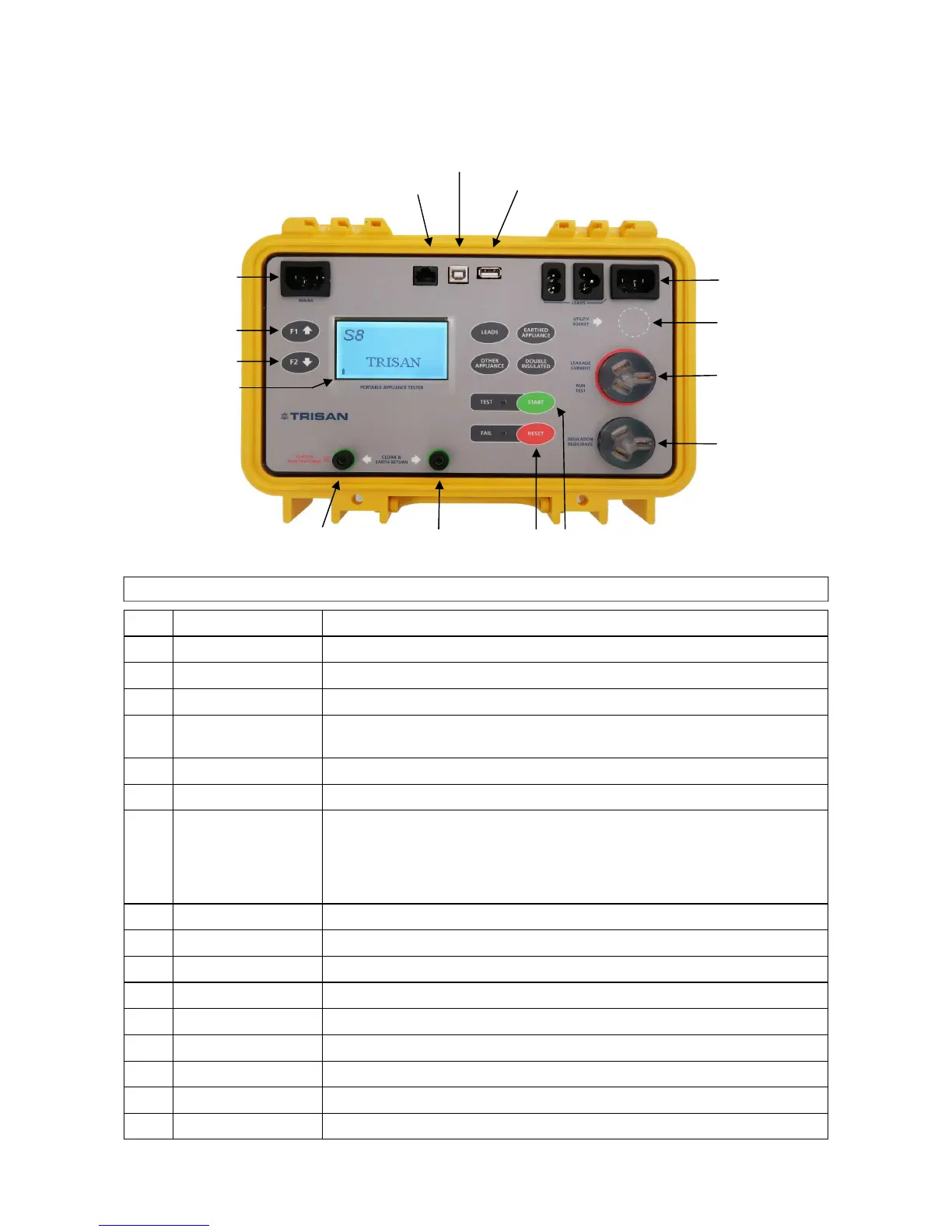
SOCKET INLETS
3 PHASE SOCKET
(Optional)
RUN TEST SOCKET
LEAKAGE CURRENT
INSULATION
MAINS INPUT
INFO DISPLAY (F1)
UTILITIES MENU (F2)
LCD DISPLAY
1 LCD 128 X 64 dots matrix display with backlight
2 FAIL Red indicator
3 PASS Green indicator
4 TEST Starts testing / confirms selection option
5
6
F1 ↑ UP
F2 ↓ DOWN
Scroll control through various utilities and test categories
7 F1 Instrument information……..version number/options/memory usage/time date
8 F2 Utilities menu via screen task screen
9 START
RESET
RESET
Switches the instrument power on or off / Starts testing.
Under Battery Power. Hold down 3 seconds until beeper sounds.
To switch the instrument “Off” the key must be pressed for 2 seconds.
The instrument automatically turns off in 8 minutes after the last key is pressed.
Returns to previous level. (Turn off instrument under Battery Power)
10 Test socket Leakage current socket and used for functional appliance run test (16 AMPS max.)
11 Test socket Insulation socket. ( Shall be isolated from protective earth for safety )
12 3 Phase test socket Signals from 3Phase test leads measuring electrical and earth continuity, leakage
13 Socket inlets Return path for leads: testing earth and electrical continuity, polarity and leakage
14 Mains inlet Mains power input: 90-265VAC 45-65Hz.
15 Class ll Run test only
Chassis protective earth potential. Ensures cloak or probe are directly connected to earth
16 Printer Sato Printer: RS232 communication
18 Keyboard & Scanner PS2 keyboard or scanner to modify clock and data entry
17 Communication to PC USB output. Transfers data to PC . CSV Format
Legend
CLASS ll CLOAK & RESET START
RUN TEST ONLY EARTH RETURN
COMMUNICATION TO PC
PRINTER KEYBOARD & SCANNER


 To Next Page