General Information
39
Riding Modes
Note:
• Riding modes are available on the
Thruxton, Thruxton R and
Bonneville T120 models.
The riding mode system allows
adjustment of the throttle response.
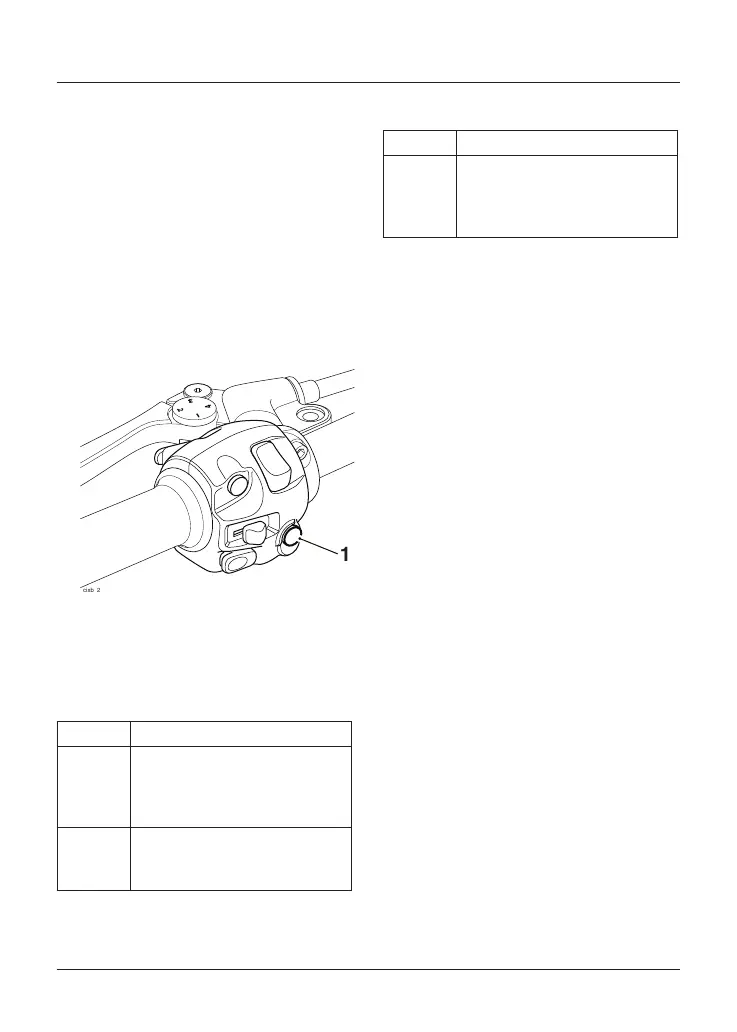
Riding modes are selected using the
MODE button on either the left or right
hand handlebar switch housing,
depending on the model.
1. MODE button (Thruxton R shown)
Press and release the MODE button to
select one of the following riding modes.
Thruxton and Thruxton R
ROAD Standard throttle response.
RAIN Reduced throttle response
when compared to the ROAD
setting, for wet or slippery
conditions.
SPORT Increased throttle response
when compared to the ROAD
setting.
Bonneville T120
ROAD Standard throttle response.
RAIN Reduced throttle response
when compared to the ROAD
setting, for wet or slippery
conditions.
Riding modes can be selected when the
motorcycle is stationary or moving.
Selecting a Riding Mode – with the
Motorcycle Stationary
Press and release the MODE button on
the instrument housing until the desired
riding mode is flashing in the display.
The selected riding mode is
automatically activated one second
after the MODE button is pressed, if the
following conditions are met:
With the Engine Off
• The ignition is switched ON.
• The engine stop switch is in the
RUN position.
With the Engine Running
• The transmission is in neutral or
the clutch is pulled in.



 To Next Page