EasyManua.ls Logo

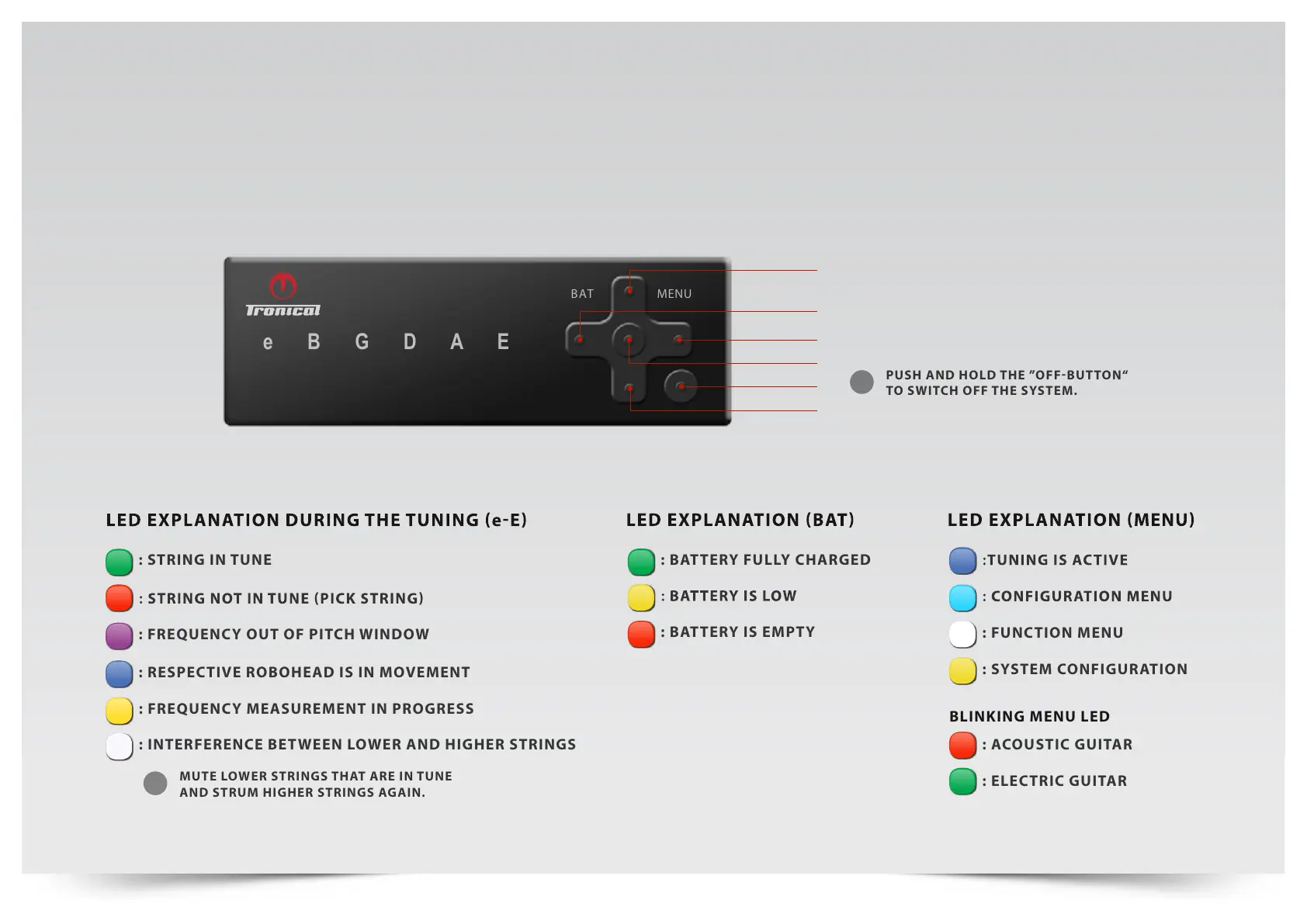
tronical TronicalTune - Tune Controller Explanation; LED Explanation during Tuning; LED Explanation for Battery Status; LED Explanation for Menu Navigation

tronical TronicalTune
48 pages
Print Icon
To Next Page IconTo Next Page
To Previous Page IconTo Previous Page
Loading...
WWW.TRONICAL-COMPONENTS.COM 2
EXPLANATIONTUNE CONTROLLER
: frequency measurement in progress
: Interference between lower and hIgher strIngs
: string in tUnE
: Battery fully Charged
: respective robohead is in movement
: Frequency out oF pitch WindoW
: function menu
: acoustic Guitar
Blinking menu led
: system configuration
: ElEctric guitar
Push and hold the off-button
to switch off the system.
i
Mute lower strings that are in tune
and struM higher strings again.
i
BAT
e B G D A E
MENU
RIGHT
ON/OFF/BACK
ENTER / OK
UP
DOWN
LEFT

Other manuals for tronical TronicalTune

Related product manuals