EN 7
convector TCH 2050 E
Operation
• Avoid open doors and windows.
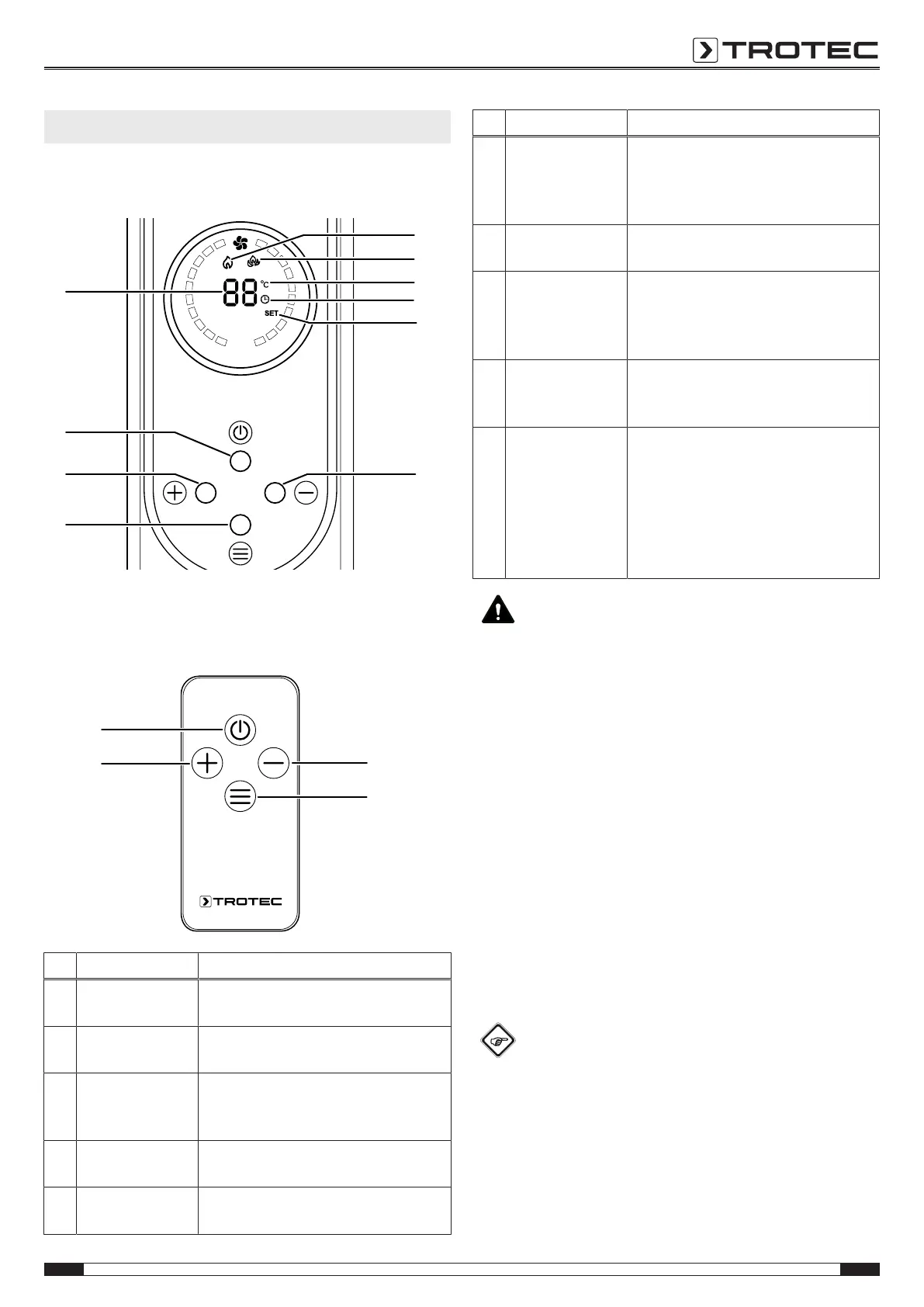
Control panel
Remote control
All settings of the device can also be made using the remote
control included in the scope of delivery.
No. Designation Meaning
9 Low heating level
icon
Low heating level activated (1200W)
10 High heating level
icon
High heating level activated (2000W)
11 Temperature
symbol
Illuminated when the desired or the
current room temperature is indicated
on the segment display
12 Timer
icon
Flashes when the timer is activated.
Illuminated during timer programming
13 SET
indication
Illuminated during temperature setting
or timer programming
No. Designation Meaning
14 Decrease value
button
For setting the desired room
temperature (15°C to 35°C) or the
number of hours for the timer (1to
24h)
15 MODE
button
For timer programming
For temperature setting
16 Increase value
button
For setting the desired room
temperature (15°C to 35°C) or the
number of hours for the timer (1to
24h)
17 Power
button
For activating the low heating level
For activating the high heating level
For activating standby mode
18 Segment display Indication of the current room
temperature during operation
Indication of the desired room
temperature during temperature
adjustment
Indication the number of hours during
timer programming
Warning
Fire hazard if device is covered or due to incorrect
positioning of the device!
There is a risk of fire if the heating device is covered or
incorrectly positioned.
Never cover the device during operation and position it
with sufficient distance to walls and objects (according
to the chapter Technical annex).
Switching the device on
Once you have completely installed the device as described in
the chapter Assembly and start-up, you can switch it on.
1. Set the on/off switch(6) toI.
ð An acoustic signal is emitted.
ð The device is now in standby mode.
ð The current room temperature is indicated on the
segment display(18).
2. Press the power button(17).
ð The device starts at the low heating level.
ð The low heating levelicon(9) is illuminated.
Info
In standby mode, the device memorizes the room
temperature setting.



 To Next Page