8 EN
dehumidifier TTK 26 E
Operation
Notes:
• Avoid open doors and windows.
• After being switched on, the device operates fully
automatically.
• The fan continues to run in dehumidification mode even
after the selected setpoint has been reached.
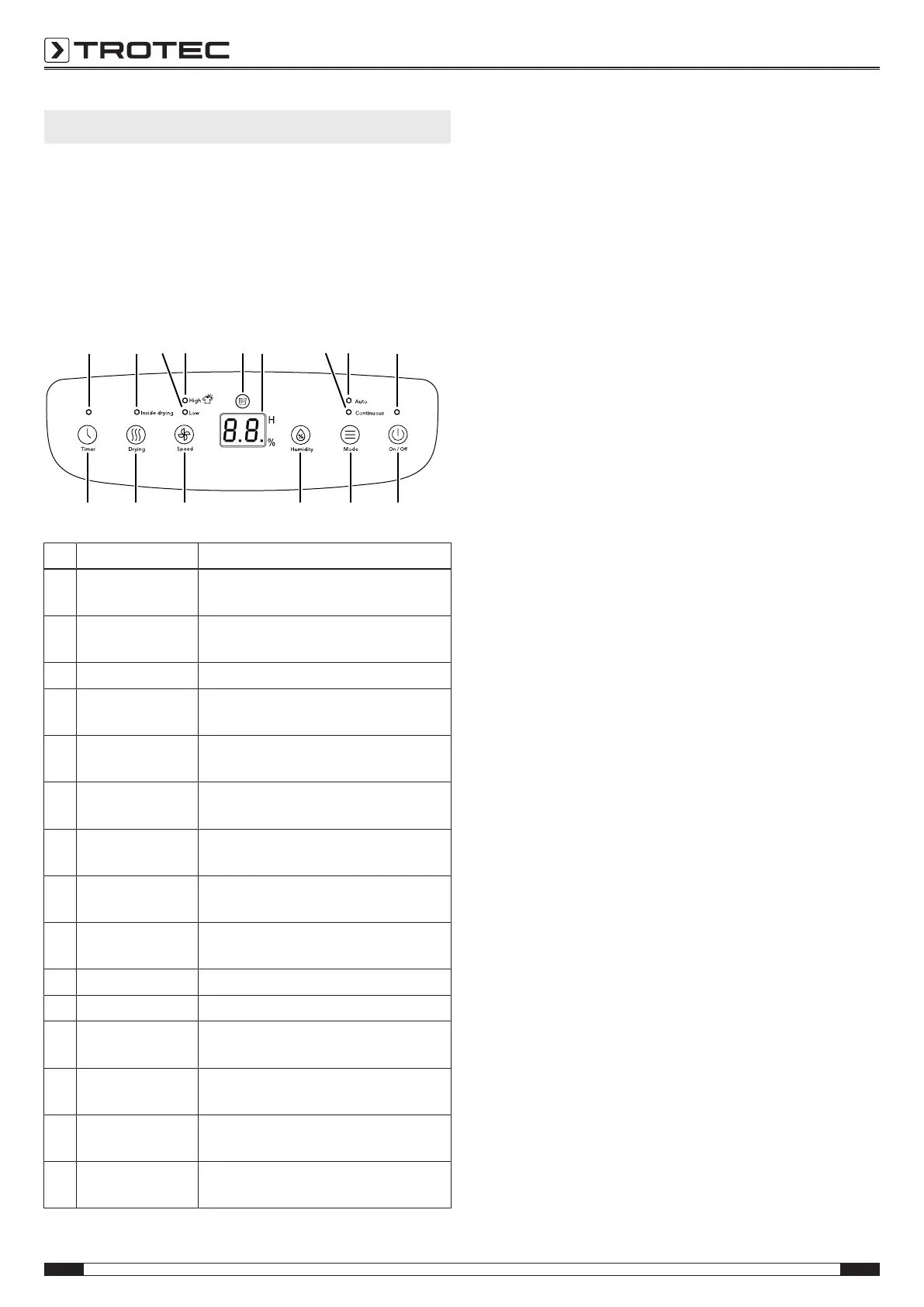
Operating elements
10
11
12
13 14 15
16 17
18
24 23 22 21 20 19
No. Designation Meaning
10 Timer LED Illuminated when the timer is
activated.
11 Inside drying LED Illuminated when the self-cleaning
function is activated
12 Low LED Is illuminated at low fan speed
13 High LED Is illuminated at high fan speed
(function for drying laundry)
14 Condensation
tank full LED
Is illuminated if the condensation tank
is full or not installed correctly
15 Segment display Indicates the relative humidity level
and the number of hours of the timer
16 ContinuousLED Is illuminated if the continuous
operation mode is selected
17 Auto LED Is illuminated if the automatic
operation mode is selected
18 Operation LED Is illuminated when the device is
switched on.
19 On/off button Switching the device on or off
20 Mode button Changing the operating mode
21 Humidity button For setting the desired relative
humidity level
22 Speed button For setting the desired fan speed
(function for drying laundry)
23 Drying button Switching the self-cleaning function on
or off
24 Timer button For switching the timer function on
and off: 1 h to 24 h
Switching the device on
Once you have completely installed the device as described in
the Start-up chapter, you can switch it on.
1. Press the On/ Off button(19).
ð The operation LED(18) is illuminated.
Setting the operating mode
1. Repeatedly press the mode button(20) to change the
operating mode.
ð In continuous operation mode, the continuous(16) LED
is illuminated.
ð In automatic operation mode, the auto(17) LED is
illuminated.
Automatic operation
The device dehumidifies the air continuously until the set
relative humidity level is reached.
Please proceed as follows to adjust the desired humidity value:
1. Repeatedly press the humidity button(21).
ð The selected humidity value is indicated on the segment
display(15).
This operating mode can also be used for drying laundry. To do
so, select the highest fan speed and observe the recommended
humidity values listed under laundry drying.
Continuous operation
Regardless of the humidity level, the device dehumidifies
continuously.
In continuous operation, only the fan speed can be manually
selected.
Setting the fan speed
You can change between low and high fan speed.
1. Press the fan button(22).
ð If the fan speed is set to a low level, the low LED(12) is
illuminated.
ð If the fan speed is set to a high level, the high LED(13,
laundry drying function) is illuminated.
Auto stop function
If the condensation tank is full or not inserted correctly, the
device will stop automatically.
The tank full LED(14) is illuminated.
Memory function
If you switch the device back on again, the settings selected for
the operating mode, the relative humidity level and fan speed
are saved.
The device memorises the settings even during short power
failures. In this case, the device automatically switches back on.
The previous settings are saved.



 To Next Page