AIS CTRX GRAPHENE Class B AIS Transponder Manual
1.4E 30 CTRX GRAPHENE Manual
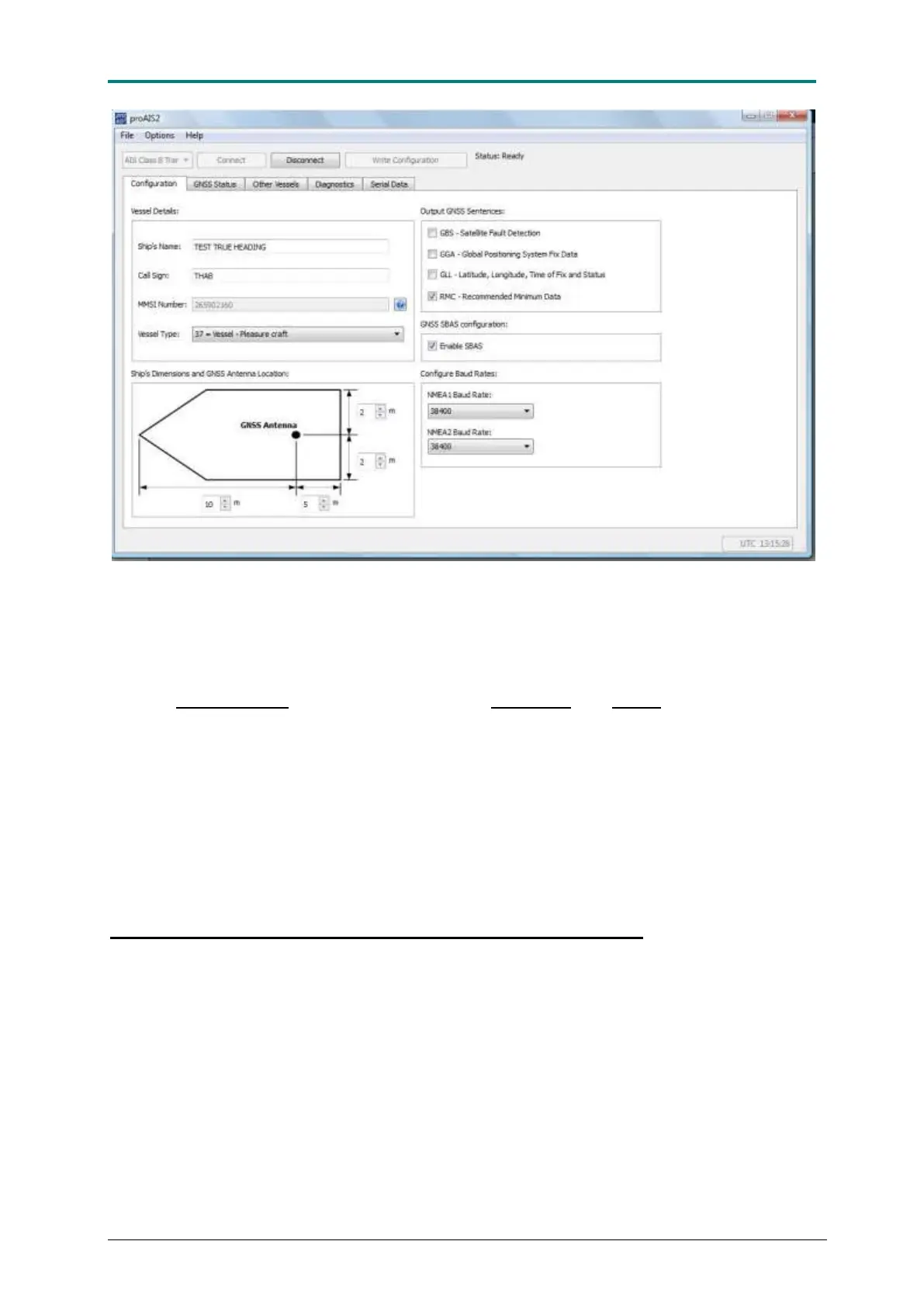
Figure 15 Connection of PC to AIS CTRX GRAPHENE takes place via choice of the correct port. Normally the correct
port will occur as the first choice stating AIS Class B AIS.
When connected to proAIS 2, the static data is presented on the Configuration
page. If the fields are empty, the transponder is un-programmed.
Type in Ship’s Name (use ONLY A-Z and –), Call Sign and MMSI number.
Select Vessel type, the type of vessel on which the transponder is installed on. We
recommend that all types of leisure craft is set as 37 = Vessel -Pleasure craft.
Ships dimensions are determined by the position of the GPS antenna. The length of
the vessel is set by the distance measured from fore to the GPS antenna and from
aft to GPS antenna. The beam is measured as the distance from starboard to the
GPS antenna and from port to the GPS antenna. All distances are in meters. Even
the distance upwards to the nearest meter.
When finished click on Write Configuration. Follow the instruction on the screen.
Note that the MMSI number can only be programmed ONCE!
If the transponder has been programmed with incorrect MMSI data True Heading
must be contacted.
Before data is stored you will be prompted to make sure that the data is correct
before you can proceed to write the data permanently. This is the last chance to
correct any errors, so make absolutely sure that MMSI, Name and Call sign are
correctly entered in their respective fields before you press the button.
In the Configuration field you can also select which type of GPS data that should be
output on the data port. The default set message is the NMEA sentence RMC
(Recommended Minimum speCific GNSS data) which contains the essential position,
course, speed and time data. GPS data. Enable SBAS (EGNOS or WAAS) selects if
DGNSS corrections is to be used or not. The baud rate of the NMEA data port is also



 To Next Page