3
2. GETTING TO KNOW THE CAMERA / CONTROLS
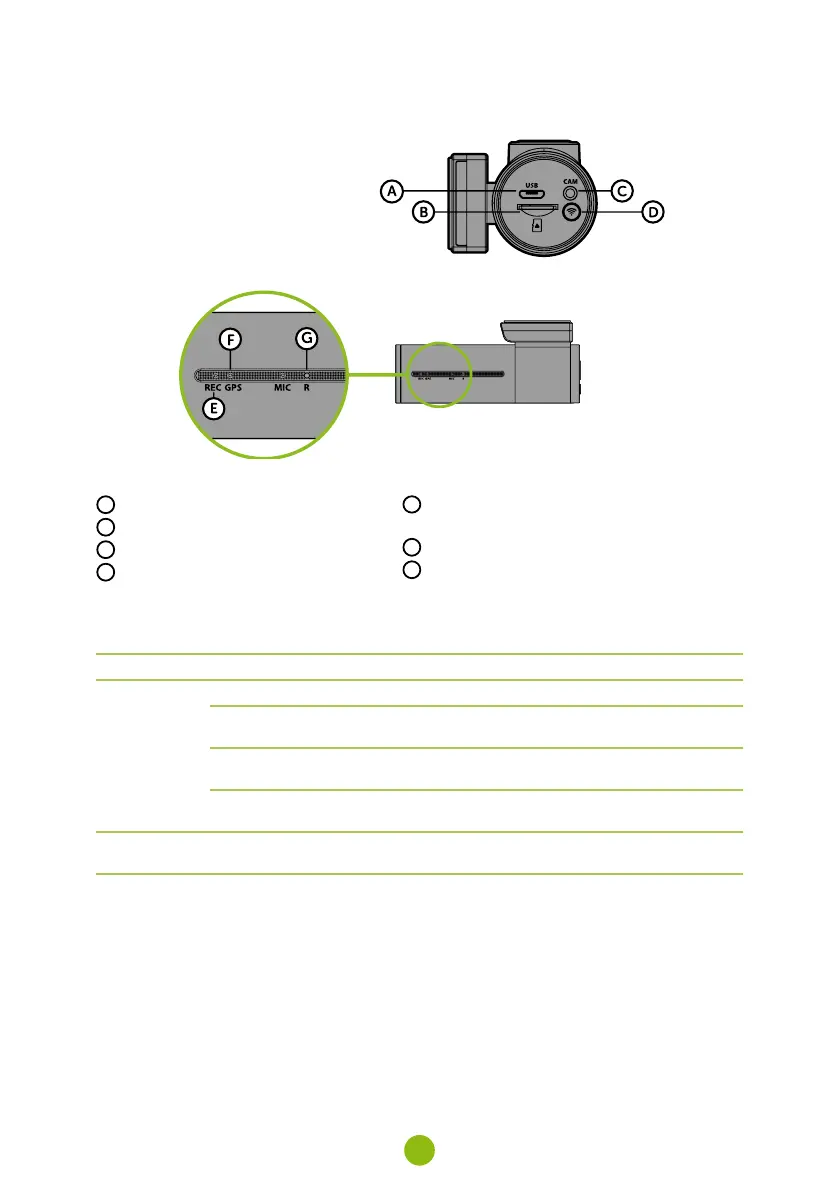
A
Mini USB power port
B
Memory card slot
C
Rear camera cable input (optional)
D
WIFI button
E
Status LED – red (lit = camera on, flashing =
recording)
F
GPS LED – green (lit = receiving GPS signal)
G
RESET button
CONTROLS:
BUTTON FUNCTION INSTRUCTIONS
WIFI
PROTECT VIDEO Press the button to protect the current video
TURN WIFI ON
Press and hold the button for 3 seconds to turn
wifi on / off
FORMAT TF CARD
Press and hold the button for 10 seconds to
format the card
2.4 GHz OR 5 GHz
WIFI SETTINGS
Double tap to switch between 2.4 GHz and
5 GHz wifi
RESET
RESET CAMERA
Press with staple for 5 seconds to reset the
camera



 To Next Page